Breaking Up with GitHub Actions: Our Love Story with Woodpecker CI
Tired of 15-minute builds, Red Sea cable latency, and GitHub's pricing games, we ditched GitHub Actions for a self-hosted Woodpecker CI setup. Four Beelink mini PCs, $1,300 total, ROI in 3 months. Here's how we did it and why sovereignty over your infrastructure still matters.


Let's be clear: I'm French, so complaining is basically my cardio. But this time, I have solutions! And before you say "Loïc, you should not be so negative!", let me tell you a nice story about how we stopped being GitHub's cash cow and started actually owning our CI/CD pipeline.

The GitHub Actions Honeymoon Phase

Once upon a time, we were naive. We trusted GitHub Actions like a fresh bootcamp graduate trusts their first Kubernetes deployment. "It just works!" they said. "It's integrated!" they promised. And to be fair, it did work. Like a 1995 Honda Civic with 300,000 kilometers works: slowly, painfully, and with a lot of mysterious noises.
Here's the thing nobody tells you about GitHub hosted runners: they are slow. Not "I'll grab a coffee" slow. More like "I'll learn a new programming language while waiting" slow. We're talking 12-15 minutes for builds that had no business taking more than 3 minutes. Why? Because you're sharing compute with everyone and their dog who decided that npm install on 47,000 dependencies was a good idea.
And if you're based in Dubai like us? Oh boy, let me tell you about the Red Sea internet cables. You know, those undersea cables that apparently get damaged every other month by anchors, pirates, or angry fish? When your CI/CD traffic has to traverse half the planet AND deal with degraded submarine infrastructure, "slow" doesn't begin to describe it. We've had builds where pulling a Docker image took longer than actually running the tests.
But Loïc, what the hell are you complaining about? It's free for open source!
Sure, and so is the bread at restaurants, but you don't make a meal out of it!
The Self-Hosted Runner Detour (Spoiler: It Was a Trap)

So we did what any reasonable infrastructure team would do: we moved to GitHub self-hosted runners. "This will solve everything!" we thought. We deployed our own runners, we had our own compute, we were masters of our destiny!
Plot twist: we were not.
First problem: no global dashboard. You want to see what's happening across all your runners? Too bad! You get to click through repository after repository like it's 2005 and you're managing a PHP forum. We're infrastructure people, we need observability, we need metrics, we need to know when things are on fire before the client calls us at 3 AM!
Second problem: no concurrent jobs. Yes, you read that correctly. A self-hosted runner can only run one job at a time by default. So we had powerful machines sitting there, twiddling their thumbs, waiting for one job to finish before picking up the next one. We were mobilizing serious firepower for it to be barely used. What's the point of having a Ryzen 7 with 32GB of RAM if it's going to sit idle 90% of the time because it's stuck in a queue of one?
Third problem, and this one really got my French blood boiling: GitHub wanted to charge us for it. Yes, you read that correctly. We provide the hardware, we pay for the electricity, we maintain the servers, and GitHub still wants a cut because... reasons? This is like paying a toll to drive on a road you built yourself.
At this point, I had a moment of clarity. You know that feeling when you realize you've been in a toxic relationship? That was me, wondering why we were paying someone else to run docker build on hardware we already owned.
The Great Escape: Not Just CI/CD, But Everything

Here's the thing: we weren't just unhappy with GitHub Actions. We were already in the process of moving away from GitHub entirely. Microsoft's acquisition, the Copilot controversies, the increasingly aggressive monetization - it all added up. We wanted sovereignty over our entire development workflow, not just the CI part.
So when we started looking at alternatives to GitHub Actions, we had a specific requirement: whatever we chose needed to work with our new Git hosting solution. And that's where Woodpecker CI shines.
Woodpecker supports GitHub, sure, but it also supports GitLab, Gitea, and Forgejo. This isn't some afterthought integration - it's first-class support. You can literally switch your entire Git infrastructure and keep your CI/CD pipelines running without rewriting everything.

After testing all options, we landed on Forgejo as our Git hosting solution. It's a community fork of Gitea, truly open source, with no corporate strings attached. It's what Gitea should have stayed. Combined with Woodpecker, we now have a complete, self-hosted, open source development platform that doesn't phone home to Microsoft.
Enter Woodpecker CI: The One That Got Away (From Corporate Greed)

For those who don't know, Woodpecker CI is what Drone CI was before Harness acquired it and did what corporations do best: add enterprise features nobody asked for and change the license to something that makes lawyers happy and engineers sad.
Woodpecker is community-driven, truly open source (Apache 2.0, thank you very much), and respects your intelligence. It doesn't try to upsell you every five minutes. It doesn't have a "contact sales" button that haunts your dreams. It just... works. The way software should.
And yes, it uses YAML for configuration. I know, I know - I wrote an entire article about how "Infrastructure as YAML is Hell." But here's the difference: Woodpecker's YAML is simple YAML. It doesn't require a PhD in indentation studies. It doesn't have 47 levels of nested abstractions. It's the kind of YAML that even a junior developer can read without questioning their career choices.
The Hardware: Because Real Engineers Buy Real Machines

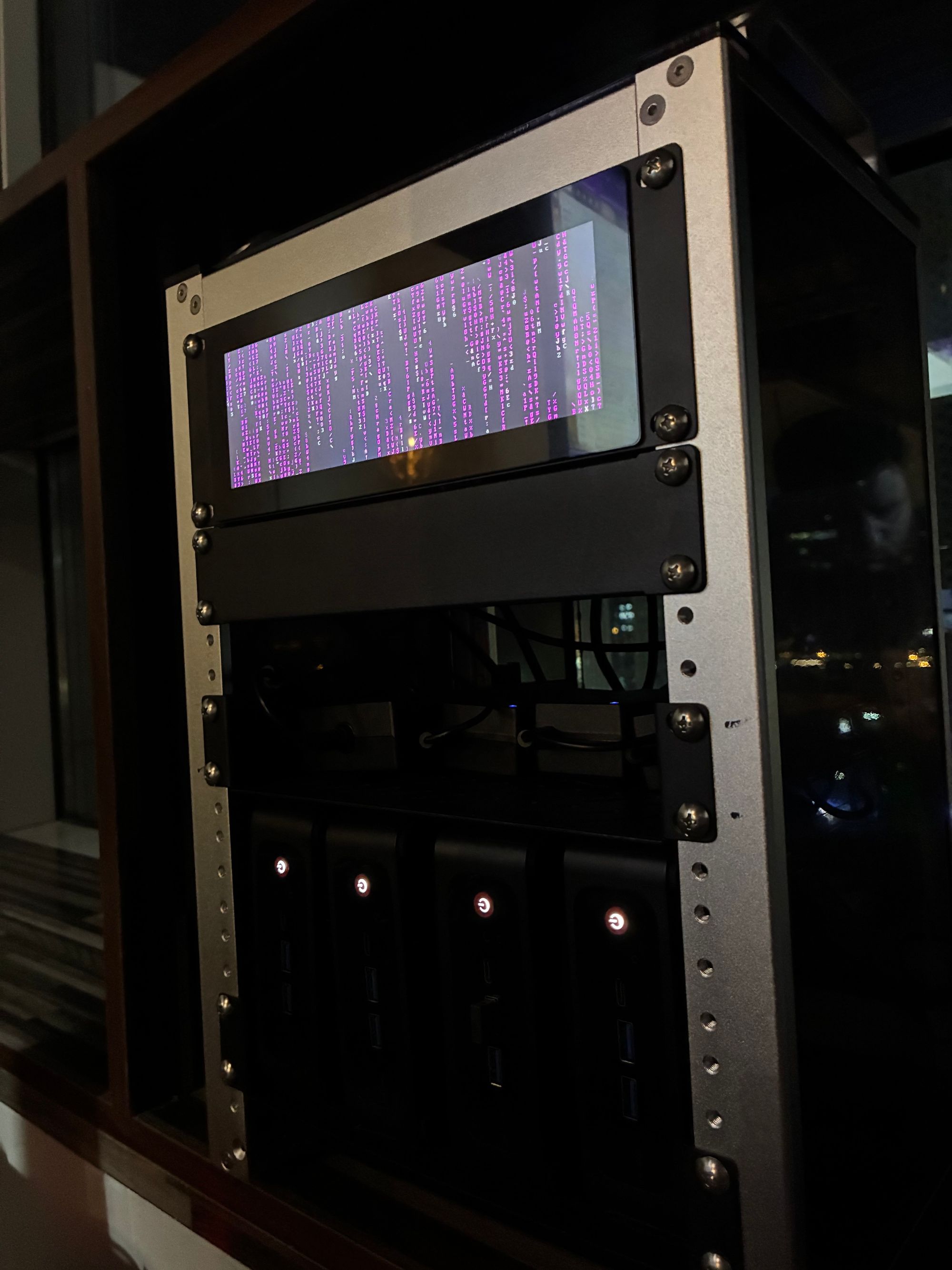
Let me introduce you to our new CI/CD family. And honestly, the setup is so elegant it makes me a little emotional.
The Rack: A GeeekPi 8U Server Cabinet. Compact, clean, professional. Fits in a corner and doesn't look like a server room exploded in your office.
The Brains: 4x Beelink SER5 mini PCs, each equipped with:
- AMD Ryzen 7 6800H processor
- 2TB NVMe storage (because waiting for disk I/O is for people who enjoy suffering)
- 32GB RAM (because Docker likes to eat memory like a teenager at a buffet)
The Architecture:
- 1 master node: runs Woodpecker server + nginx-based cache
- 3 worker nodes: pure build muscle
The OS: Alpine Linux 3.23, because of course we use Alpine. If you've read our articles about declarative Linux and running Docker on 352MB of RAM, you know we don't do bloated distributions. Alpine is lean, secure, and doesn't come with 47 services you'll never use.
The Management Layer: Coolify. This is the secret weapon that makes the whole setup maintainable. Coolify handles the deployment and management of all our services - Woodpecker, the Docker registry, the cache layer, everything. It's like having a PaaS that you actually own. Updates? One click. Rollbacks? One click. Logs? Right there. No more SSHing into servers to check if something is running.
And here's the beautiful part that makes infrastructure nerds weep with joy: the entire rack needs only 1 ethernet cable and 1 power cable. That's it. One network drop, one power outlet, and you have a complete CI/CD cluster. Try doing that with "enterprise" solutions.
Total cost? About $1,300. That's it. One-time purchase. No subscription. No "your plan has been updated" emails. No surprise invoices. Paid for itself in less than 3 months.
But Loïc, what about maintenance? What about hardware failures? What about updates?
Let me tell you something: we are infrastructure people. This is literally what we do. We manage bare metal servers for clients in production environments. We debug kernel panics at 2 AM.
If you're a DevOps engineer who's scared of managing four mini PCs, I have questions about what you've been doing with your career. And I say this with love, the same love I have for people who put Kubernetes in production without understanding what a container actually is.

The Secret Sauce: A Comprehensive Caching Strategy

Here's where it gets interesting. Raw compute power is nice, but smart infrastructure is better. And when you're in Dubai dealing with Red Sea cable issues, caching isn't optional - it's survival.
Our Own Docker Registry
Remember when I said GitHub runners are slow? And remember the Red Sea cable situation? Part of the reason our builds were painfully slow is that every single build started by pulling images from Docker Hub. Those images had to travel from some data center in the US or Europe, through degraded submarine cables, across the Middle East, and eventually arrive in Dubai like a package that got lost three times.
We deployed our own Docker registry. Local. Fast. Private. Now when a build needs python:3.14-alpine, it doesn't go on a world tour. It grabs it from the same rack.
Important note: We always build our Docker images with --no-cache. Yes, always. Why? Because we want reproducible builds. We want to know that when we build an image, it's actually rebuilding from scratch with the latest packages and dependencies. Docker layer caching is great for development, but in CI/CD, it can hide issues and create inconsistencies. The speed we lose on not caching Docker layers, we gain back tenfold with our package registry caches.
The Cache That Changes Everything
But the Docker registry is just the beginning. We built a comprehensive caching proxy that covers almost every package registry our builds touch:
Package Registries:
- Maven Central: 365 days cache, 100GB. Every JAR, every POM, every piece of metadata. Our Java builds went from "let me download the entire Apache Foundation" to instant.
- NPM Registry: 90 days cache, 50GB. Because
node_modulesis a black hole, but at least now it's a local black hole. - PyPI: 180 days cache, 50GB. Python wheels cached locally. No more waiting for pip to contemplate the meaning of life before installing requests.
OS Package Mirrors:
- Alpine Linux: Full mirror of Alpine packages. When you're running Alpine 3.23 everywhere (as you should), having a local mirror means
apk addis instant. - Arch Linux: Full mirror for our development machines. Yes, we use Arch, btw.
- FreeBSD: 30 days cache for pkg. Because some of us still appreciate a proper Unix.
GitHub Ecosystem (because we're still transitioning):
- GitHub Container Registry (ghcr.io): 90 days cache, 200GB. Container images cached locally.
- GitHub Releases: 90 days cache, 100GB. All those release assets, binaries, and tarballs? Cached.
- GitHub Packages (NPM and Maven): Cached for private and organization packages.
- GitHub API: 5 minutes cache. Reduces API rate limit consumption and speeds up tooling.
The result? A pipeline that used to spend 5 minutes just downloading dependencies now spends 5 seconds. And when the Red Sea cables are having a bad day? We don't even notice.
| Metric | GitHub Actions | Woodpecker + Local Cache |
|---|---|---|
| Image pull time | 45-90 seconds (sometimes 3+ min) | 2-5 seconds |
| npm install (fresh) | 60-120 seconds | 5-10 seconds |
| pip install | 30-60 seconds | 3-5 seconds |
| Maven dependencies | 90-180 seconds | 10-15 seconds |
| Build time (average) | 12-15 minutes | 2-4 minutes |
| Monthly cost | $500+ and growing | Electricity (negligible) |
| Affected by submarine cable issues | Constantly | Never |
Custom Plugins: The Real Power Move
Here's something that surprised us: writing custom Woodpecker plugins is actually easy. Like, suspiciously easy. We've already built several custom plugins for our specific workflows, including one that integrates directly with Coolify for deployments.
Think about that for a second. Our CI pipeline builds an image (with --no-cache, always), runs tests, and then triggers a deployment in Coolify - all automated, all self-hosted, all under our control. No webhooks to external services, no API tokens stored in someone else's vault, no "please upgrade to Enterprise for this feature."
The plugin system is just Docker containers. If you can write a shell script and put it in a container, you can write a Woodpecker plugin. No SDK to learn, no proprietary format, no vendor lock-in. This is how software should be designed.
The Trade-offs (Because We're Honest People)

I'm not going to sit here and tell you self-hosting is all sunshine and rainbows. There are trade-offs, and you should know them:
1. You are the support team now. When something breaks at 11 PM, you can't open a ticket and wait for GitHub's team to respond in 3-5 business days. You fix it yourself. For us, this is a feature, not a bug. For others, it might be terrifying.
2. Updates are your responsibility. Woodpecker releases updates. You need to apply them. This requires reading changelogs, testing in staging (you have staging, right?), and deploying. Though with Coolify managing everything, updates are genuinely painless. But if your idea of infrastructure management is "set and forget," maybe stick with managed services.
3. Initial setup takes time. This isn't a 5-minute "click deploy" situation. We spent about two weeks getting everything perfect: the runners, the registry, the cache layer, the monitoring, the alerting, the Coolify integration. But that's two weeks once, versus fighting GitHub's limitations forever.
4. You need actual skills. This is perhaps the most controversial trade-off. Self-hosting requires you to understand Linux, networking, containers, and system administration. It requires the kind of skills that boot camps don't teach and certifications don't measure. If your team's idea of troubleshooting is "have you tried restarting the pod?", you might not be ready.
Why Sovereignty Matters (And No, It's Not Just a Buzzword)

Let me tell you about a conversation I had with a client last year. They were using a SaaS CI/CD provider (I won't name names). One day, that provider decided to change their pricing. Overnight, the client's bill tripled. They had no leverage, no alternatives ready, and no choice but to pay.
When you self-host, you own your destiny. Our code doesn't touch anyone else's servers. Our build logs aren't stored in some data center we'll never see. Our pipeline configuration isn't locked into a proprietary format that requires a migration project to escape.
Is this paranoid? Maybe. But I've been in this industry long enough to see "trusted partners" become "hostile vendors" faster than you can say "we're pivoting our business model."
Furthermore, for clients with compliance requirements (and we work with a lot of them in the UAE), being able to say "your code never leaves our infrastructure" is worth its weight in gold. When you add Forgejo to the mix, it's not just your CI/CD that's sovereign - it's your entire development workflow.
Keeping Skills Sharp in a Button-Pusher World

Here's something I think about a lot: the modern DevOps landscape is designed to make you dependent. Every SaaS tool, every managed service, every "just click here" solution is slowly eroding the actual skills that made this industry interesting.
Running your own CI/CD infrastructure forces you to understand:
- How containers actually work (not just
docker run) - Network configuration beyond "enable auto-assign public IP"
- Storage performance and optimization
- Resource monitoring and capacity planning
- Security hardening that isn't just "enable the WAF"
- How package registries and caching proxies work
- Why building with
--no-cachematters for reproducibility
These skills don't become obsolete. They don't get deprecated in the next version. They're the foundation that everything else is built on.
I've interviewed candidates who list "CI/CD Expert" on their resume but can't explain what happens when you run git push. I've met "DevOps Engineers" who've never SSHed into a server. I've seen "Infrastructure Architects" who think high availability means "AWS handles it."
Self-hosting isn't just about saving money or gaining control. It's about staying sharp in a world that wants to turn you into a button-pusher.
The Migration: A War Story

Let me tell you how the actual migration went, because I know you're curious.
Week 1: Planning and Setup We set up the four Beelink machines with Alpine Linux 3.23 (because of course we use Alpine - read our article about it). Assembled everything in the GeeekPi cabinet. One ethernet cable to the switch, one power strip, done. Deployed Coolify on the master node, then used Coolify to deploy everything else: Woodpecker server, agents on the workers, the Docker registry, the nginx-based cache proxies.
First surprise: Woodpecker's documentation is actually good. I know, I was shocked too. Clear examples, sensible defaults, no marketing fluff.
Week 2: Migration and Testing We converted our GitHub Actions workflows to Woodpecker pipelines. Most of it was straightforward - the YAML structure is similar enough that you can often copy-paste and adjust. We also started migrating repositories from GitHub to Forgejo.
Second surprise: some pipelines got simpler. GitHub Actions has this tendency to make you work around its limitations. Woodpecker just... lets you do things.
Week 3: Registry, Cache, and Custom Plugins We deployed the Docker registry and configured all the cache proxies: Maven, NPM, PyPI, Alpine mirror, Arch mirror, the whole ecosystem. This is where the real performance gains came from. We also wrote our first custom plugin - the Coolify integration - which turned out to be embarrassingly easy.
Week 4: Cutover We switched everything to Woodpecker. No drama. No late-night emergencies. No "why is everything broken" Slack messages.
The whole team adapted within days. The UI is intuitive, the logs are accessible, and nobody has complained about missing GitHub Actions. In fact, the most common feedback has been "why didn't we do this sooner?"
The Numbers Don't Lie

Let me give you the cold, hard data after 3 months of running Woodpecker:
Build Performance:
- Average build time: 2.8 minutes (down from 13.2 minutes)
- P95 build time: 4.5 minutes (down from 22 minutes)
- Failed builds due to infrastructure issues: 2 (both our fault, both fixed in minutes)
- Cache hit rate on package registries: 95%+
Cost:
- Hardware investment: $1,300 (one-time)
- Monthly electricity: ~$15
- Monthly GitHub bill: $0 (down from $500+)
- ROI achieved: Month 3
Developer Experience:
- Time waiting for CI: Down 78%
- Complaints about CI: Down 100%
- Builds affected by Red Sea cable issues: 0
- Understanding of what CI actually does: Up significantly
Conclusion: Be the Master of Your Own Destiny
Look, I'm not saying everyone should self-host everything. If you're a 3-person startup with no infrastructure experience, maybe managed services make sense. If your entire tech stack is "we use Heroku for everything," you probably have bigger fish to fry.
But if you're an organization with infrastructure capabilities, if you have people who understand systems, if you're tired of being at the mercy of vendors who see you as a revenue line item - consider taking back control.
Woodpecker CI isn't perfect. No software is. But it's honest. It's open source. It respects your intelligence and your autonomy. And in a world full of "enterprise solutions" and "platform plays," that's refreshingly rare.
We made the switch, and we're never going back. Our builds are faster, our costs are lower, our skills stay sharp, and we sleep better knowing that our infrastructure actually belongs to us.
Four mini PCs in a small cabinet. Alpine Linux 3.23. Coolify for management. Forgejo for Git. Woodpecker for CI/CD. A comprehensive cache for every package registry we touch. One ethernet cable. One power cable. Custom plugins when we need them. That's all it takes to own your entire development workflow. Sometimes the best solutions are the simple ones.
As I always say: it's Infrastructure as Code, not Infrastructure as Someone Else's Problem.
Now if you'll excuse me, I have some YAML to write. The good kind.

Want to know more about our self-hosting journey? Check out our previous articles on Alpine Linux, declarative infrastructure, and why understanding the fundamentals still matters. And if you're in the UAE and need help untangling your CI/CD pipeline, well, you know where to find us.