RAG Deep Dive Series: RAG Architectures
Part 7: RAG Architectures - From Basic to Big Brain Mode

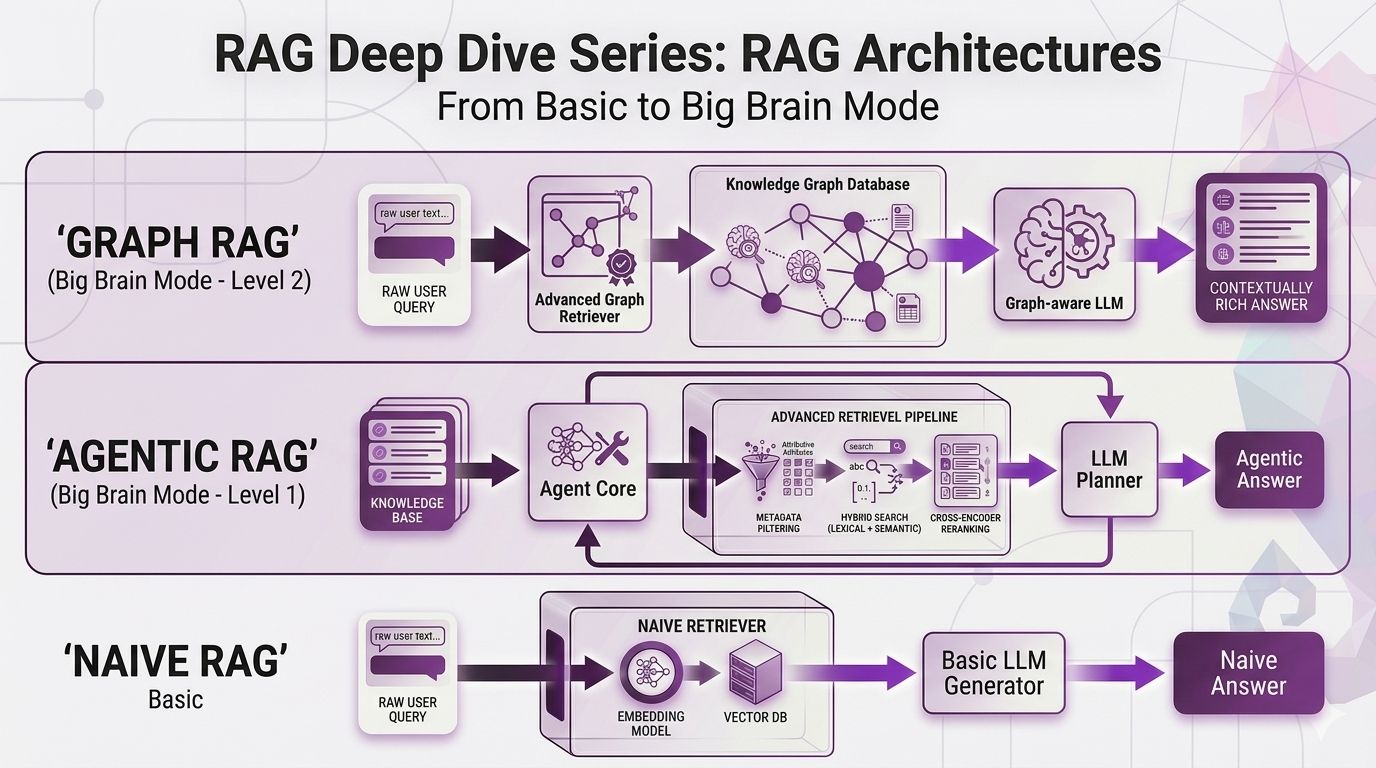
In Post 6, we went deep on query strategies expansion, multi-query, HyDE, decomposition, multi-hop. All of those techniques help you ask better questions before you search.
But here's the thing nobody tells you until you're knee-deep in production: you can have the best query strategies in the world, and your RAG system will still fumble certain questions. Not because the query was bad. Not because the retrieval was broken. But because the architecture itself wasn't built for that type of question.
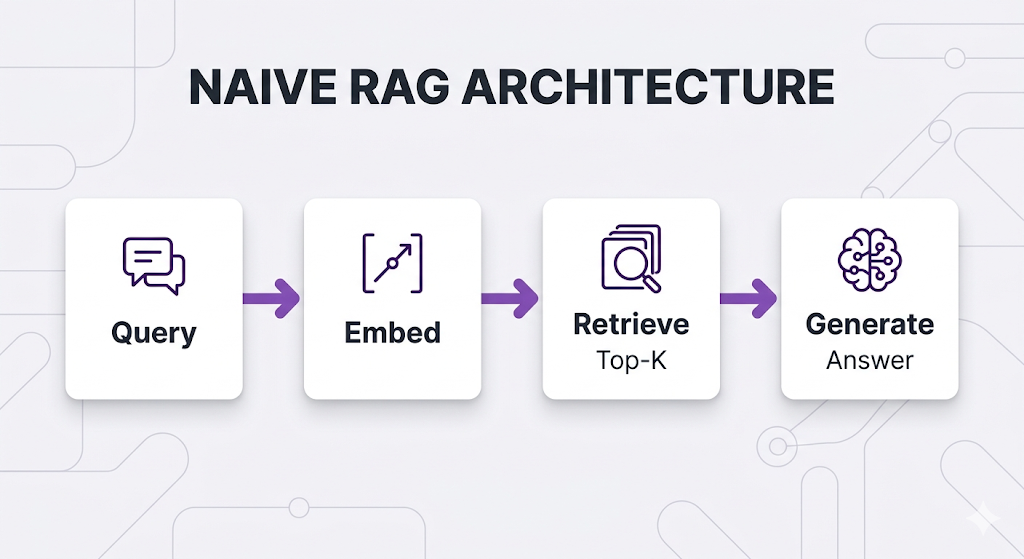
Think about it. Your current RAG pipeline handles every query the exact same way embed it, retrieve top-K chunks, generate an answer. That works great until it doesn't.
And it doesn't work for a lot of real-world scenarios.
This post is about recognizing when your pipeline needs a different shape, not just better components. We're going from "one pipeline to rule them all" to "the right pipeline for the right job."
No code. No jargon without context. Just the concepts, the trade-offs, and the honest "when should I actually use this" breakdown.
Let's get into it.
Table of Contents
- The Problem: Why Architecture Matters
- Naive RAG: The Starting Point
- The Evolution: Why Naive RAG Isn't Enough
- Corrective RAG (CRAG): Trust But Verify
- Adaptive RAG: Choose Your Fighter
- Agentic RAG: Let the LLM Drive
- GraphRAG: It's All Connected
- Architecture Comparison: The Full Picture
- Choosing Your Architecture
- Key Takeaways
- What's Next
The Problem: Why Architecture Matters
You've learned the RAG fundamentals. Chunking, embeddings, retrieval techniques, query strategies the whole toolkit. You've built a working RAG system.
But here's the thing not all queries are created equal.
The "One-Size-Fits-All" Trap
Your current RAG pipeline probably looks something like this:
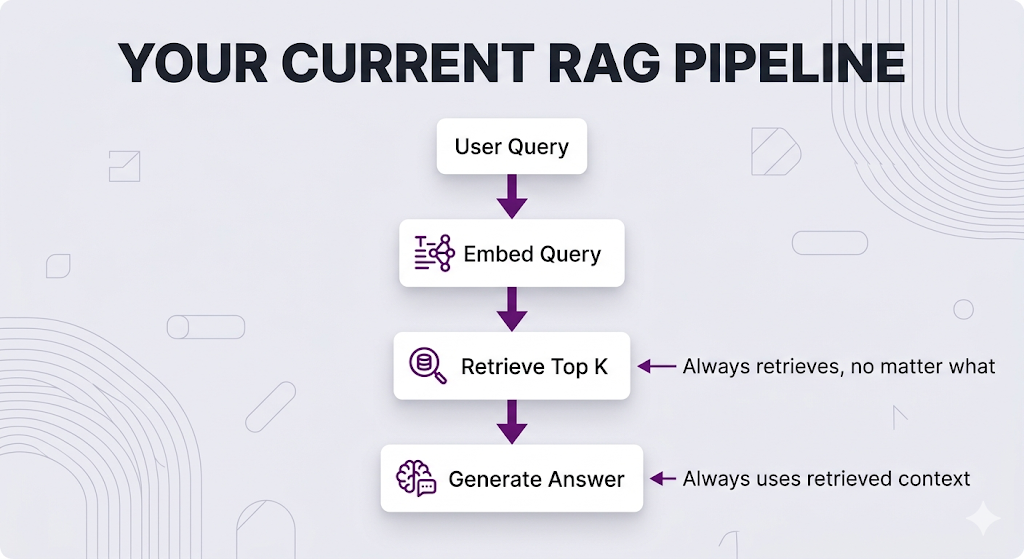
This works. But it's kinda mid.
Here's why:
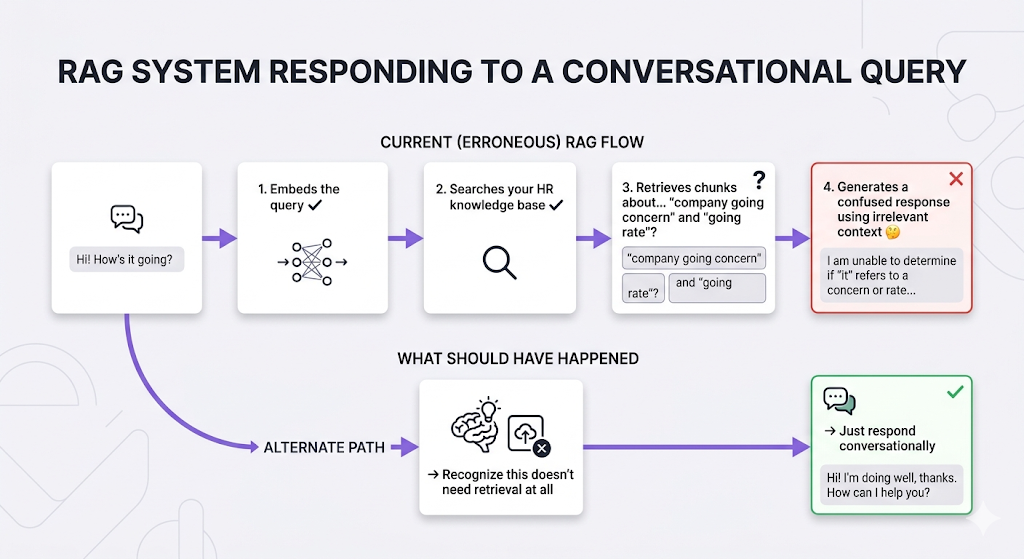
Scenario 1: The "Why Are You Even Searching?" Question
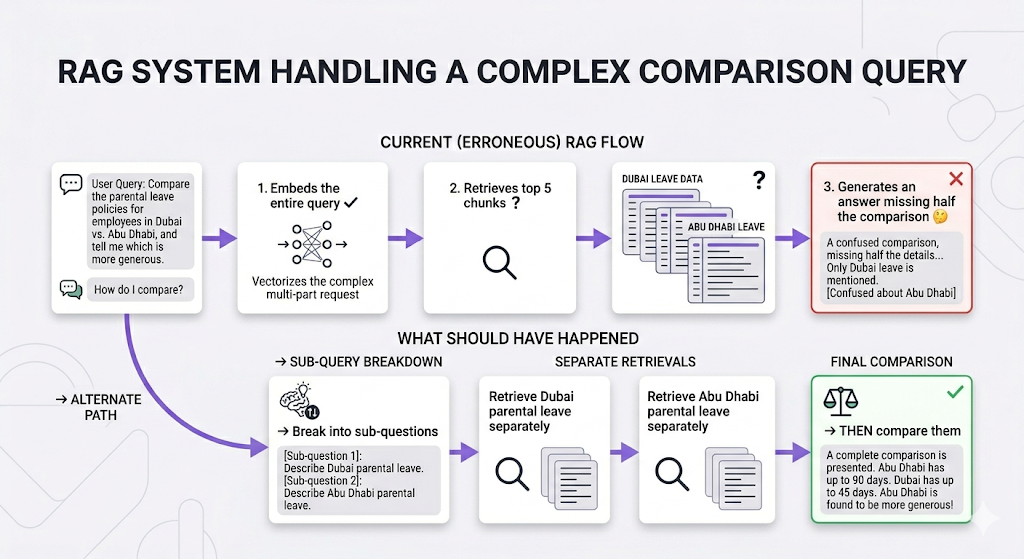
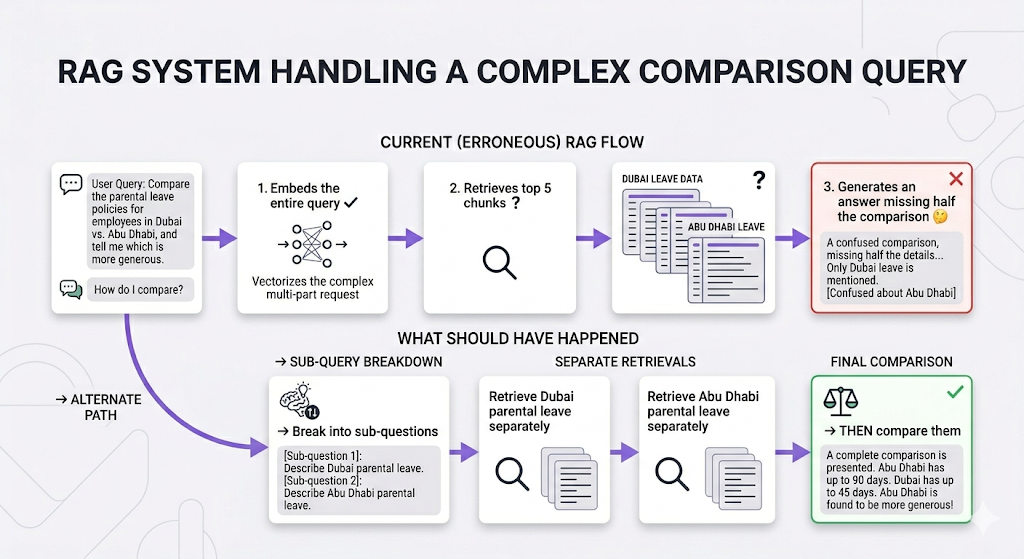
Scenario 2: The Multi-Step Comparison
Scenario 3: The "Bad Retrieval" Situation
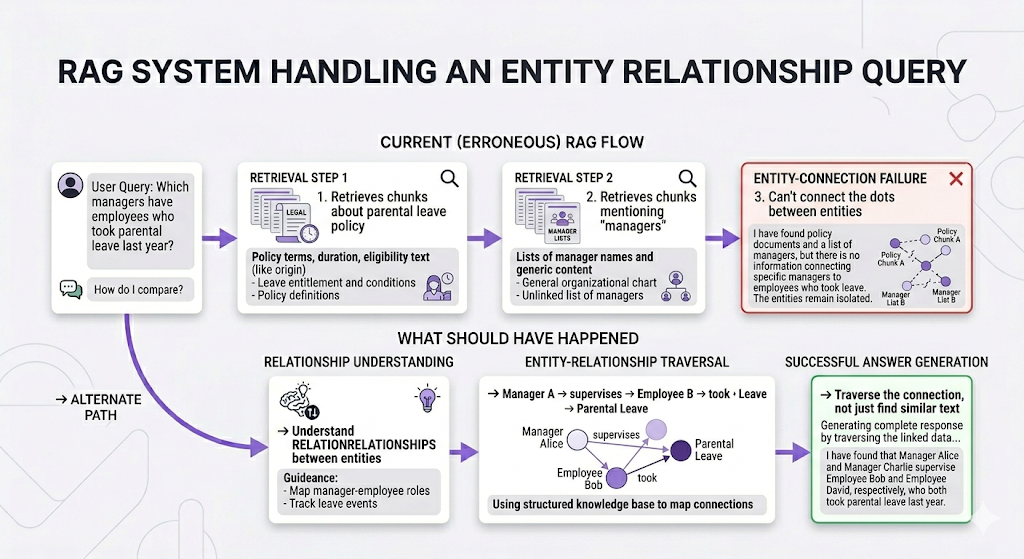
Scenario 4: The Connected Concepts Question
The bottom line: Different questions require different approaches. Using the same pipeline for everything is like using a hammer for every home repair task. Sometimes you need a screwdriver. Sometimes you need a wrench. Sometimes you need to call a professional for real.
Naive RAG: The Starting Point
Before we level up, let's establish what we're working with. This is the architecture we've been building across Posts 1–6.
What is Naive RAG?
Naive RAG (also called "Basic RAG" or "Vanilla RAG") is the straightforward retrieve-then-generate pattern:
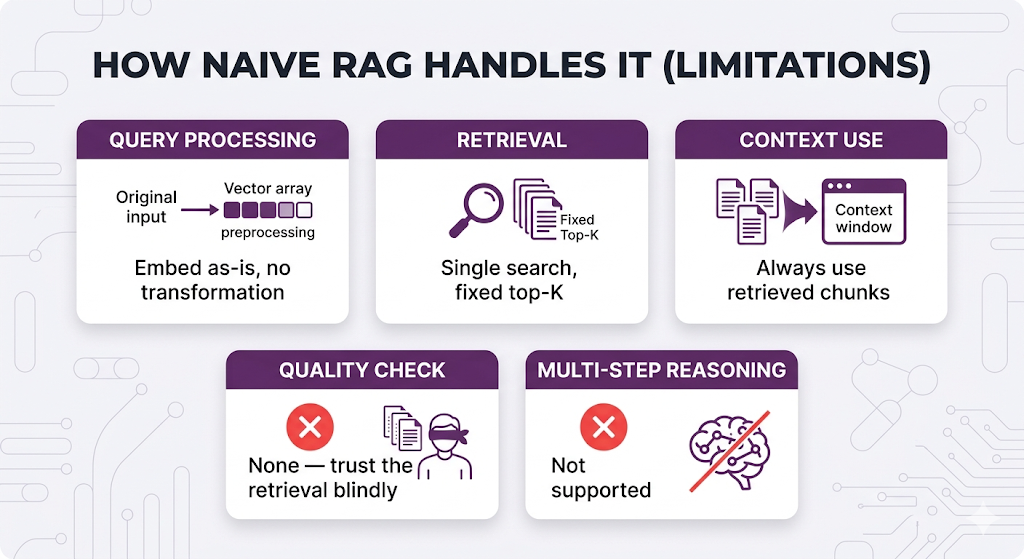
Don't Sleep on Naive RAG Though
It's actually perfect for a lot of scenarios:
✅ Simple factual lookups "How many sick days do I get?" or "What's the expense reimbursement limit?"
✅ Single-topic questions "Explain the performance review process" or "What documents do I need for visa sponsorship?"
✅ High-quality, well-organized knowledge base When your docs are clean, chunked well, and comprehensive
✅ Predictable query patterns When users ask similar types of questions consistently
The Honest Assessment
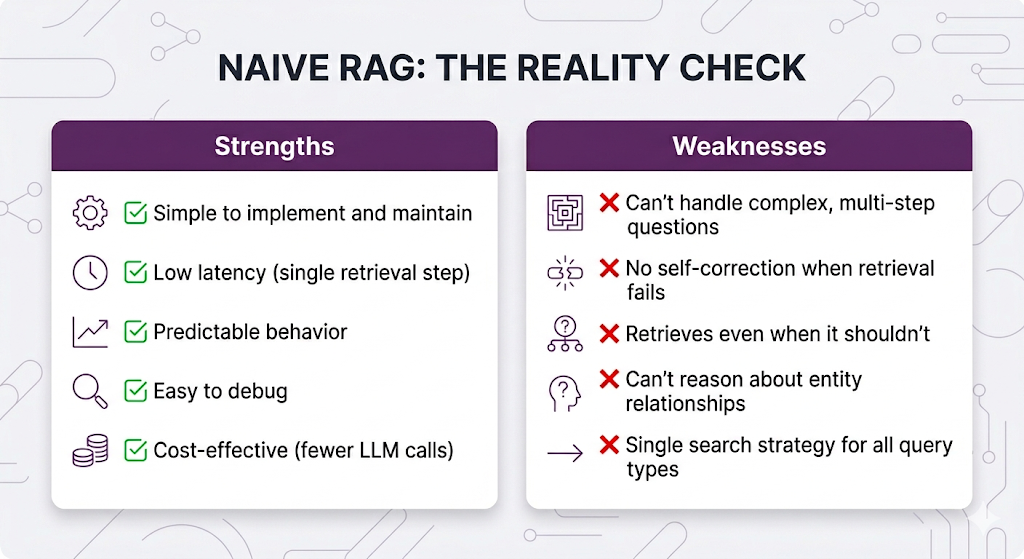
If your use case fits Naive RAG's strengths? Ship it. Seriously. Don't overcomplicate things when the simple approach works. The architectures we're about to cover exist for the cases where it doesn't work and knowing the difference is the whole game.
The Evolution: Why Naive RAG Isn't Enough
As RAG systems moved into production serving real users, patterns of failure kept showing up. Researchers and practitioners identified these pain points and developed specialized architectures to address each one.
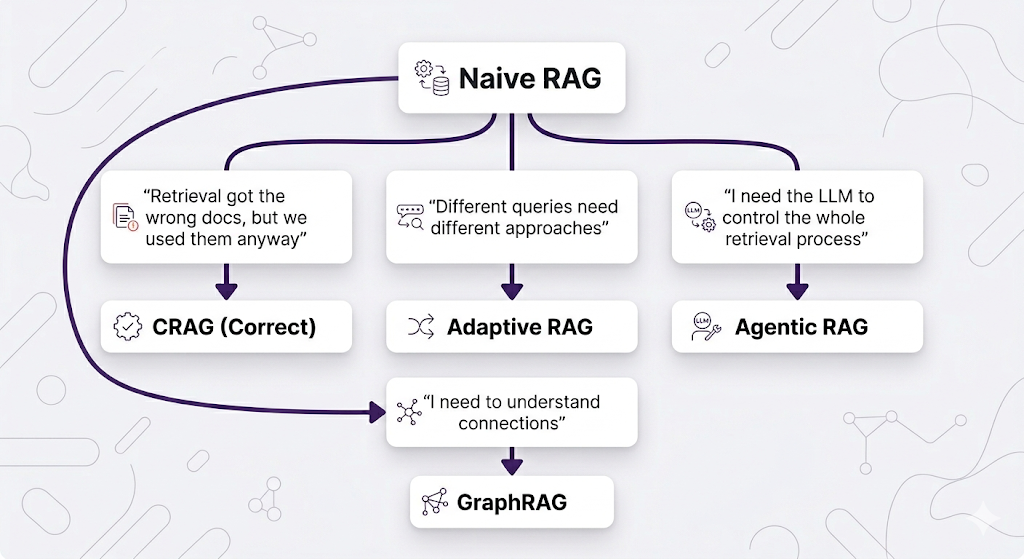
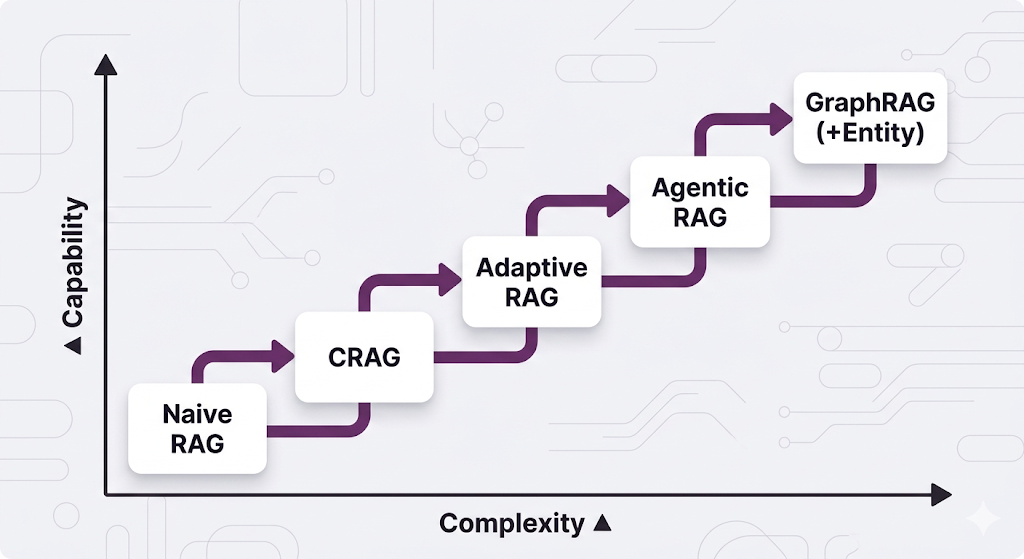
Each architecture addresses a specific failure mode. Let's go through them in order of "least new stuff to learn" to "most paradigm-shifting."
Corrective RAG (CRAG): Trust But Verify
The Pain Point
Here's a scenario that probably hits different if you've run RAG in production:
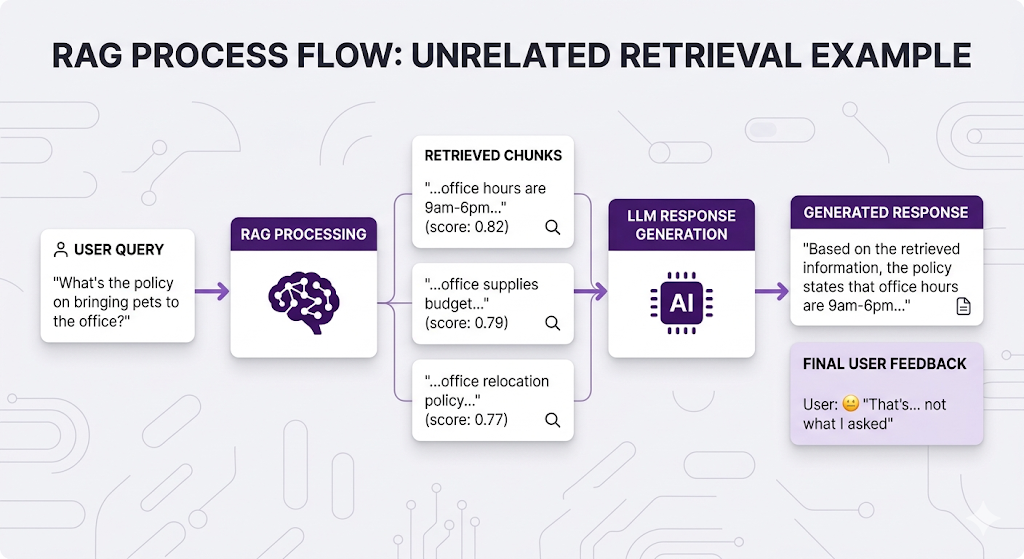
The retrieval technically worked it found chunks with "office" in them. But those chunks don't actually answer the question. And Naive RAG doesn't know the difference. It just vibes with whatever it gets back.
The Core Idea
Corrective RAG (CRAG) adds a quality-check step: after retrieval, evaluate whether the retrieved content is actually relevant before using it. If it's not, take corrective action.
Think of it like this:
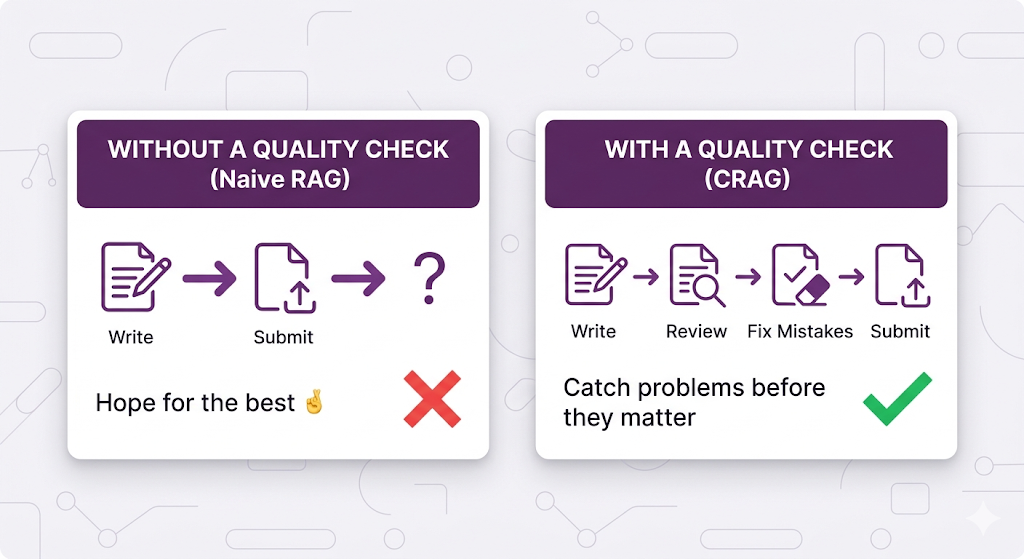
CRAG is basically a relevance spell-check for your retrieval.
How CRAG Works
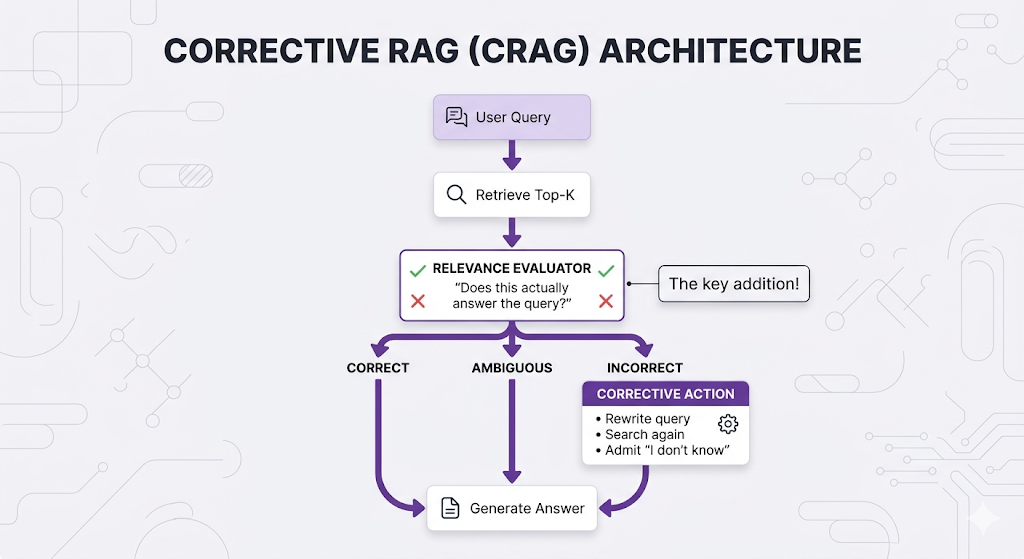
The evaluator grades each retrieved document:
✅ CORRECT: "This document directly answers the user's question." → Use it for generation.
⚠️ AMBIGUOUS: "This document is related but doesn't fully answer." → Use with caution, maybe search for more.
❌ INCORRECT: "This document doesn't answer the question at all." → Discard it, trigger corrective actions.
Real Example: CRAG in Action
Let's walk through our HR system:
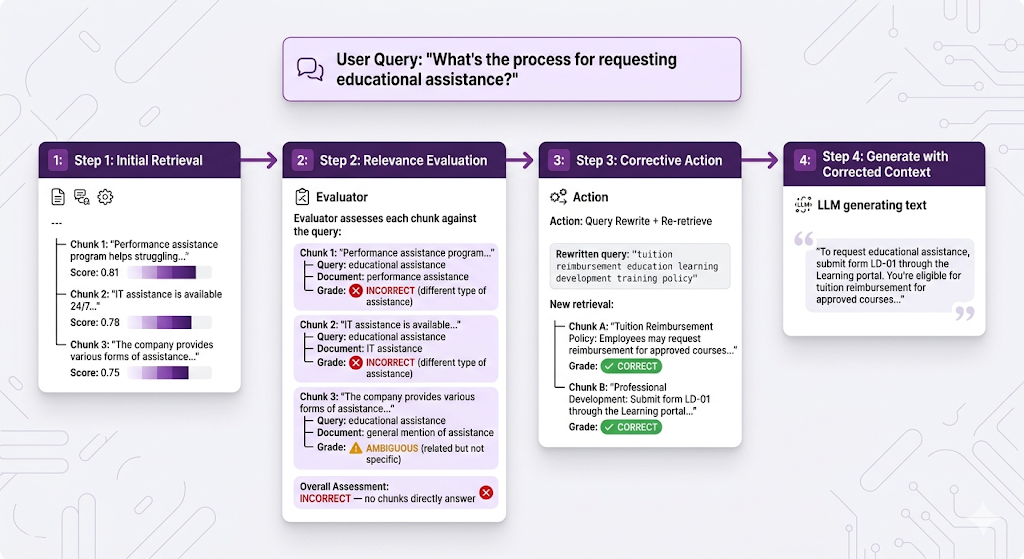
Without CRAG, the system would've rambled about performance reviews or IT support. With CRAG, it caught the bad retrieval and self-corrected. That's clutch.
Can't I Just Tell the LLM to Not Answer Wrongly?
You might be thinking: why build a whole evaluator step? Can't I just write a really good system prompt that tells the LLM to check the context before answering?
Something like:
System Prompt: "Only answer the user's question if the provided
context directly addresses it. If the context is irrelevant or
doesn't contain the answer, respond with 'I don't have enough
information to answer that question accurately.' Never make up
information that isn't in the provided context."
And honestly? This works. Like, actually works. For a lot of teams, this is the right first move and it covers roughly 80% of what CRAG gives you. We'll call this CRAG-lite.
Here's what a well-crafted system prompt handles:
✅ Tells the LLM to evaluate whether the retrieved context actually answers the question
✅ Instructs it to say "I don't know" rather than hallucinate from irrelevant chunks
✅ Filters out bad context at generation time so the LLM ignores the noise
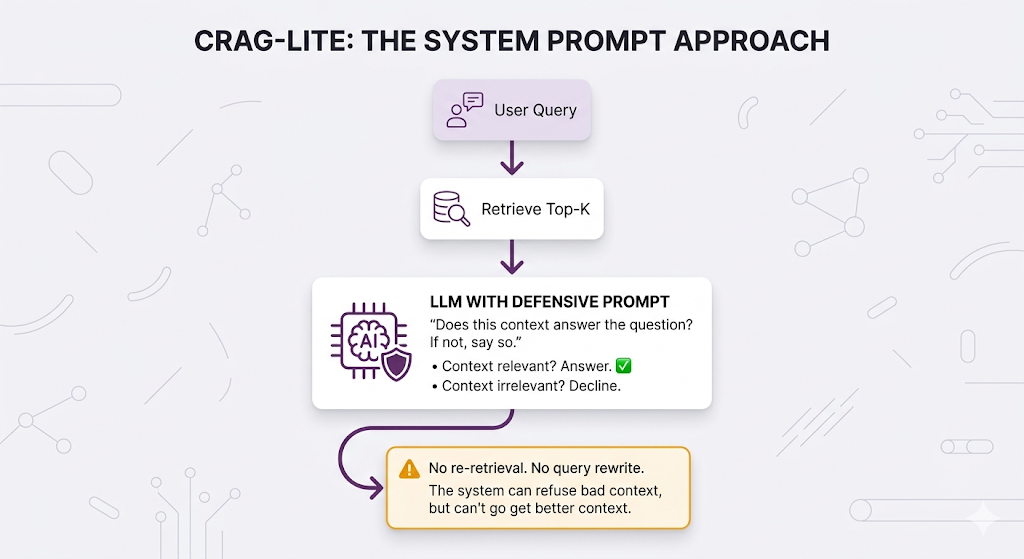
But here's where it falls short and why full CRAG exists:
A system prompt can only say "no." It can't go fix the problem.
Remember our educational assistance example? The system retrieved chunks about "performance assistance" and "IT assistance" all wrong. With CRAG-lite (the system prompt approach), the LLM correctly identifies that the context doesn't answer the question and says "I don't have enough information." Better than hallucinating, for sure.
But with full CRAG, the system rewrites the query to "tuition reimbursement education learning development" and tries again and actually finds the right answer.
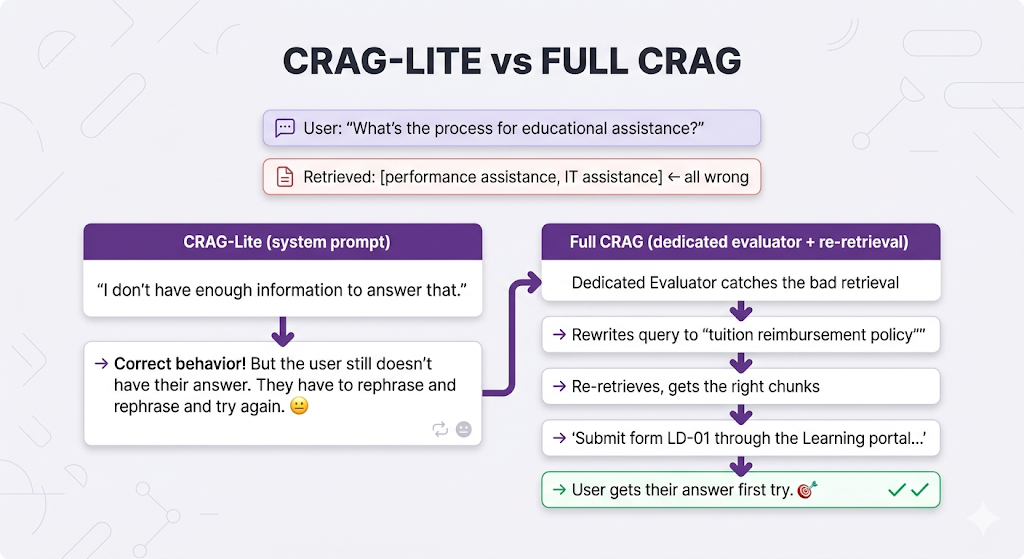
The difference:
| Capability | CRAG-Lite (System Prompt) | Full CRAG (Evaluator) |
|---|---|---|
| Refuse bad context | ✅ Yes | ✅ Yes |
| Rewrite the query and retry | ❌ No | ✅ Yes |
| Fall back to web search | ❌ No | ✅ Yes |
| Grade relevance per-chunk | ❌ Implicit (LLM decides internally) | ✅ Explicit (scored before generation) |
| Admit "I don't know" | ✅ Yes | ✅ Yes (but as last resort, after trying to fix it) |
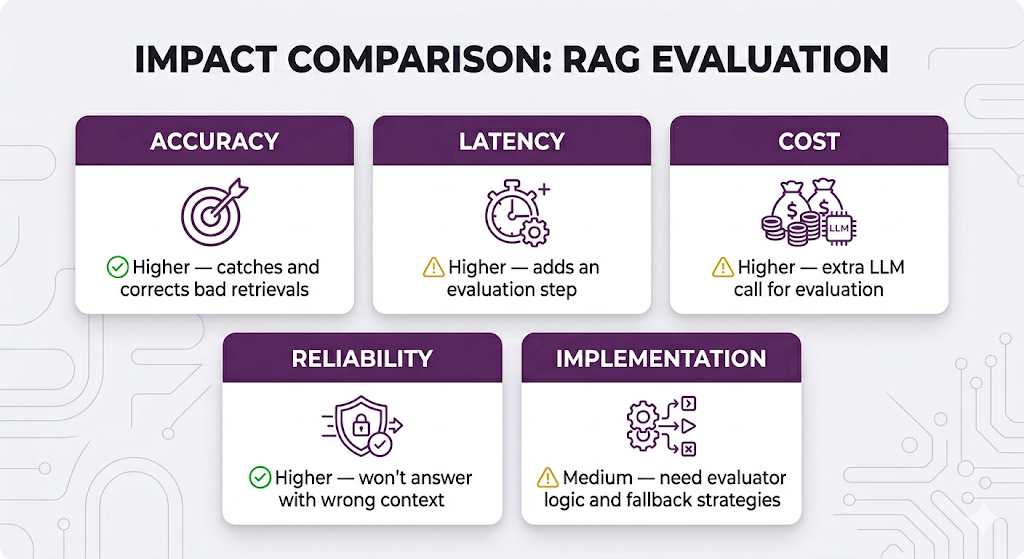
| Extra latency/cost | ❌ None | ⚠️ Adds evaluation + potential re-retrieval |
The bottom line: Start with the system prompt approach. Seriously. It's free, it ships today, and it stops the most painful failure mode (confidently wrong answers). But if you find that users keep getting "I don't have enough information" responses when the answer does exist in your knowledge base under different wording that's your signal to upgrade to the full evaluator with re-retrieval.
CRAG-lite is the seat belt. Full CRAG is the seat belt plus airbags plus lane assist.
Building the Full Evaluator
Two main approaches to implementing the relevance evaluator:
| Approach | Speed | Cost | Accuracy |
|---|---|---|---|
| LLM-based Evaluation — ask a model to grade relevance | Slower | Higher | Very High |
| Fine-tuned Classifier — train a small model specifically for relevance classification | Faster | Lower | High |
| Hybrid — classifier first, LLM for ambiguous cases | Medium | Medium | Very High |
The hybrid approach is the sweet spot for most production systems. Use the cheap, fast classifier to handle the easy cases (clearly relevant or clearly irrelevant), and only call the expensive LLM for the genuinely ambiguous ones.
CRAG Trade-offs
When to Use CRAG
✅ Use when:
- Accuracy is critical (legal, medical, compliance, HR policy)
- Users have low tolerance for wrong answers
- Your knowledge base has varying content quality
- You'd rather say "I don't know" than be wrong
❌ Skip when:
- Latency is critical and you can't afford the extra step
- Your knowledge base is high-quality and well-matched to expected queries
- "Good enough" answers are acceptable for your use case
Adaptive RAG: Choose Your Fighter
The Pain Point
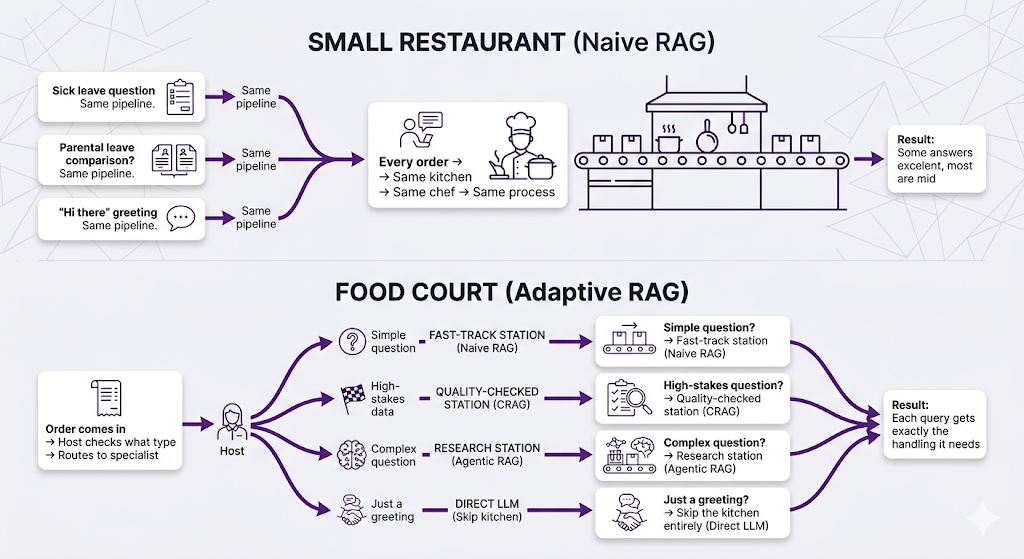
Different queries need different handling. We've established that. But what if instead of building one complex system that tries to do everything, you had multiple specialized approaches and a smart router sitting in front of them?
That's Adaptive RAG in a nutshell.
The Analogy: Restaurant vs. Food Court
The Core Idea
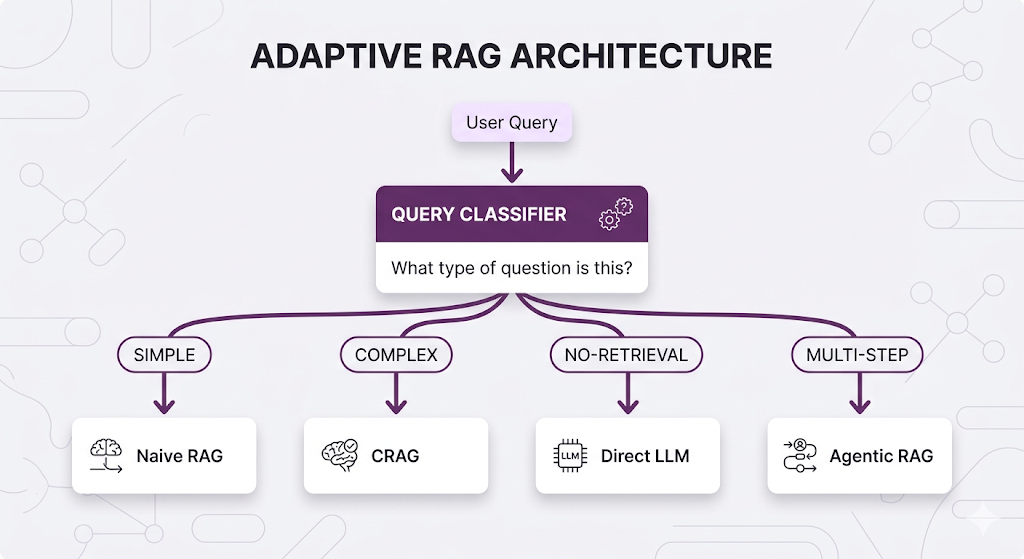
Adaptive RAG classifies the incoming query first, then routes it to the most appropriate pipeline. It's like a hospital triage system assess the patient, then direct them to the right specialist.
How Adaptive RAG Works
Query Routing in Action
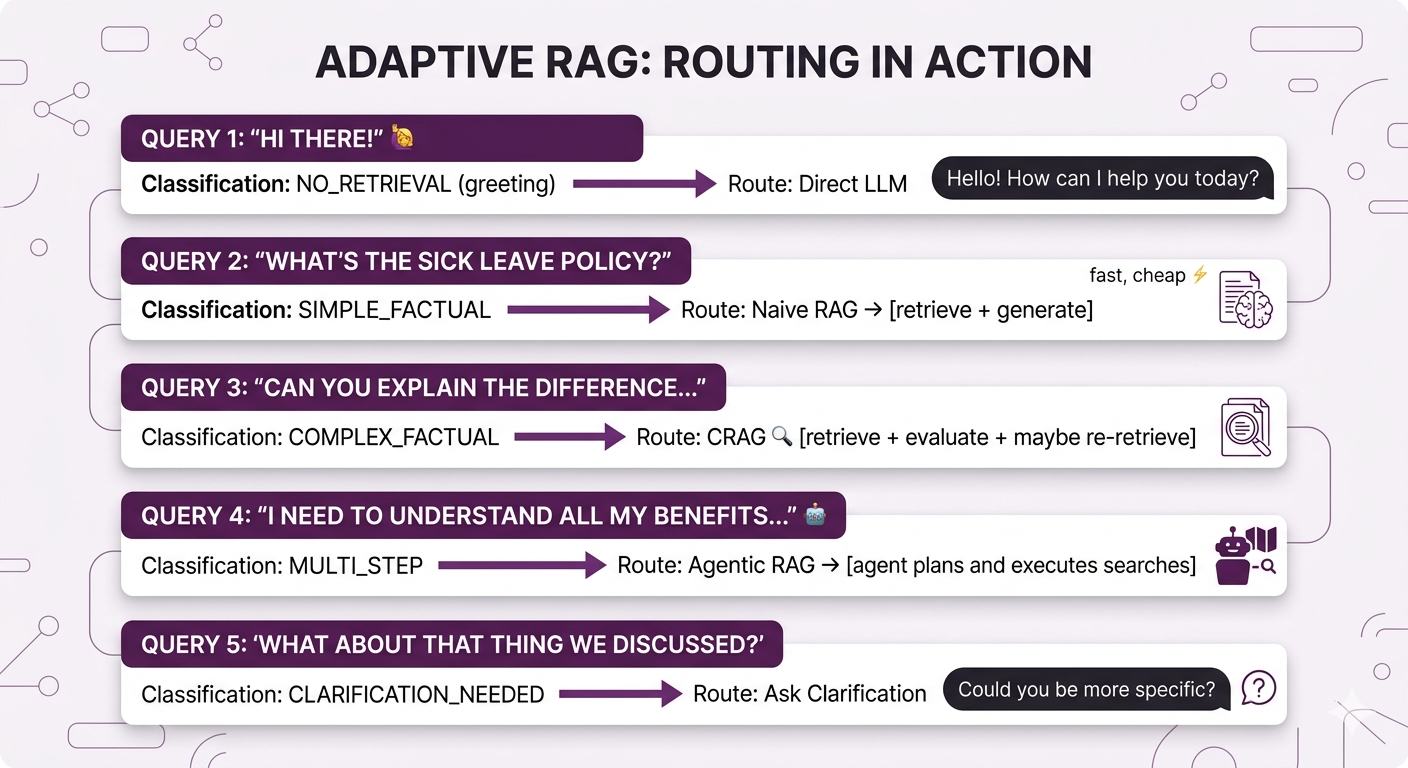
| Category | What It Looks Like | Example | Routed To |
|---|---|---|---|
| Simple Factual | Single fact lookup | "How many sick days do I get?" | Naive RAG |
| Complex Factual | Multi-faceted or high-stakes | "What's the approval chain for expenses over $5K?" | CRAG |
| No-Retrieval | General/conversational | "Thanks for your help!" | Direct LLM |
| Multi-Step | Requires reasoning across topics | "Compare benefits across all office locations" | Agentic RAG |
| Clarification Needed | Too vague to route | "What about the policy?" | Ask user to clarify |
Let's see this play out with real queries:
Building the Classifier
Three approaches, each with its own trade-off profile:
| Approach | Speed | Accuracy | Maintenance |
|---|---|---|---|
| LLM Classification — prompt a model to categorize the query | Slow | High | Low (no training data needed) |
| Fine-tuned Model — train a small model (like DistilBERT) on labeled examples | Fast | High | Medium (needs retraining as patterns change) |
| Rule-based Heuristics — if/else logic on keywords and patterns | Very Fast | Medium | High (manual rules break on edge cases) |
| Hybrid — rules for obvious cases, LLM for everything else | Medium | Very High | Medium |
For most teams, starting with LLM classification and migrating to a fine-tuned model once you have enough data is the move.
Adaptive RAG Trade-offs
| Dimension | Impact |
|---|---|
| Efficiency | ✅ Optimizes cost — simple queries don't trigger expensive pipelines |
| Latency | ✅ Better average latency — most queries take the fast path |
| Accuracy | ✅ Higher — each query type gets optimal treatment |
| Complexity | ⚠️ Higher — need to maintain multiple pipelines + router |
| Debuggability | ⚠️ Medium — must trace through router + specific pipeline |
When to Use Adaptive RAG
✅ Use when:
- Query types are diverse (simple lookups, comparisons, conversational)
- You need to optimize cost and latency at scale
- Some queries need heavy processing but most don't
- You have distinct user personas with different question patterns
❌ Skip when:
- All queries are similar (just use the single best approach)
- Low query volume doesn't justify the complexity
- You're still figuring out what works (start with one approach, then evolve)
Agentic RAG: Let the LLM Drive
The Pain Point
Remember in Post 6 when we talked about multi-hop retrieval and query decomposition? Those strategies let us break down complex queries. But they're all pre-programmed. we decide in advance how to handle queries.
What if we let the LLM itself decide what to retrieve and when?
The Core Idea
Agentic RAG gives the LLM control over the retrieval process. Instead of a fixed pipeline, the LLM becomes an "agent" that can decide whether to search, what to search for, when to search again, and when it has enough information to answer.
| Naive RAG | Agentic RAG |
|---|---|
| Assembly line worker: same task every time | Knowledge worker: decides approach per task |
| Script: "Always search, then answer" | Judgment: "Do I need to search? What for?" |
| Fixed steps | Dynamic reasoning |
The Analogy: Search Engine vs. Research Assistant
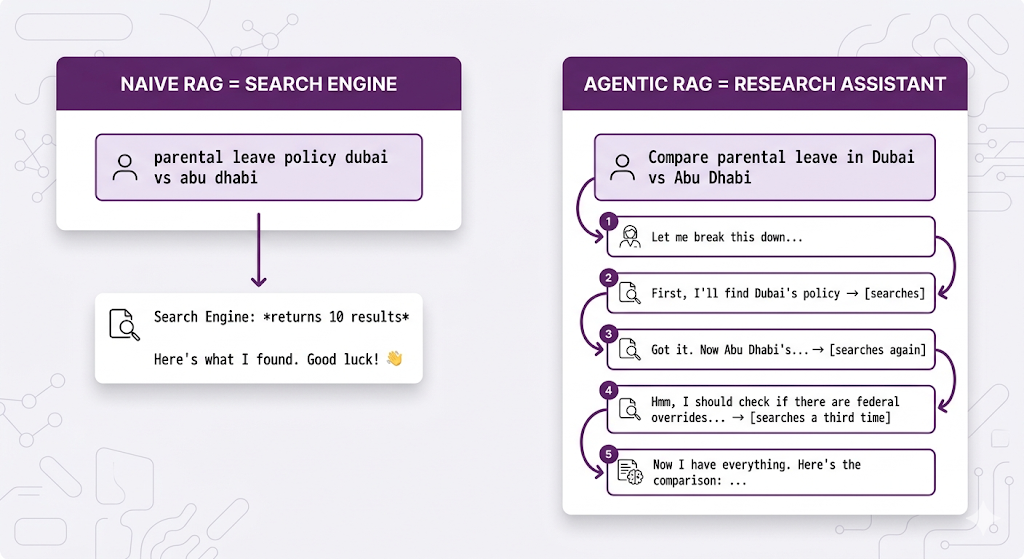
The agent thinks about what it needs. It doesn't just retrieve blindly.
How Agentic RAG Works
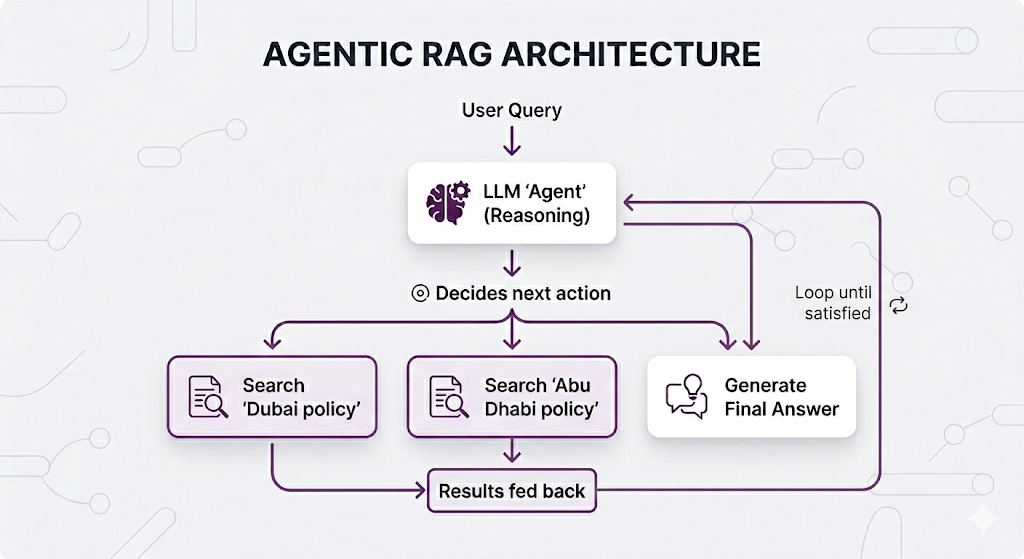
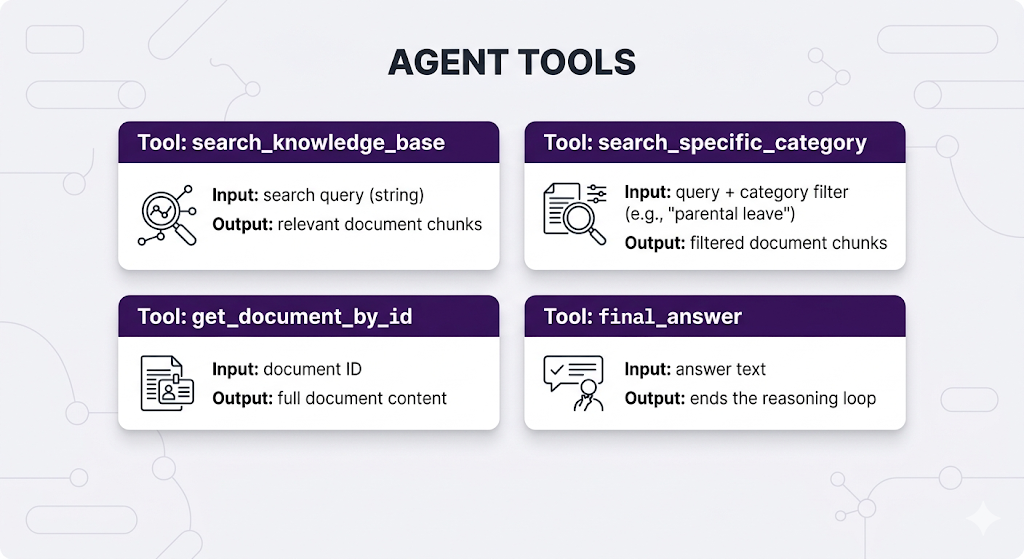
The agent has access to "tools" it can call think of them like actions available on a menu:
Real Example: Agent Reasoning Trace
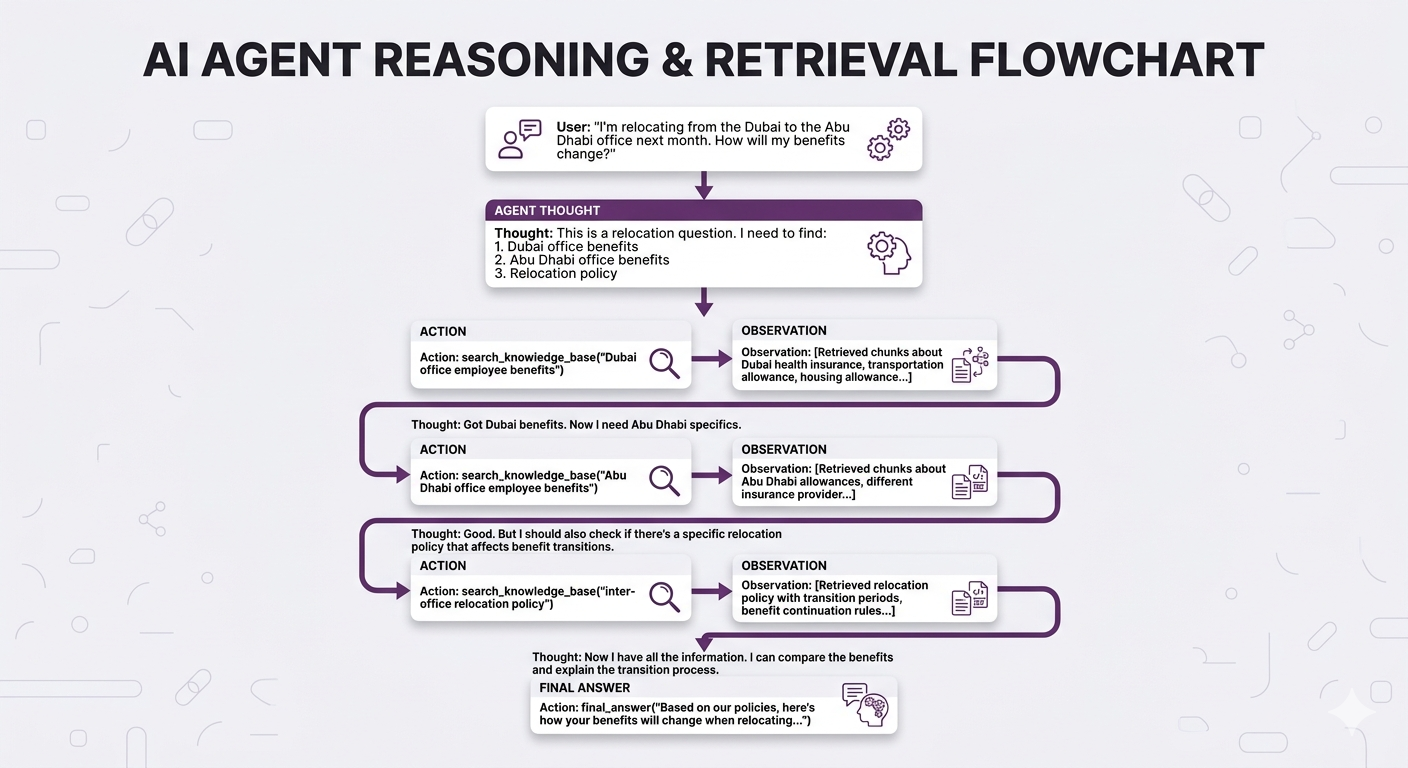
No way Naive RAG handles this as well. The agent figured out what to search for including the relocation policy, which wasn't even mentioned in the original question.
Agentic RAG Trade-offs
| Dimension | Impact |
|---|---|
| Accuracy | ✅ Higher for complex queries — dynamic retrieval finds better info |
| Latency | ⚠️ Higher — multiple LLM calls for reasoning + retrieval |
| Cost | ⚠️ Higher — more LLM tokens consumed per query |
| Predictability | ❌ Lower — agent might reason differently each time |
| Debuggability | ⚠️ Medium — can trace reasoning, but it varies |
| Implementation | ⚠️ More complex — need agent frameworks |
When to Use Agentic RAG
✅ Use when:
- Queries are complex, multi-faceted, and unpredictable
- Users ask open-ended research-style questions
- Information needs span multiple topics or documents
- You need the system to "figure things out" autonomously
❌ Skip when:
- Queries are simple and predictable (you don't need an agent to find sick leave policy)
- Latency is critical (real-time chat with sub-second responses)
- You need deterministic, reproducible behavior
- Budget is constrained (those extra LLM calls add up)
GraphRAG: It's All Connected
The Pain Point
Alright, this one is a bit different. All the previous architectures still use vector similarity as their core retrieval mechanism. GraphRAG takes a fundamentally different approach.
Let's say you're building an HR RAG system for a big organization hundreds of documents, org charts, policies that reference other policies, teams that span locations. A user asks:
"Which managers have employees who took parental leave last year?"
Vector search finds chunks that mention "managers" and chunks that mention "parental leave." But it can't connect those concepts. It doesn't understand that Manager A → supervises → Employee B → took → Parental Leave.
Now, we did cover a potential solution in Post 6 multi-hop retrieval. You could decompose this into multiple searches and chain the results. Let's be real about what that looks like:
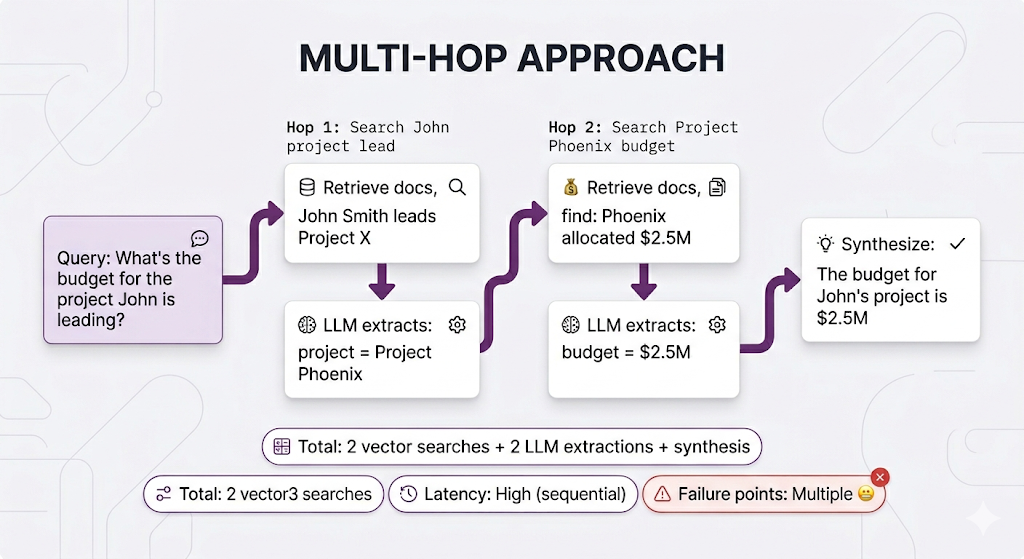
It works, but look at all that work. And you're re-discovering relationships that already exist in your documents every single time someone asks.
The Core Idea
What if you could extract those connections once, store them as a structured network, and just traverse them at query time?
That's GraphRAG. It introduces knowledge graphs a structured representation of entities (people, projects, policies, departments) and the relationships between them.
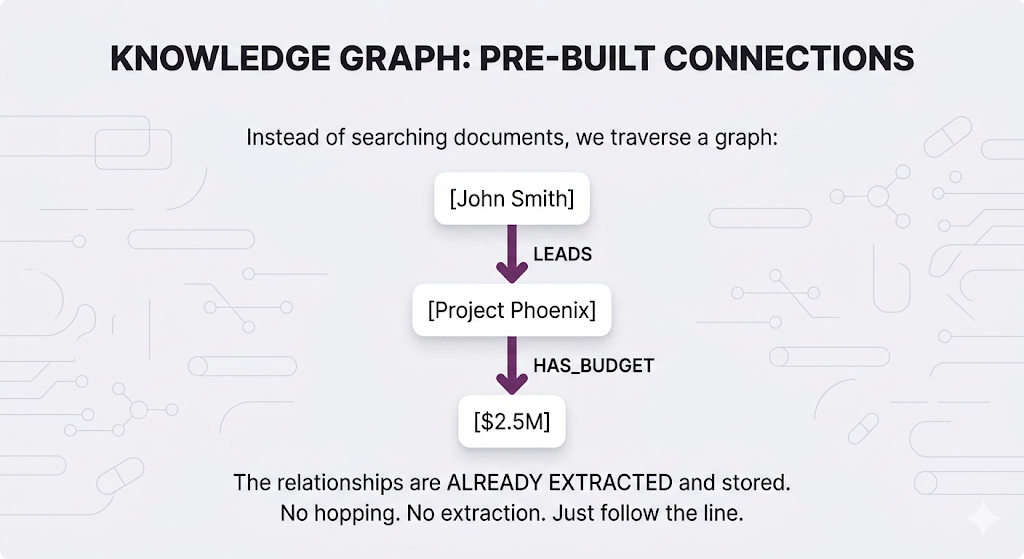
Now that same query becomes trivial one graph traversal instead of two vector searches plus LLM extraction.
| Aspect | Multi-hop | GraphRAG |
|---|---|---|
| Searches | 2+ vector searches | 1 graph traversal |
| LLM calls between steps | Yes (extraction) | No |
| Latency | High (sequential) | Low |
| Failure points | Multiple | Minimal |
| Setup cost | None | Build the graph first |
The trade-off is clear: GraphRAG requires upfront work to build the graph, but queries become dramatically simpler once it exists.
How Knowledge Graphs Work
A knowledge graph stores three things:
Entities (nodes): The things mentioned in your documents: people, policies, projects, departments, locations.
Relationships (edges): How entities connect: LEADS, REPORTS_TO, APPLIES_TO, WORKS_IN, HAS_BUDGET.
Properties: Attributes on entities and relationships: names, dates, amounts, statuses.
Extraction is a Design Decision
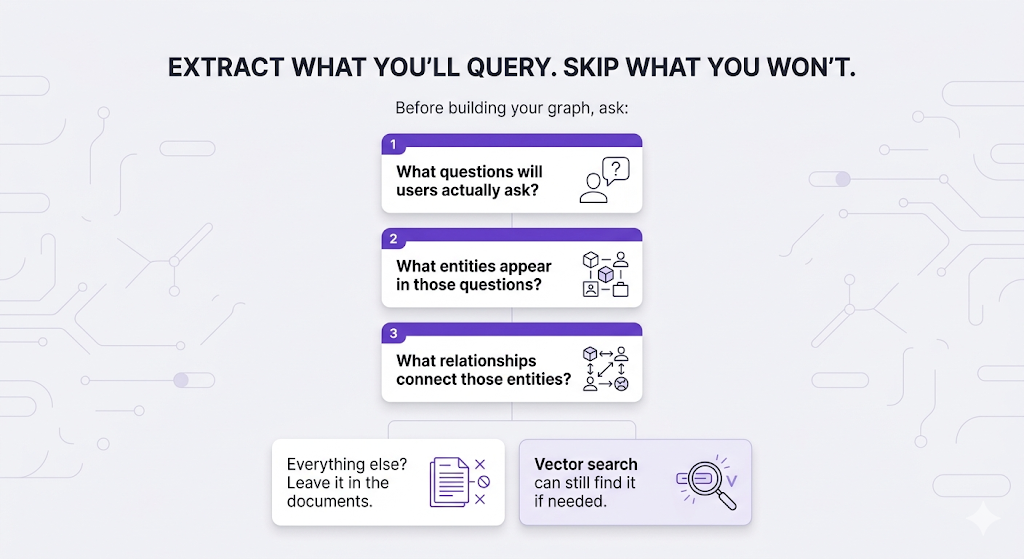
Here's something people miss: you don't extract everything from your documents into the graph. You extract what matters for the questions your system will answer.
The same HR document "John Smith (Engineering Manager) approved the $50K budget for Project Phoenix on Jan 15, 2024 in Conference Room B" produces completely different graphs depending on your use case:
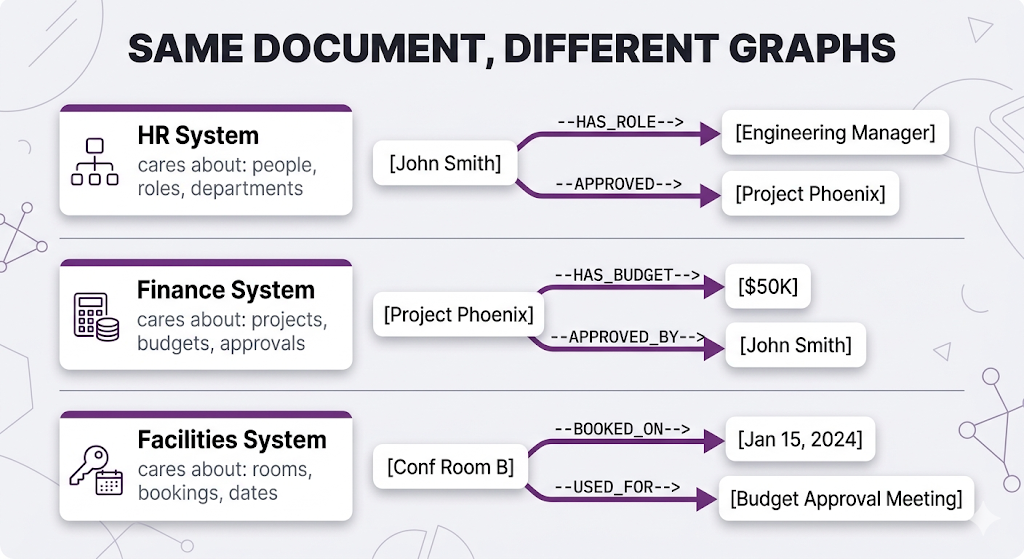
Same sentence. Three completely different graphs. Each one only extracts what's relevant to its use case.
The principle:
Three Ways to Query a Knowledge Graph
Once your graph exists, you have three retrieval methods:
1. Direct Graph Queries Follow nodes and edges using a graph query language. No LLM involved, just pattern matching.
Query: "What projects are led by Engineering managers?"

Traversal:
[Engineering Dept] ──HAS_MANAGER──▶ [Managers] ──LEADS──▶ [Projects]

→ Start at Engineering node
→ Find all people connected with HAS_MANAGER
→ Follow their LEADS relationships
→ Return those projects

Result: Project Phoenix, Cloud Migration, API Gateway
2. Community Summaries The graph automatically groups tightly-connected entities into "communities" (clusters of things heavily related to each other). You pre-generate a summary for each cluster.
Query: "Tell me about the Dubai Engineering team"

→ Query matches to "Dubai Engineering" community
→ Return the pre-generated summary:
  "The Dubai Engineering team has 12 members led by John Smith.
   They focus on cloud infrastructure and have flexible remote
   work arrangements."

→ No traversal needed summary already exists
This is clutch for broad questions like "give me an overview of X" where you need a high-level view, not specific facts.
3. Hybrid: Graph + Vector Use vector search to find the entry point, then traverse from there.
Query: "What benefits does Sarah Chen have?"

Step 1 (Vector): Search "Sarah Chen"
                 → Finds the Sarah Chen node in the graph

Step 2 (Graph):  Traverse from that node
                 Sarah → WORKS_IN → Marketing
                 Marketing → HAS_BENEFITS → [list]
                 Sarah → EMPLOYMENT_TYPE → Full-time
                 Full-time → ELIGIBLE_FOR → [more benefits]

→ Vector search finds WHERE to start
→ Graph traversal finds the CONNECTED information
Most real GraphRAG systems use a mix of all three depending on the query type.
The Sneaky Hard Part: Keeping the Graph Fresh
With vector RAG, updating is simple new doc? Chunk it, embed it, done. Updated doc? Re-embed. Deleted doc? Remove the vectors.
With GraphRAG, it's trickier. Adding a new document means running it through your extraction pipeline, adding new entities and relationships but is "John Smith" in this doc the same "John Smith" already in your graph? That's entity resolution, and it's the challenge that separates a working GraphRAG system from a broken one.
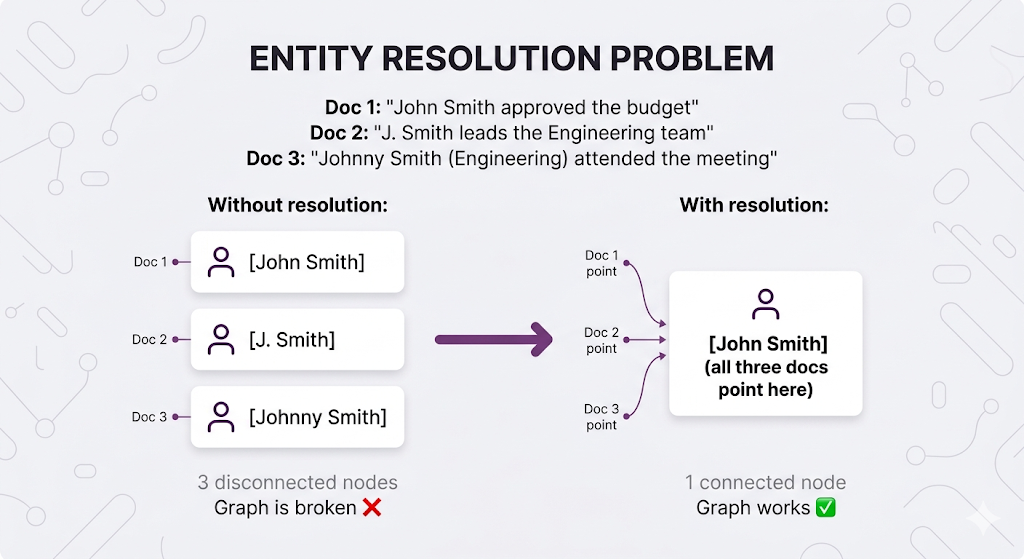
This is why GraphRAG has higher maintenance overhead than vector RAG. You're not just storing content you're maintaining a structured model of your knowledge that needs to stay accurate as things change.
GraphRAG Trade-offs
| Dimension | Impact |
|---|---|
| Relational Queries | ✅ Excellent — native support for entity connections |
| Global Questions | ✅ Better — community summaries capture corpus-wide patterns |
| Setup Complexity | ❌ High — need to build and maintain the graph |
| Latency | ⚠️ Variable — depends on query complexity |
| Maintenance | ⚠️ Higher — graph needs updating as data changes |
| Cost | ⚠️ Higher — entity extraction + graph database |
When to Use GraphRAG
✅ Use when:
- Questions involve relationships between entities (who reports to whom, which policies apply to which teams)
- Your docs constantly reference each other (policies reference other policies, contracts reference amendments)
- Global corpus understanding matters (trends, overviews, summaries across many docs)
- Compliance or audit requires entity tracking
❌ Skip when:
- Queries are purely content-based ("what does the sick leave policy say about X")
- You don't have clear entity types in your documents
- Real-time updates are critical (graph building is slow)
- Budget and complexity constraints are tight
Architecture Comparison: The Full Picture
Let's put everything side-by-side:
Feature Comparison
| Feature | Naive RAG | CRAG | Adaptive RAG | Agentic RAG | GraphRAG |
|---|---|---|---|---|---|
| Query Understanding | None | Post-retrieval check | Classifier | LLM-driven | Entity recognition |
| Retrieval Control | Fixed | With fallback | Route-dependent | Dynamic | Graph traversal |
| Self-Correction | ❌ | ✅ (explicit) | ✅ (per route) | ✅ (via reasoning) | ⚠️ (limited) |
| Multi-step Reasoning | ❌ | ❌ | ✅ (if routed) | ✅ | ✅ |
| Relationship Queries | ❌ | ❌ | ⚠️ | ⚠️ | ✅ |
| Implementation Effort | Low | Medium | Medium-High | High | High |
| Latency | Low | Medium | Variable | High | Variable |
| Cost per Query | Low | Medium | Variable | High | Medium-High |
Complexity vs. Capability
Choosing Your Architecture
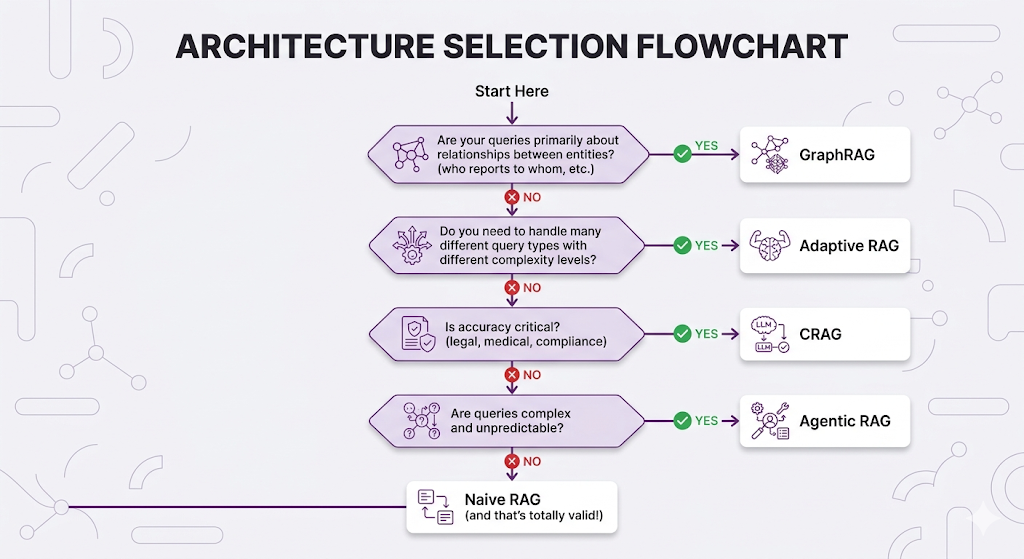
The Decision Flowchart
Common Architecture Combinations
In practice, you'll often combine approaches:
Combination 1: Adaptive + Specialized Backends
Query → Classifier → Route to:
                     ├── Simple → Naive RAG
                     ├── Complex → CRAG
                     └── Multi-step → Agentic RAG
Combination 2: CRAG + GraphRAG
Query → Graph Query → Results → Evaluator → If bad → Vector fallback
Combination 3: Agentic with Graph Tools
Agent Tools:
├── search_documents (vector)
├── query_knowledge_graph (graph)
├── search_web (external)
└── final_answer
Practical Recommendations
| Scenario | Recommended Architecture | Why |
|---|---|---|
| MVP / Prototype | Naive RAG | Fast to build, easy to debug |
| Production HR Bot | Adaptive RAG | Mix of simple and complex queries |
| Legal/Compliance | CRAG | Can't afford wrong answers |
| Research Assistant | Agentic RAG | Open-ended exploration |
| Org Chart Questions | GraphRAG | Entity relationships matter |
| Customer Support | Adaptive (Naive + CRAG) | Mostly simple, some critical |
Key Takeaways
Mental Models to Remember
MENTAL MODEL #1: Different Problems, Different Solutions
There's no "best" RAG architecture only the best fit for
your specific query patterns, accuracy requirements,
and resource constraints.
MENTAL MODEL #2: Evolution, Not Revolution
Start with Naive RAG. Identify failure modes. Add complexity
only where it solves real problems. Premature optimization
is still the root of all evil.
MENTAL MODEL #3: The 80/20 of RAG
80% of queries can probably be handled by Naive RAG.
Advanced architectures exist for the 20% that can't. Route accordingly (that's literally what Adaptive RAG does).
MENTAL MODEL #4: Graphs for Relationships
If your questions are about WHO/WHAT connects to WHO/WHAT,
vector similarity won't cut it. You need graph traversal.
The Running Architecture (Updated)
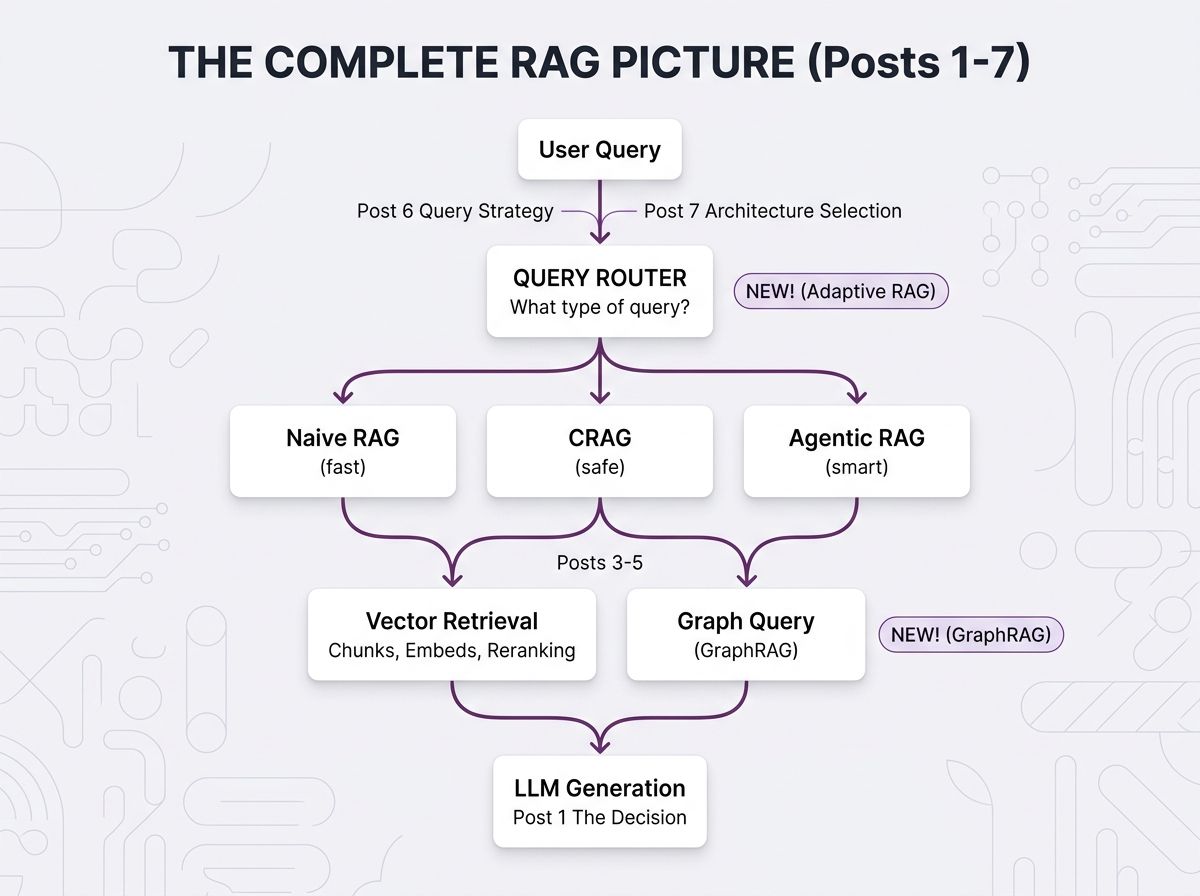
Here's how all 7 posts fit together now:
The Golden Rule
┌─────────────────────────────────────────────────────────────────┐
│                                                                 │
│  "The best architecture is the simplest one that solves         │
│   your actual problems."                                        │
│                                                                 │
│  Don't add complexity until you've earned it through            │
│  real-world failures that simpler approaches can't handle.      │
│                                                                 │
└─────────────────────────────────────────────────────────────────┘
Quick Reference
| Your Situation | Architecture | Key Benefit |
|---|---|---|
| Just getting started | Naive RAG | Simplicity |
| Accuracy is critical | CRAG | Self-correction |
| Queries are complex | Agentic RAG | Dynamic reasoning |
| Query types vary widely | Adaptive RAG | Optimized routing |
| Need entity relationships | GraphRAG | Connection traversal |
| Not sure | Start Naive, evolve | Learn from failures |
What's Next
We've now covered the full spectrum of RAG architectures from the simplest retrieve-and-generate to agents that reason about what to search for and graphs that traverse pre-built connections.
But here's the question nobody can avoid forever: how do you know if any of this is actually working?
Post 8 Preview: Evaluation and Production
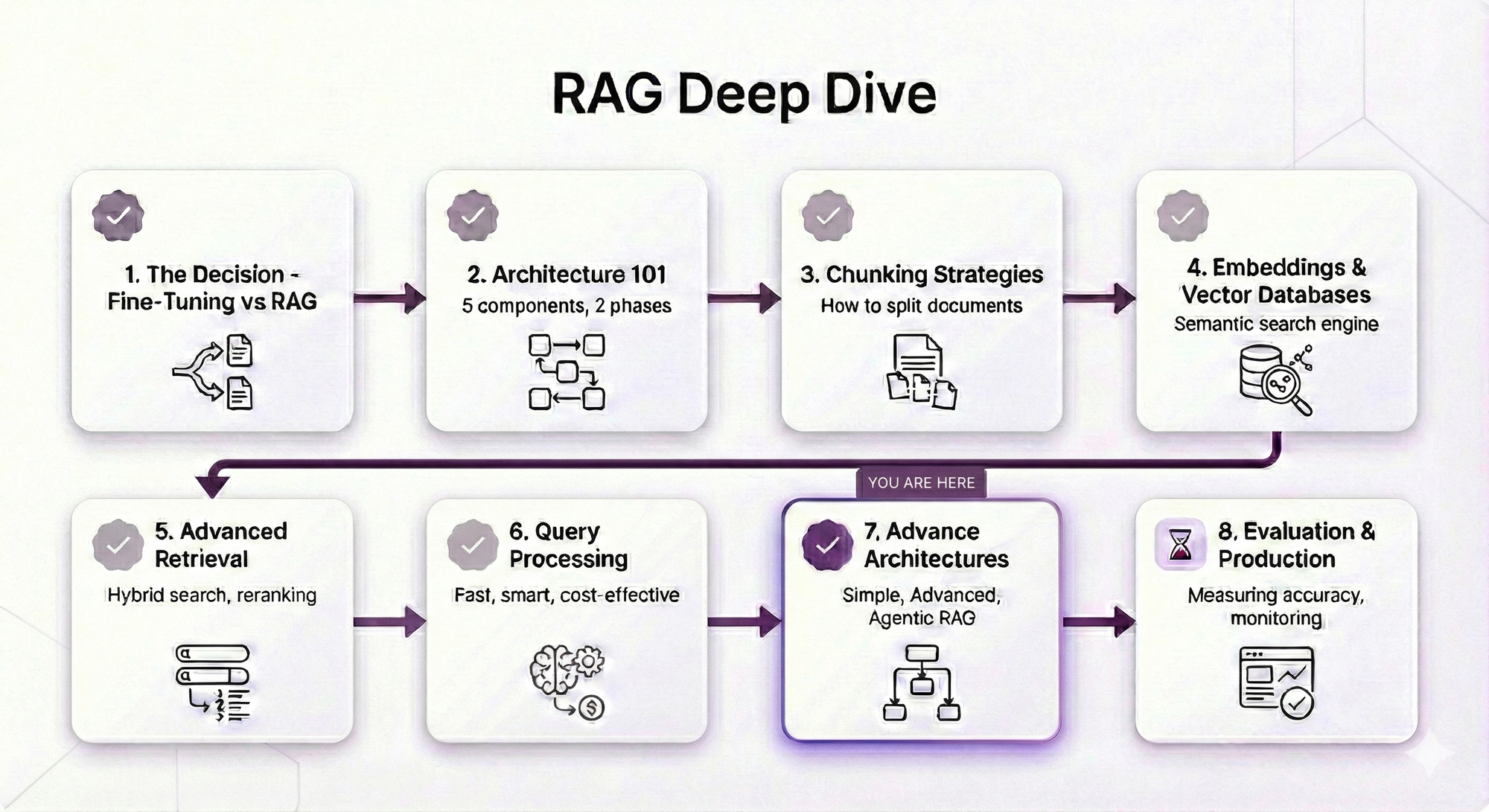
In Post 8: Evaluation and Production, we're covering the final piece how to measure your RAG system's performance, test different architectures against each other, and keep everything running smoothly once it's serving real users.
We'll cover retrieval metrics (are you finding the right chunks?), generation quality (are the answers actually good?), building evaluation datasets, A/B testing different architectures, and monitoring in production.
It's the capstone. Everything from Posts 1–7 comes together.
See You in Post 8
You've built every component:
- Post 1: Why RAG
- Post 2: How RAG works
- Post 3: How to chunk
- Post 4: How to search semantically
- Post 5: How to search better
- Post 6: How to ask better questions
- Post 7: How to architect the whole system
Next up: How to know if it's actually working and keep it working in production.
Ready to Build Your RAG System?
We help companies build production-grade RAG systems that actually deliver results. Whether you're starting from scratch or optimizing an existing implementation, we bring the expertise to get you from concept to deployment. Let's talk about your use case.


Part 7 of the RAG Deep Dive Series | Next up: RAG Evaluation & Production