RAG Deep Dive Series: Query Processing
Part 6: Query Processing — Getting the Question Right

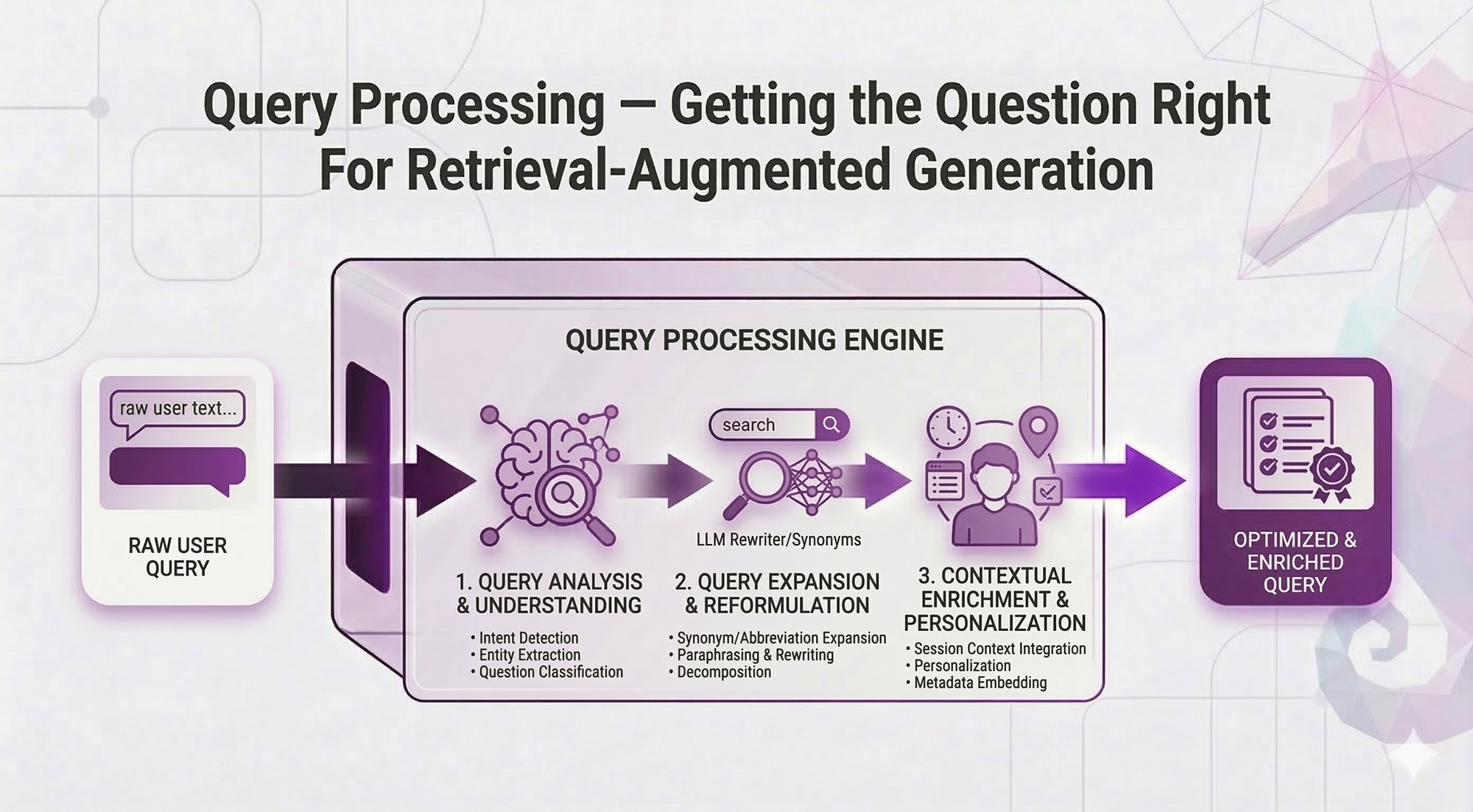
In Post 5, you learned advanced retrieval techniques: reranking, hybrid search, metadata filtering, parent-child retrieval. Now your retrieval pipeline is solid.
But here's the thing: Even the best retrieval can't fix a bad query.
Think about it:
You've optimized how you search. But what if users are searching with the WRONG words?
User types: "PTO"
Your documents say: "paid time off" and "vacation leave"
Result: Miss ❌

User types: "leave"
Your documents cover: sick leave, vacation leave, parental leave, unpaid leave
Result: Everything matches, nothing specific ❌

User types: "Compare our vacation policy with our sick leave policy"
Your system: Searches for docs mentioning BOTH terms together
Result: Misses your best vacation-only and sick-leave-only documents ❌
The problem isn't your retrieval, it's the query itself.
This post shows you how to fix that.
What You'll Learn
You'll understand:
- Query expansion — Handle synonyms, acronyms, vocabulary mismatches
- Multi-query — Search from multiple angles, catch more relevant docs
- HyDE — Generate hypothetical answers, then search for those
- Query decomposition — Break complex queries into simpler sub-queries
- Multi-hop retrieval — Chain sequential searches when info depends on prior results
Same promise: Concepts first, real examples, no code unless it clarifies the idea.
By the end, you'll know how to transform user queries into search queries that actually find what they need.
Table of Contents
- The Problem: When Queries Let You Down
- Query Expansion: Bridging Vocabulary Gaps
- Multi-Query: Search From Multiple Angles
- HyDE: Think in Reverse
- Query Decomposition: Breaking Down Complexity
- Multi-Hop Retrieval: Following the Trail
- Putting It All Together
- Key Takeaways
- What's Next
The Problem: When Queries Let You Down
You've built your RAG system. Retrieval is optimized. Everything works great.
Then users show up.
And they type:
"leave"
"how do i take time off"
"pto stuff"
"can I work from home if my kid is sick"
"what about that thing for new parents"
What would actually retrieve better:
"annual leave sick leave parental leave entitlement policy"
"time off request application process HR portal"
"paid time off PTO vacation days entitlement"
"work from home remote work sick child family policy"
"parental leave maternity paternity policy new parents"
The Query Problems
Problem 1: Too short / Too vague
Query: "leave"
Matches: Everything about leave (sick, vacation, parental, unpaid...)
User wanted: Probably something specific, but we don't know what
Problem 2: Vocabulary mismatch
User says: "PTO"
Docs say: "paid time off", "vacation days", "annual leave"
Result: Semantic search helps, but might still miss exact policy
Problem 3: Complex queries
User asks: "Compare our vacation policy with our sick leave policy"
Problem: This needs TWO separate retrievals + synthesis
Single search misses best sources for each policy individually
Problem 4: Chained information needs
User asks: "What's the budget for the project John is leading?"
Problem: Need to find John's project first, THEN find that project's budget
Can't search "John's project budget" directly
The core insight:
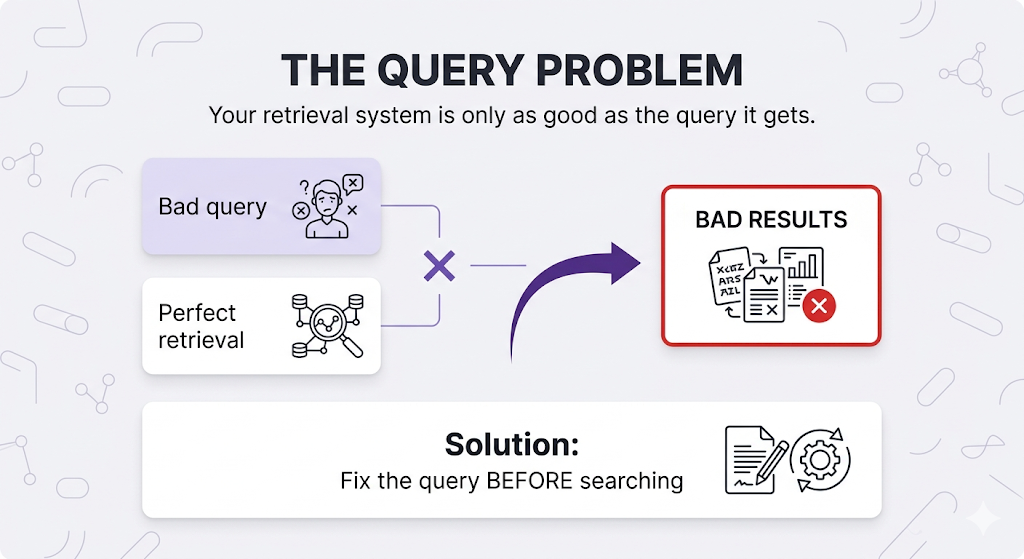
Let's fix these one by one.
Query Expansion: Bridging Vocabulary Gaps
The simplest technique: Add synonyms and related terms to the query.
The Concept
Instead of searching:
"PTO"Search:
"PTO paid time off vacation days annual leave time away"Why this works:
Even if your documents use "vacation days" and the user says "PTO", the expanded query includes both terms. You catch documents regardless of which vocabulary they use.
Types of Query Expansion
1. Synonym Expansion
Original: "car insurance"
Expanded: "car insurance automobile vehicle coverage policy protection"

Original: "refund"
Expanded: "refund reimbursement return money back repayment"
2. Acronym Expansion
Original: "PTO"
Expanded: "PTO paid time off"

Original: "HR"
Expanded: "HR human resources personnel"

Original: "OOO"
Expanded: "OOO out of office away"
3. Formality Level Matching
User (casual): "sick days"
Expanded: "sick days sick leave medical leave illness absence"

User (formal): "medical certification requirements"
Expanded: "medical certification requirements doctor's note sick note medical documentation"
Implementation Approaches
Approach 1: Manual Synonym Dictionary
Build a mapping of common terms in your domain:
{
  "PTO": ["paid time off", "vacation", "annual leave"],
  "WFH": ["work from home", "remote work", "telecommute"],
  "sick leave": ["medical leave", "illness", "sick days"],
  "refund": ["reimbursement", "return", "money back"]
}
Pros:
- Complete control
- Domain-specific
- Fast (no LLM call)
Cons:
- Manual maintenance
- Can't handle new terms
- Doesn't adapt to context
Approach 2: LLM-Based Expansion
Ask an LLM to expand the query:
System Prompt:
"Given a user query, expand it with synonyms and related terms that might
appear in HR policy documents. Return the expanded query."

User Query: "PTO"

LLM Output: "PTO paid time off vacation days annual leave time away
             work-life balance time off request"
Pros:
- Handles any query
- Context-aware
- No manual maintenance
Cons:
- Adds latency (~200-500ms)
- API costs
- Less predictable
When to Use Query Expansion
Use it when:
- Vocabulary mismatch is common (users say "PTO", docs say "vacation")
- Domain has many acronyms or jargon
- Users type short queries (1-3 words)
Skip it when:
- Queries are already detailed and specific
- Semantic search already handles synonyms well
- Over-expansion creates noise ("leave" → everything about leaving)
Multi-Query: Search From Multiple Angles
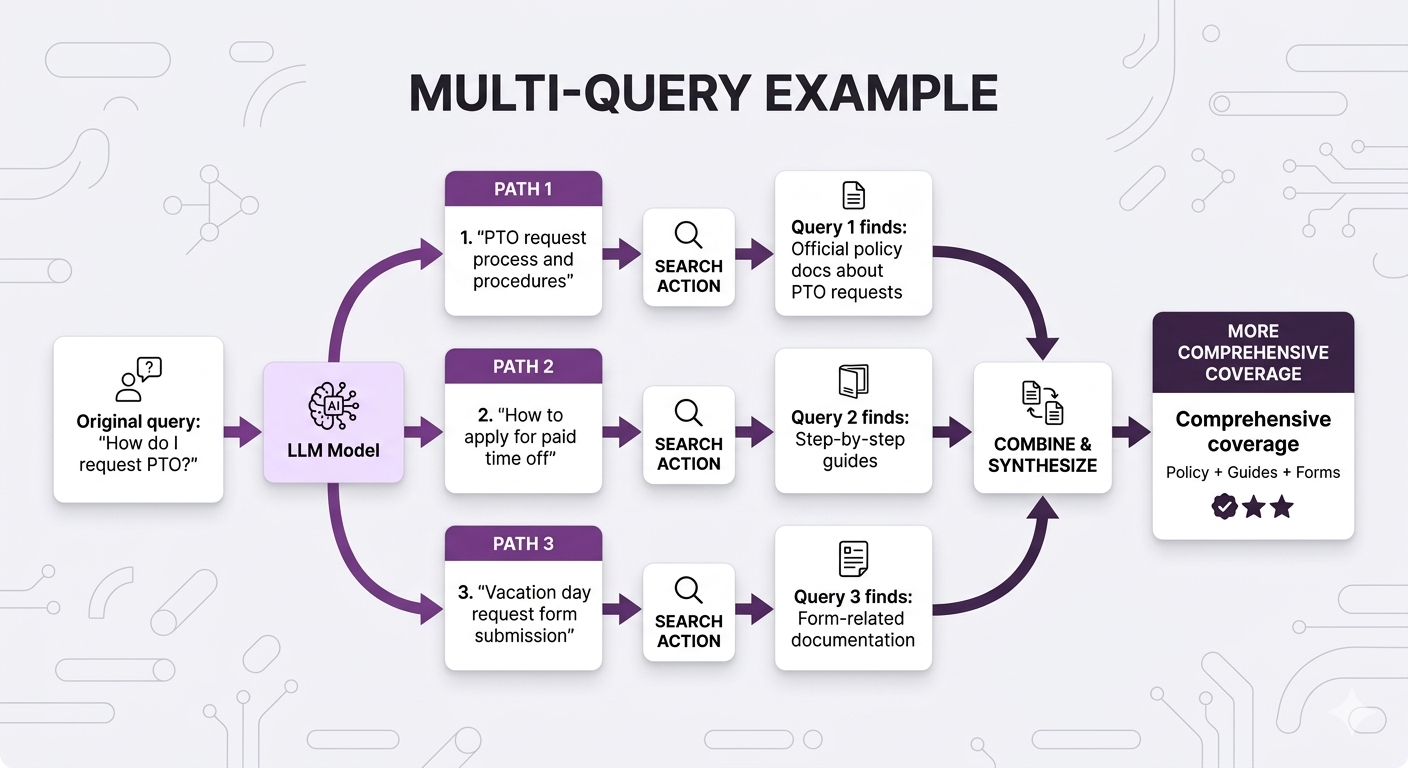
Similar concept to query expansion, but with a key difference: Generate multiple complete queries instead of expanding one.
The Difference
Query Expansion:
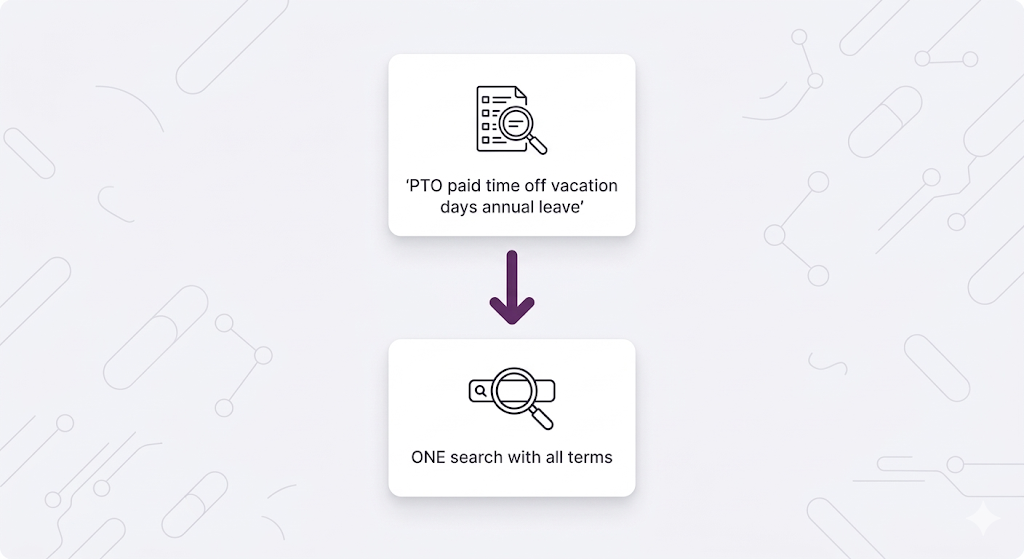
Multi-Query:
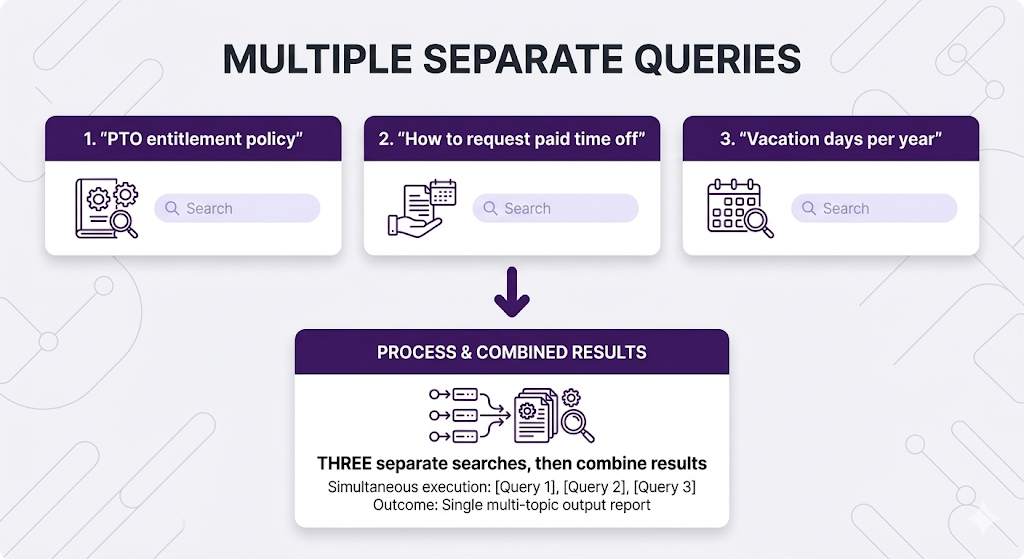
Why Multiple Queries?
Different query formulations catch different documents:
Fusion Methods: Combining Multiple Result Lists
Here's what's happening:
You run 3 separate searches:
Query 1: "PTO request process and procedures"
  → Returns ranked list: [Doc A, Doc B, Doc C, Doc D, Doc E, ...]

Query 2: "How to apply for paid time off"
  → Returns ranked list: [Doc B, Doc F, Doc A, Doc G, Doc H, ...]

Query 3: "Vacation day request form submission"
  → Returns ranked list: [Doc B, Doc C, Doc I, Doc J, Doc A, ...]
Now you have a problem: You have 3 different ranked lists of chunks. Which chunks should you actually send to the LLM?
You need to merge these 3 lists into 1 final ranked list.
That's what fusion does.
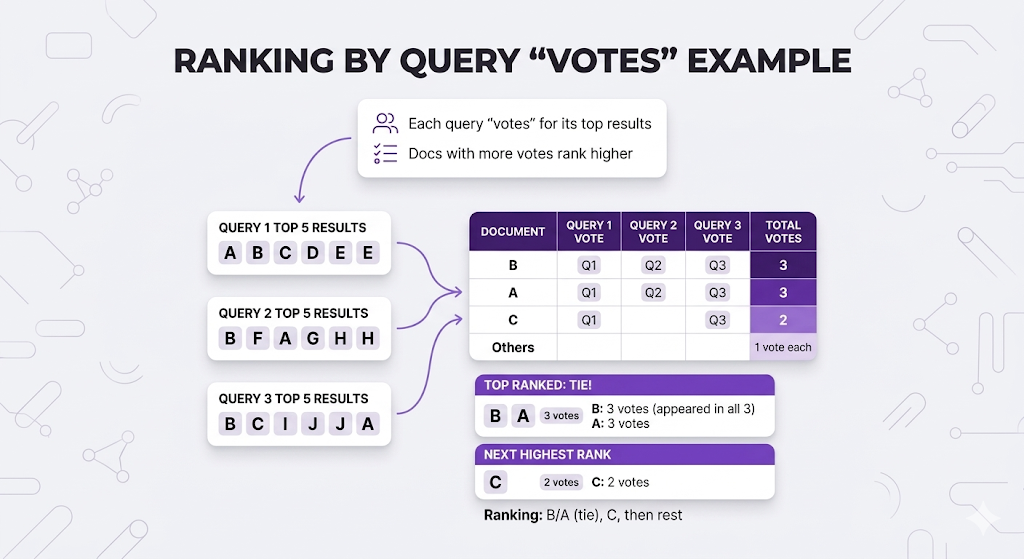
If a chunk appears highly ranked in MULTIPLE queries, it's probably more relevant than chunks that only appear in one query.
Fusion Method 1: Reciprocal Rank Fusion (RRF)
What it does: Gives each document a score based on its rank position in each query's results.
The formula:
For each document:
  Score = Σ 1/(k + rank_in_query)
  where k = 60 (standard constant)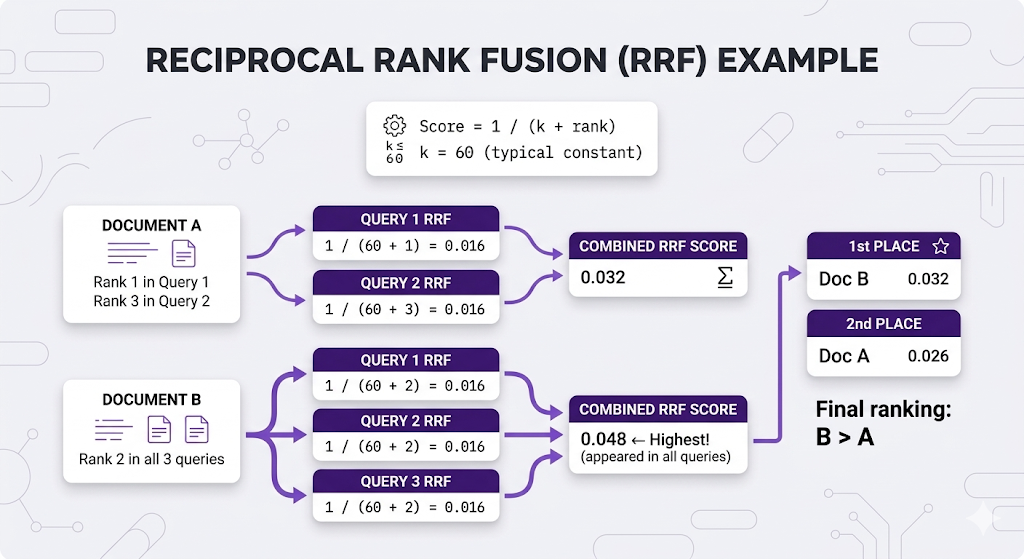
Why RRF is popular:
- ✅ Simple no tuning needed
- ✅ No score normalization required
- ✅ Rewards docs that appear in multiple queries
Method 2: Weighted Voting
The Complete Multi-Query Flow
Let me show the ENTIRE flow from start to finish:
┌─────────────────────────────────────────────────────────────────┐
│              COMPLETE MULTI-QUERY FLOW                          │
├─────────────────────────────────────────────────────────────────┤
│                                                                 │
│  1. USER QUERY                                                  │
│     "How do I request PTO?"                                     │
│           ↓                                                     │
│                                                                 │
│  2. GENERATE MULTIPLE QUERY VARIATIONS (LLM)                    │
│     → Query 1: "PTO request process and procedures"             │
│     → Query 2: "How to apply for paid time off"                 │
│     → Query 3: "Vacation day request form submission"           │
│           ↓                                                     │
│                                                                 │
│  3. SEARCH EACH QUERY SEPARATELY (3 separate vector searches)   │
│     → Query 1 results: [Doc A, Doc B, Doc C, Doc D, Doc E...]   │
│     → Query 2 results: [Doc B, Doc F, Doc A, Doc G, Doc H...]   │
│     → Query 3 results: [Doc B, Doc C, Doc I, Doc J, Doc A...]   │
│           ↓                                                     │
│                                                                 │
│  4. FUSION (Combine the 3 lists into 1 final list)              │
│     Using RRF or Weighted Voting                                │
│     → Final ranking: [Doc B, Doc A, Doc C, Doc F, Doc G...]     │
│           ↓                                                     │
│                                                                 │
│  5. SEND TOP N TO LLM (e.g., top 5 from fused list)             │
│     → LLM receives: Doc B, Doc A, Doc C, Doc F, Doc G           │
│     → LLM generates answer based on these docs                  │
│                                                                 │
└─────────────────────────────────────────────────────────────────┘
The key point: Fusion takes MULTIPLE ranked lists of chunks (one list per query) and creates ONE final ranked list that you send to the LLM.
Query Expansion vs Multi-Query
| Factor | Query Expansion | Multi-Query |
|---|---|---|
| Searches | 1 | N (3-5 typically) |
| Latency | ~100ms | ~100ms × N queries |
| Coverage | Good | Better |
| Complexity | Low | Higher (need fusion) |
| Best for | Simple synonym issues | Maximum recall needed |
HyDE: Think in Reverse
Hypothetical Document Embeddings. This one's clever, Instead of searching with the user's question, predict what the answer looks like, then search for that.
The Core Insight
Your documents contain ANSWERS, not QUESTIONS:
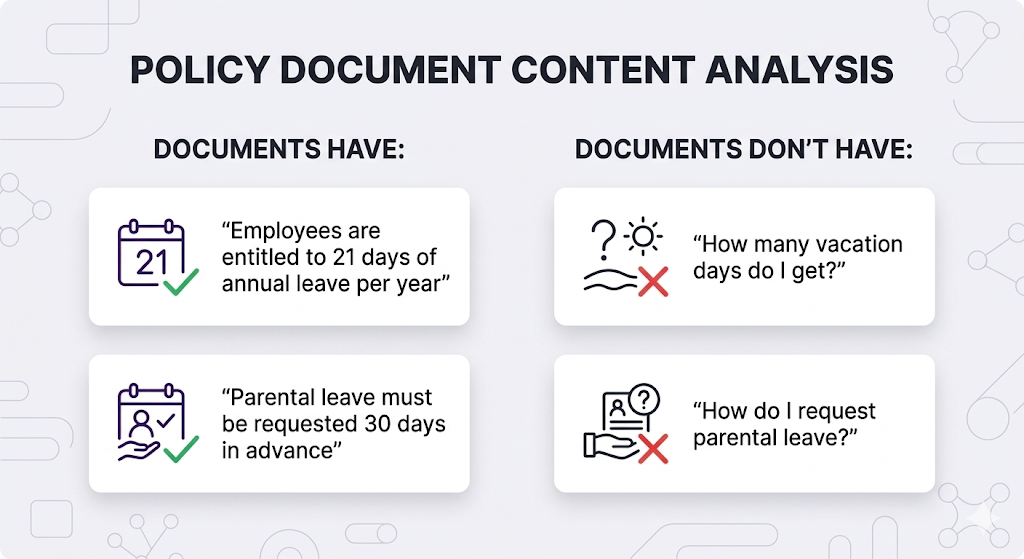
The problem:
When you embed "How many vacation days do I get?" and search, you're comparing:
- Question-style text (short, interrogative)
- vs Answer-style text (declarative, detailed)
HyDE fixes this: Generate a hypothetical answer first, then search for documents similar to that answer.
How HyDE Works
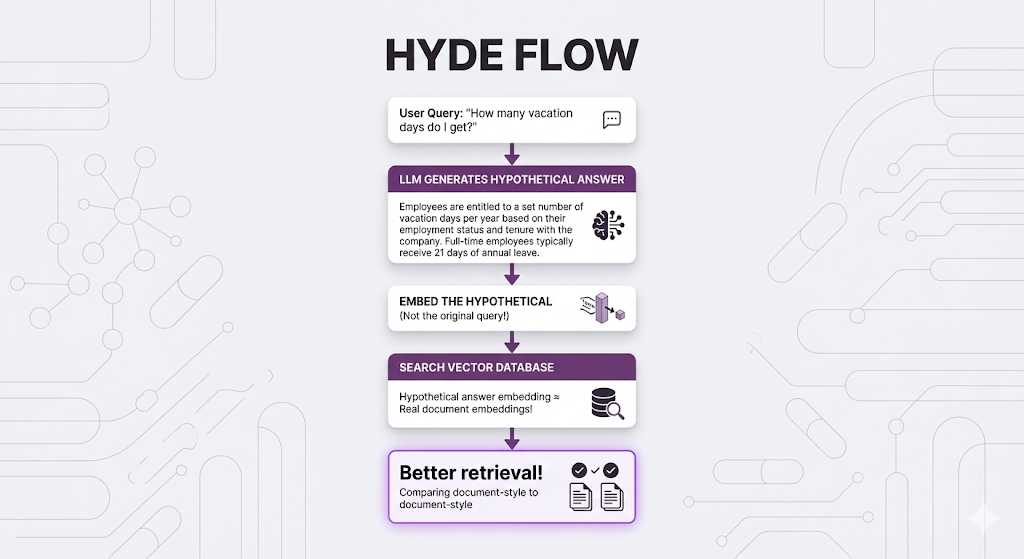
The counterintuitive part: The hypothetical answer doesn't need to be CORRECT! It just needs to be written in the same STYLE as your documents.
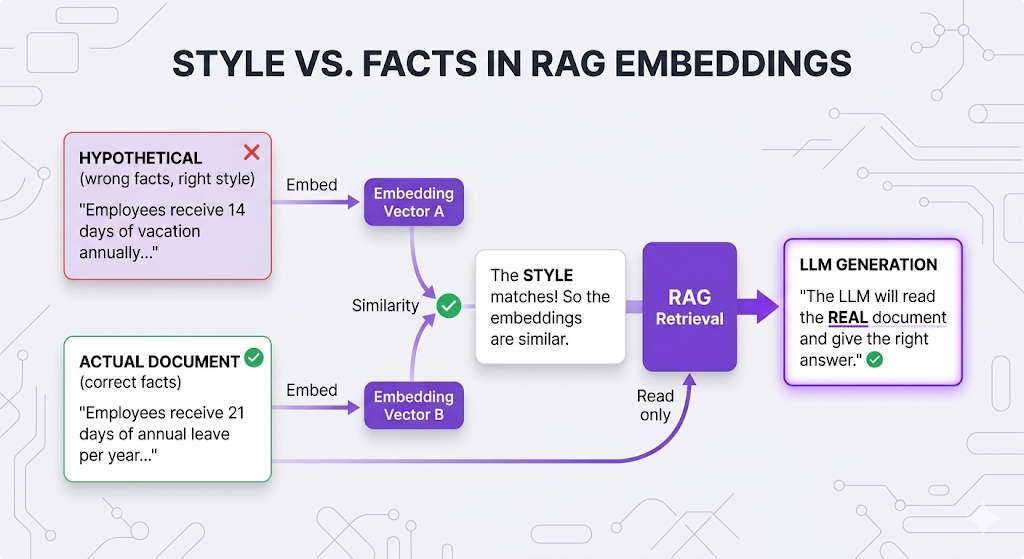
When HyDE Helps
| Scenario | HyDE Helps? | Why |
|---|---|---|
| Short queries (1-3 words) | ✅ Yes | Expands into document-style text |
| Question → Document mismatch | ✅ Yes | Bridges semantic gap |
| Domain-specific jargon | ✅ Yes | LLM generates proper terminology |
| Already detailed queries | ❌ Not much | Might not add value |
| Latency-sensitive apps | ⚠️ Adds ~500ms | Extra LLM call |
Pro tip: Describe your document style in the LLM system prompt. If your docs are formal policies, tell the LLM to write formally. If they're casual wikis, match that tone. Better style matching = better retrieval.
Query Decomposition: Breaking Down Complexity
So far, all techniques assume the query needs to be ENHANCED (expanded, rewritten, etc).
But what if the query is actually TOO COMPLEX?
The Problem
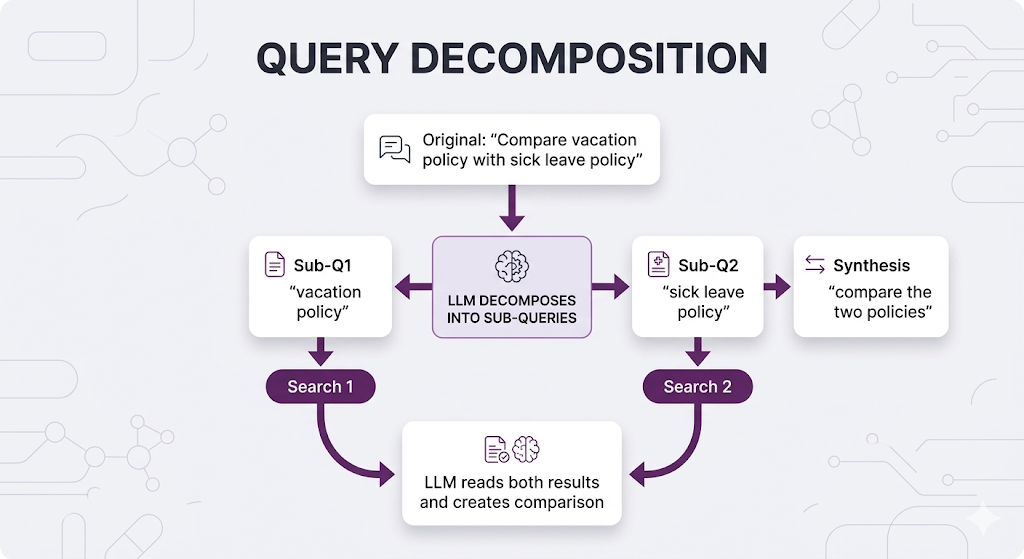
User: "Compare our vacation policy with our sick leave policy"This asks for TWO distinct things:
- What is our vacation policy?
- What is our sick leave policy?
If you search this as-is:
You'll match documents that mention BOTH "vacation" AND "sick leave" together.
But your best sources:
- Vacation policy doc: Doesn't mention sick leave
- Sick leave policy doc: Doesn't mention vacation
Your best documents won't match the combined query!
The Solution
Break the query into sub-queries, search each separately, then synthesize:
When to Decompose
Decompose when queries contain:
| Pattern | Example | Sub-queries |
|---|---|---|
| Compare/Contrast | "Compare X with Y" | "What is X?", "What is Y?" |
| Multiple subjects | "Benefits for engineers and managers" | "Engineer benefits", "Manager benefits" |
| Aggregation | "Summarize all Q3 complaints" | "Q3 complaints issue 1", "Q3 complaints issue 2", etc. |
| Complex conditions | "Remote work policy for parents with young children" | "Remote work policy", "Parental benefits", "Childcare support" |
Don't decompose when:
- ❌ Query is simple and focused
- ❌ Sub-queries would overlap too much
- ❌ Latency budget is tight (adds LLM call + multiple searches)
Multi-Hop Retrieval: Following the Trail
Sometimes information is chained you need the answer to Question 1 before you can even ask Question 2.
The Concept
Example:
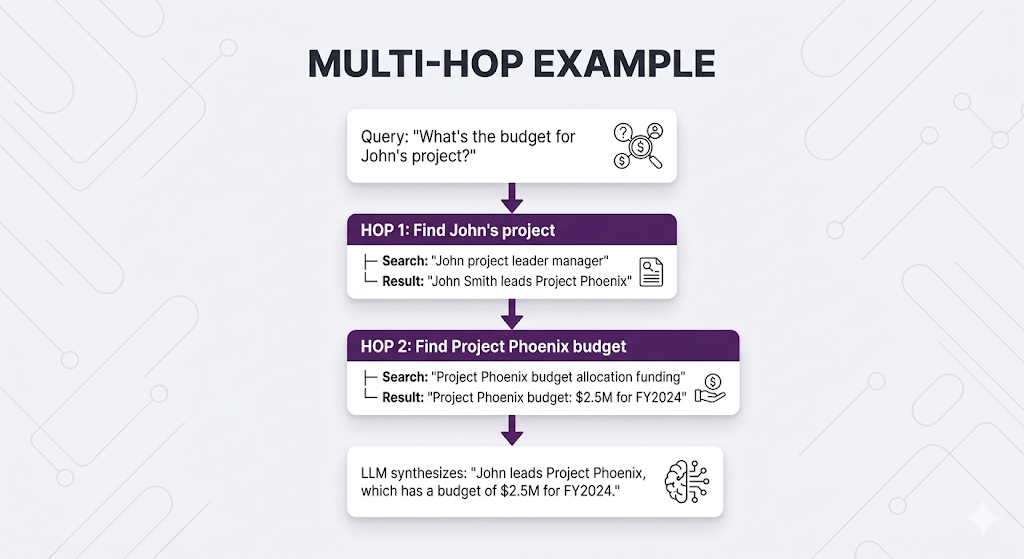
User: "What's the budget for the project John is leading?"

Problem: You can't search "John's project budget" directly
Why not?
You don't know WHICH project John is leading. That information isn't in the query it's in your documents.
You need to:
- First find: Which project is John leading?
- Then search: What's that project's budget?
This is multi-hop retrieval.
How Multi-Hop Works
When to Use Multi-Hop
Use when information has dependencies:
| Query Pattern | Requires Multi-Hop? |
|---|---|
| "What's the budget for [person]'s project?" | ✅ Yes - Find project, then budget |
| "Who is Sarah's manager's manager?" | ✅ Yes - Find Sarah's manager, then their manager |
| "What are the prerequisites for the advanced course?" | ✅ Yes - Find course, then prerequisites |
| "How many vacation days do I get?" | ❌ No - Direct lookup |
When to stop hopping:
Max hops: Usually 2-3
Why: Each hop adds:
- ~500ms latency (search + LLM processing)
- Potential for error accumulation
- Complexity

After 3 hops, accuracy drops significantly
Putting It All Together
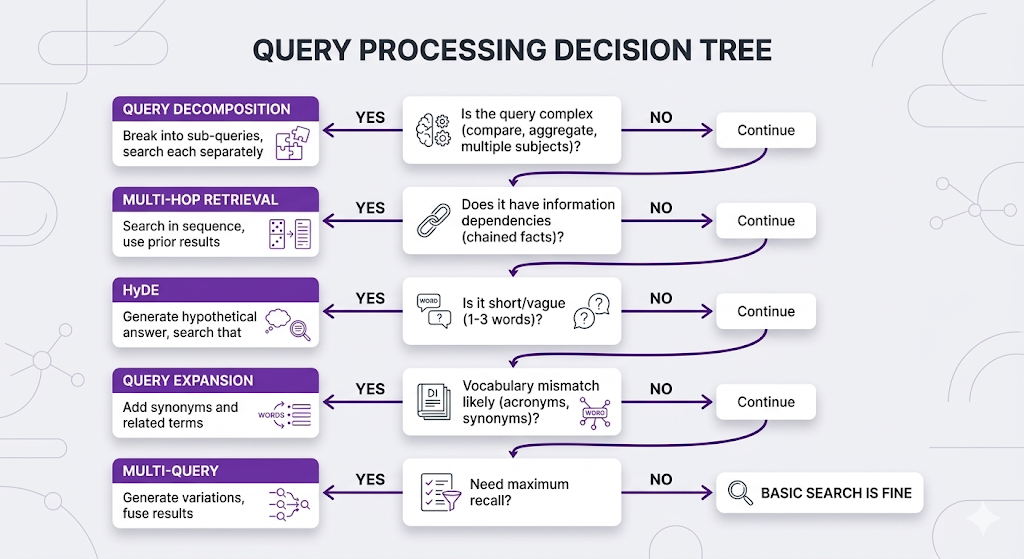
You've learned 5 query processing techniques. How do you combine them?
The Query Strategy Stack
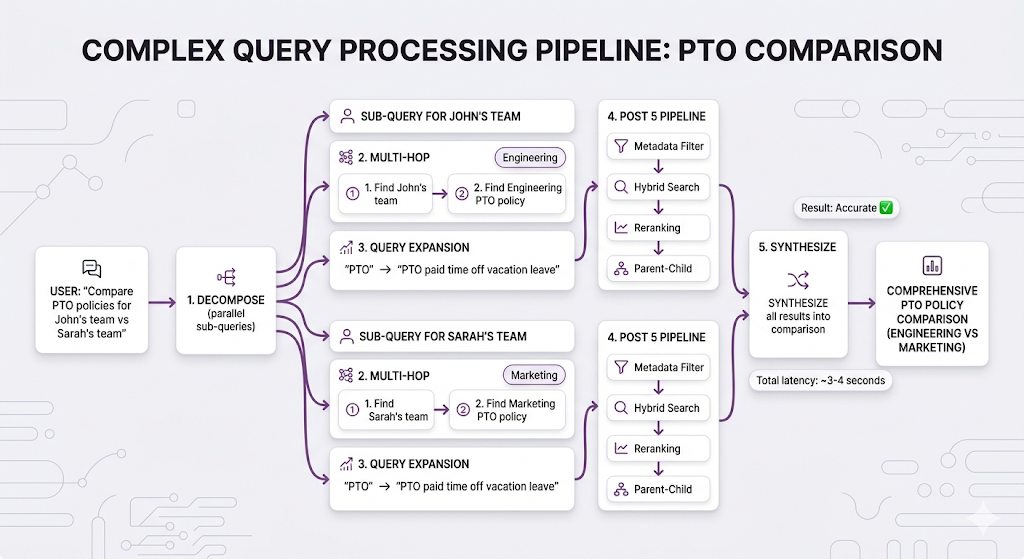
Real Example: Complex Query Pipeline
Key Takeaways
You've learned how to transform user queries into effective search queries.
The Mental Model
Your retrieval is only as good as the query it gets.

Perfect retrieval × Bad query = Bad results

Fix the query BEFORE searching.
Core Principles
1. Different problems need different solutions
- Vocabulary mismatch → Query Expansion
- Short/vague → HyDE
- Complex → Query Decomposition
- Chained info → Multi-Hop
2. Techniques can be combined
- Decompose first, then expand each sub-query
- Multi-hop with HyDE at each hop
- Multi-query with expansion
3. More processing = more latency
- Query Expansion: +0ms (if manual) or +200ms (if LLM)
- Multi-Query: +100ms × N queries
- HyDE: +500ms (LLM call)
- Decomposition: +500ms (LLM call) + multiple searches
- Multi-Hop: +500ms × hops
4. Start simple, add complexity only when needed
- Don't over-engineer
- Measure actual query quality issues first
- Add techniques that solve your specific problems
Quick Reference
| Problem | Strategy | Latency Cost |
|---|---|---|
| "User says 'PTO', docs say 'vacation'" | Query Expansion | +0-200ms |
| "Query is 1-2 words" | HyDE | +500ms |
| "Need maximum coverage" | Multi-Query | +100ms × N |
| "Compare X with Y" | Query Decomposition | +500ms + searches |
| "Find X's Y" (chained) | Multi-Hop | +500ms × hops |
What's Next
You've optimized the entire pipeline: chunking, embeddings, retrieval, and now query processing.
But how do you know if it's actually working?
Post 7 Preview: RAG Architectures
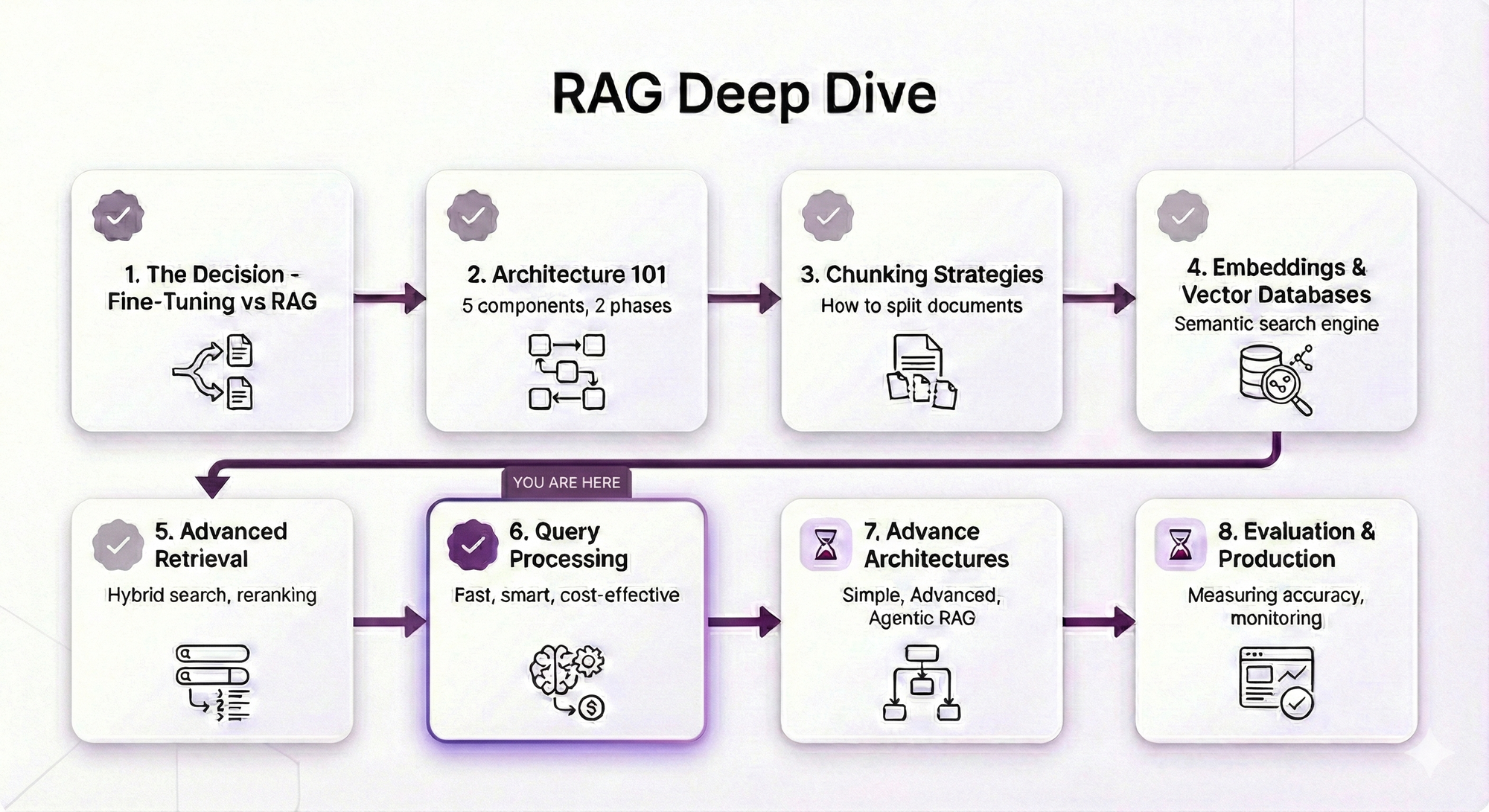
What Post 7 will cover:
Naive RAG:
- The basic pattern we've been building
- When it's enough vs when you need more
Advanced RAG Patterns:
- Corrective RAG: Check retrieval quality, retry if needed
- Adaptive RAG: Route queries to different strategies based on type
- Self-RAG: The system evaluates its own outputs
Agentic RAG:
- Let the LLM control retrieval decisions
- Multi-step reasoning with tool use
- When to let the agent explore vs constrain it
GraphRAG:
- Knowledge graphs + vector search
- Relationship-aware retrieval
- When graph structure matters
Why Architectures Matter
You know all the techniques. Now you need to know how to combine them into a coherent system.
Different use cases need different architectures:
Simple FAQ bot:
→ Naive RAG (basic retrieval + generation)

Customer support with complex policies:
→ Advanced RAG (reranking, hybrid, parent-child)

Research assistant exploring broad topics:
→ Agentic RAG (LLM decides what to search, when to stop)

Legal document analysis with citations:
→ GraphRAG (relationship-aware, multi-document synthesis)
In Post 7, you'll learn which architecture fits your use case.
See You in Post 7
You've built every component:
- Post 1: Why RAG
- Post 2: How RAG works
- Post 3: How to chunk
- Post 4: How to search semantically
- Post 5: How to search better
- Post 6: How to ask better questions
Next up: How to put it all together into production-ready architectures.
Ready to Build Your RAG System?
We help companies build production-grade RAG systems that actually deliver results. Whether you're starting from scratch or optimizing an existing implementation, we bring the expertise to get you from concept to deployment. Let's talk about your use case.


Part 6 of the RAG Deep Dive Series | Next up: RAG Architectures