RAG Deep Dive Series: Embeddings & Vector Databases
Part 4: Embeddings & Vector Databases — The Semantic Search Engine

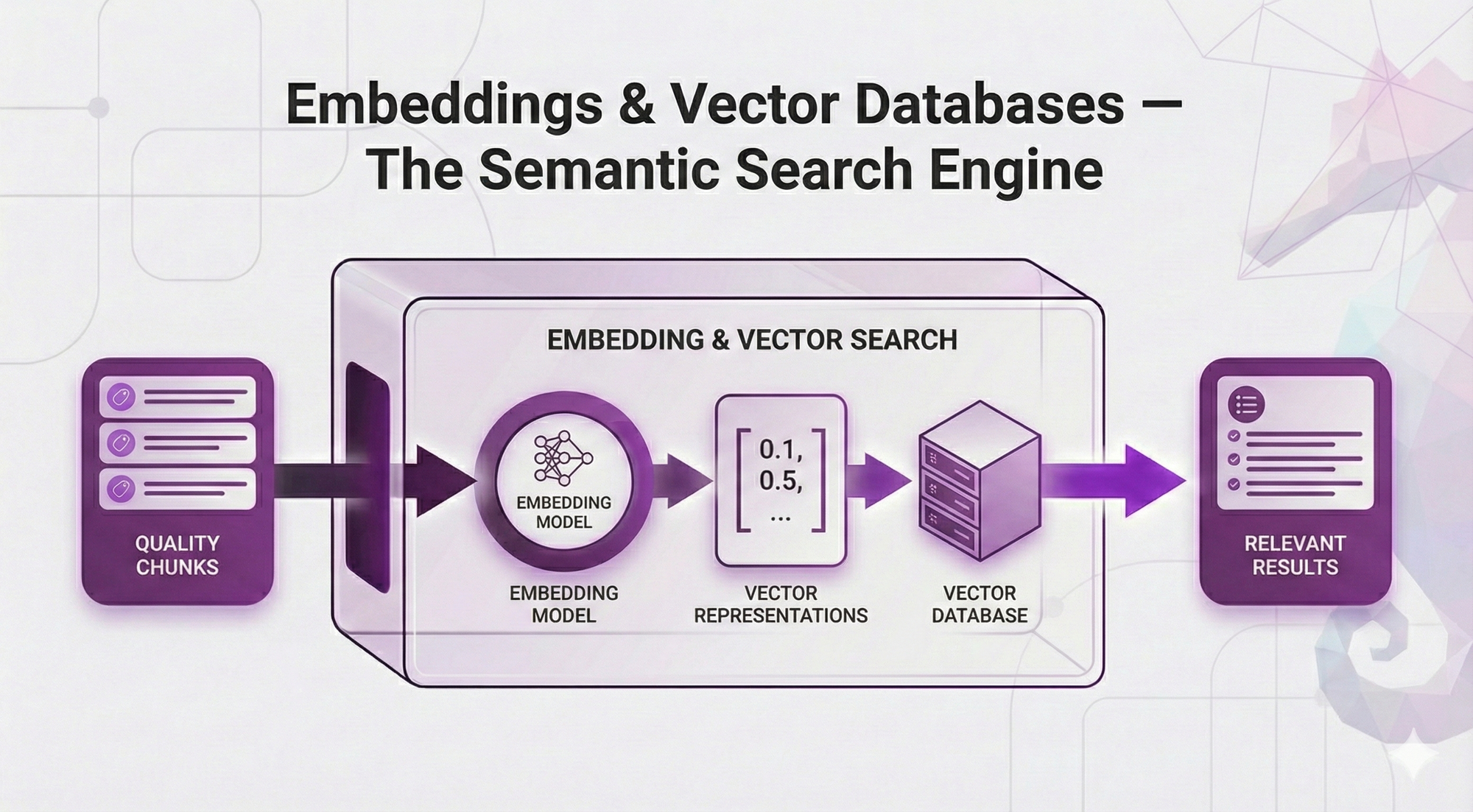
In Post 3, you learned why chunking is the foundation of retrieval quality. You understand that bad chunks → wrong retrieval → garbage answers, no matter how fancy your system is.
But there's something we've been hand-waving over.
Remember this from Post 2?
User asks: "How many sick days do I get?"

System searches documents and finds:
"Employees are entitled to 15 days of sick leave per calendar year."

User gets perfect answer ✅
We said the embedding model "understands that 'sick days' = 'sick leave'" like it's magic. But HOW does it actually know that?
And we mentioned that vector databases are "purpose-built for similarity search" - but what does that actually MEAN?
This post answers those questions.
The Problem We're Actually Solving
Let's make this concrete. Your company's HR policy document says:
"Employees are entitled to participate in the automobile coverage program."A user asks:
"What's the car insurance policy?"Zero matching words. Perfect semantic match.
How does the system know these are talking about the same thing?
Embeddings transform meaning into math. And once you have math, you can measure similarity. And once you can measure similarity, you can search by meaning instead of keywords.
What You'll Learn
In this post, we're diving deep into the semantic search engine that makes RAG work.
You'll understand:
- How embeddings actually learn meaning (not just "they capture semantics")
- What vector space looks like and why similar meanings cluster together
- Similarity metrics explained (cosine vs euclidean vs dot product - when each matters)
- How to choose an embedding model (decision framework with real trade-offs)
- How to choose a vector database (managed vs self-hosted, when each makes sense)
- Critical mistakes to avoid (the same-model rule, dimensionality traps)
Same promise: Concepts first, no code, analogies over equations.
By the end of this post, you'll understand the "magic" behind semantic search and know how to make smart choices about embeddings and vector databases for your RAG system.
Table of Contents
- The Keyword Search Problem
- How Embeddings Capture Meaning
- Vector Space: Where Meaning Becomes Geometry
- Similarity Metrics: Measuring Closeness
- Choosing Your Embedding Model
- Choosing Your Vector Database
- The Critical Rules
- What Can Go Wrong
- Key Takeaways
- What's Next
The Keyword Search Problem
Before embeddings, search engines relied on keyword matching. And it has a fundamental flaw.
How Keyword Search Works
Traditional search (like BM25, TF-IDF, or your basic Ctrl+F) looks for exact word matches.
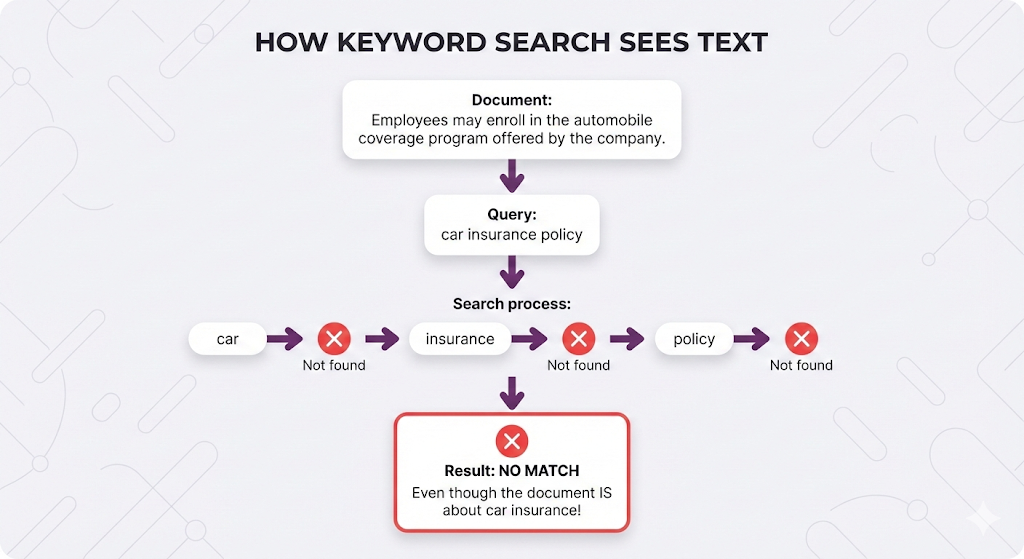
Why Keyword Search Fails
- "car" and "automobile" are completely different
- "insurance" and "coverage" have zero connection
- "PTO" and "vacation days" are unrelated strings
It treats language as a string-matching problem, not a meaning problem.
The Real-World Impact
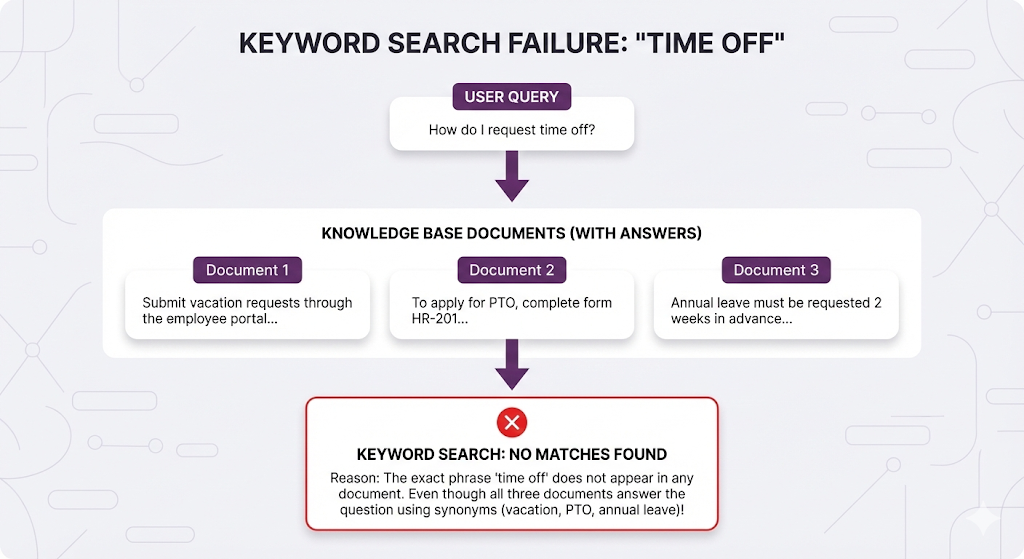
This is why RAG needed something fundamentally different.
How Embeddings Capture Meaning
In Post 2, we said embeddings are "lists of numbers that represent text meaning." Now let's understand HOW they actually learn meaning.How Embeddings Capture Meaning
The Training Process (Conceptually)
Embedding models are trained on billions of sentences. They learn patterns like:
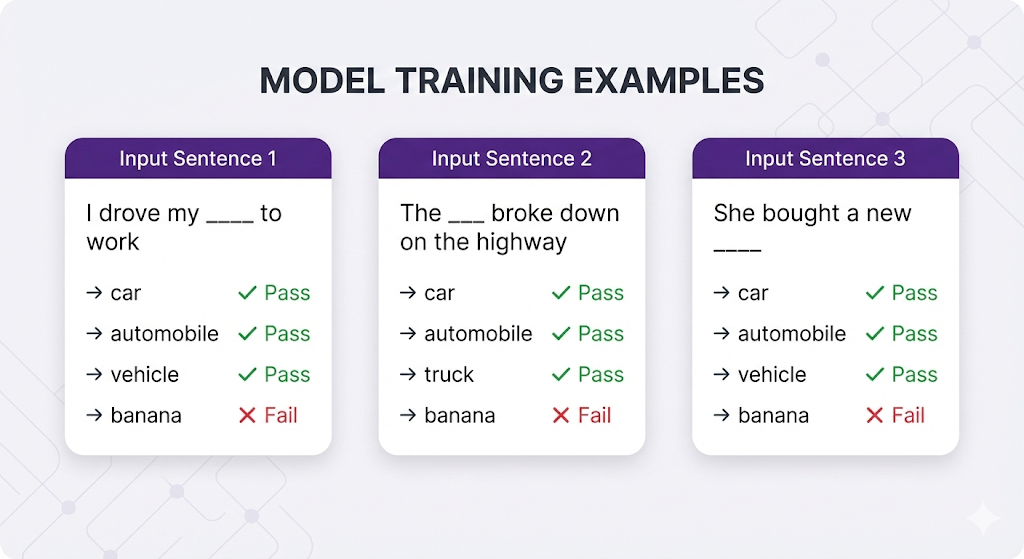
The pattern the model learns: "Car, automobile, vehicle, and truck all fit in similar contexts → they must mean similar things → encode them with similar numbers."
From Context to Vectors
After training on billions of examples:
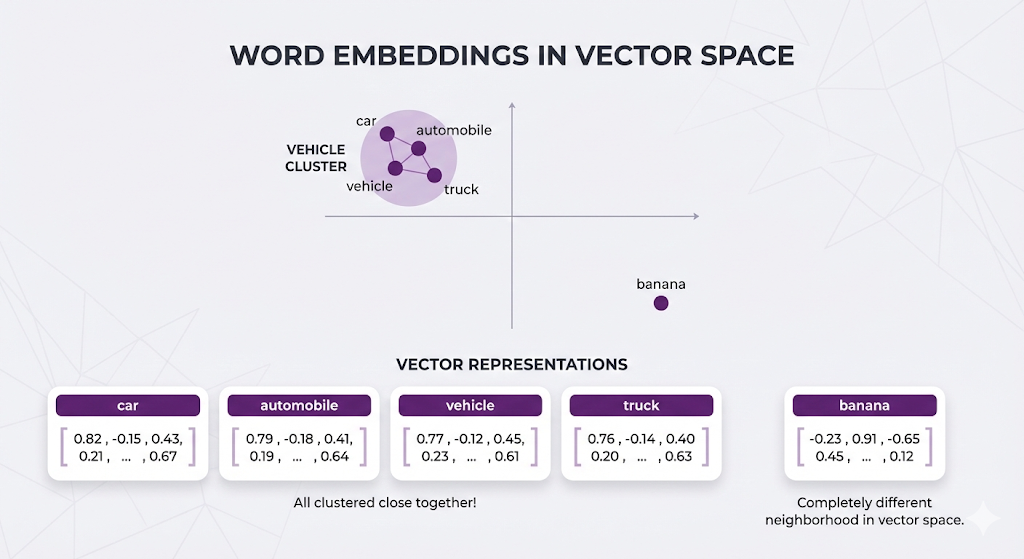
The model doesn't have a dictionary saying "car = automobile". It learned this by observing that they appear in similar contexts millions of times.
Multi-Word Embeddings
Here's where it gets interesting - embeddings work on phrases and sentences too:
"car insurance"                 → [0.81, -0.16, 0.42, ...]
"automobile coverage program"   → [0.79, -0.18, 0.40, ...]
"vehicle protection plan"       → [0.77, -0.15, 0.44, ...]

All similar vectors!

"banana recipes"                → [-0.22, 0.89, -0.63, ...]
Totally different.
The embedding model understands:
- "car insurance" ≈ "automobile coverage"
- Even though NO individual words match
- Because the MEANING is the same
The Transformer Connection
Here's something important: Embedding models and LLMs are cousins.
| Concept | Embedding Model | LLM (like GPT, Claude) |
|---|---|---|
| Architecture | Transformer (encoder) | Transformer (decoder) |
| Training | Billions of text examples | Billions of text examples |
| Learns synonyms | ✅ Yes | ✅ Yes |
| Understands context | ✅ Yes | ✅ Yes |
Why this matters for RAG:
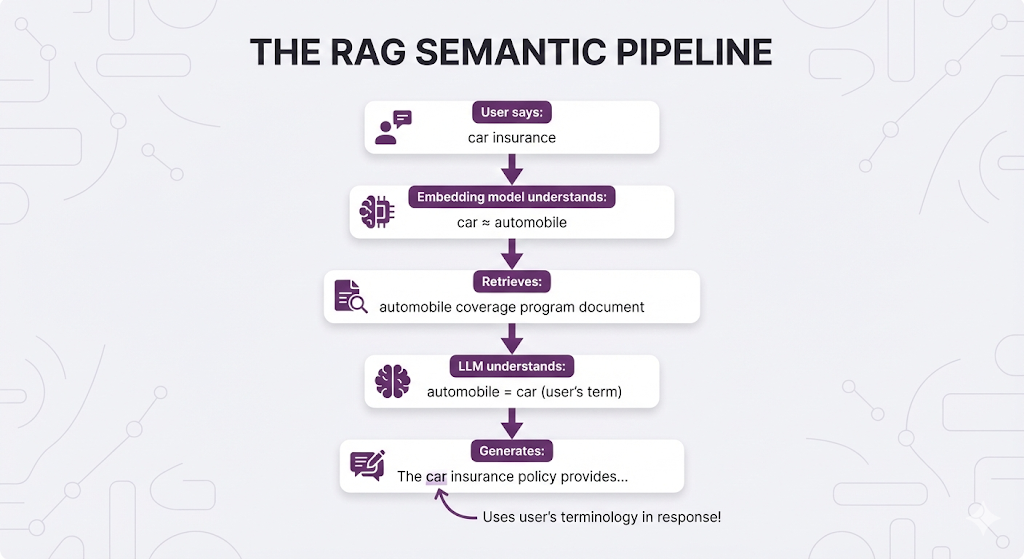
The retriever (using embeddings) and the generator (LLM) "speak the same semantic language." They both understand that "car" = "automobile", that "PTO" = "vacation", that "coverage" = "insurance".
This creates seamless flow:
Vector Space: Where Meaning Becomes Geometry
Embeddings create a map where similar meanings live close together in space.
Visualizing the Concept
Real embeddings have 384-1536 dimensions, but let's visualize in 2D:
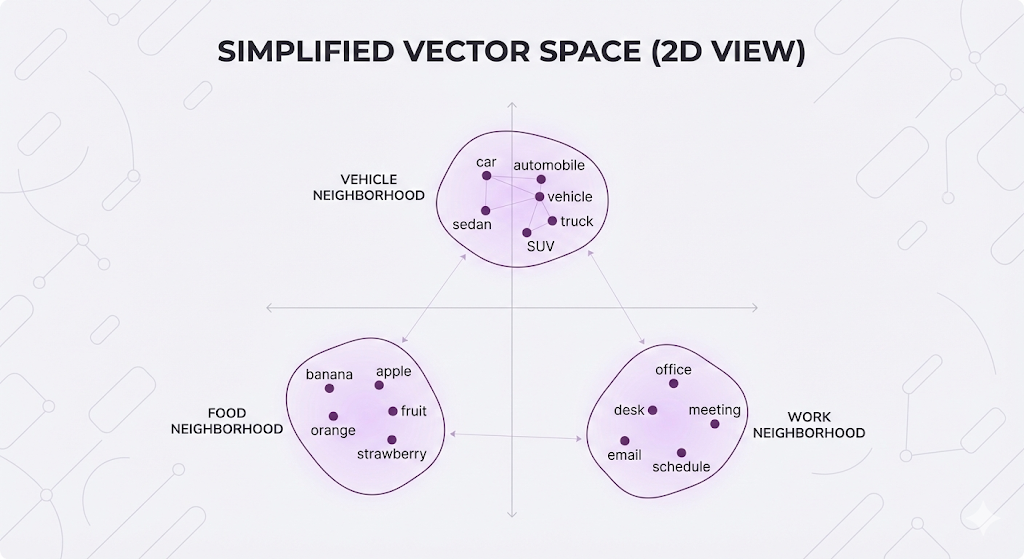
Related concepts cluster together. Unrelated concepts are far apart.
Search as Geometric Proximity
When you search, your query gets embedded into this same space:
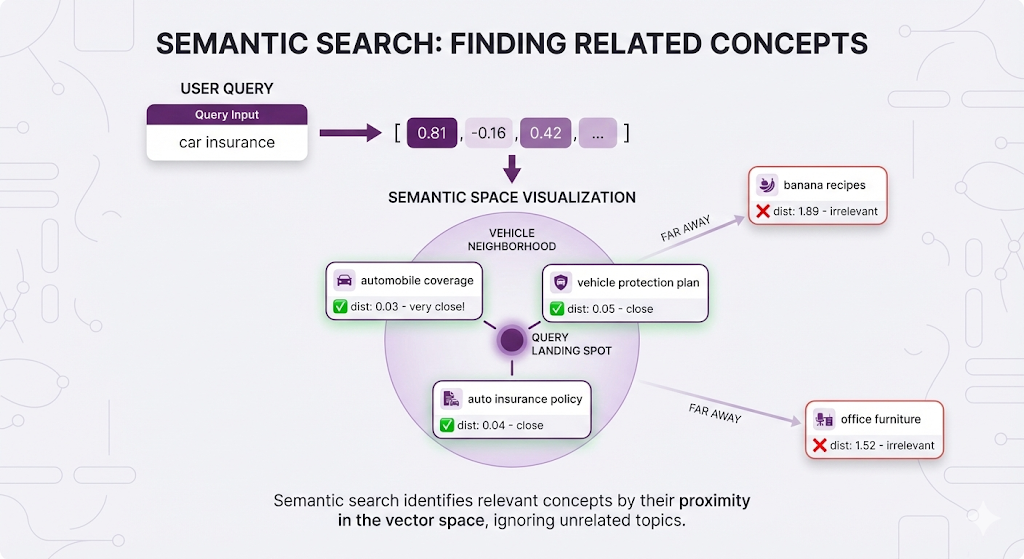
You're not searching by keywords. You're finding points in space that are geometrically close to your query point.
Why Dimensionality Matters
Real embeddings aren't 2D - they're 384D, 768D, or 1536D. Why so many dimensions?
Think of each dimension as a semantic attribute:
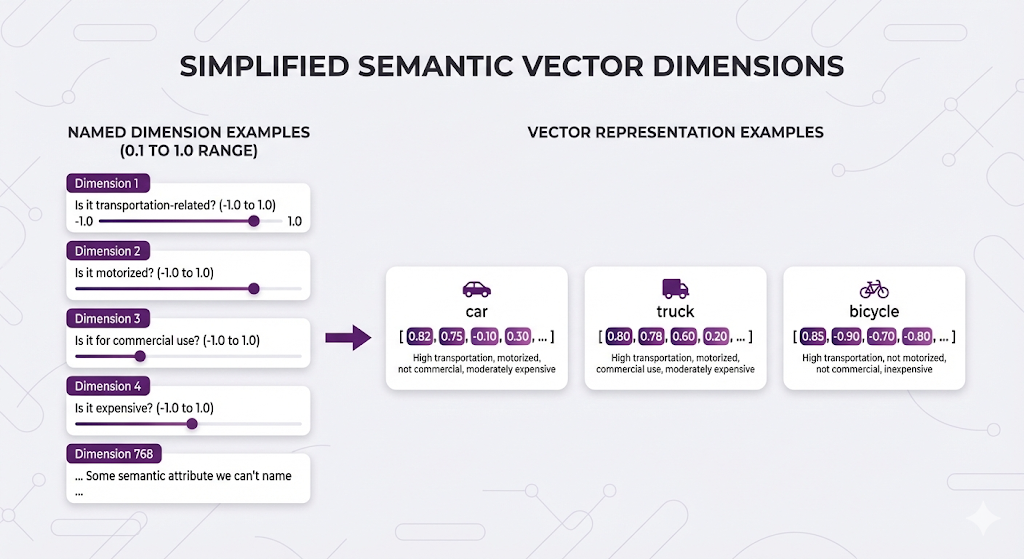
Important note: We can't actually interpret what each dimension means. Unlike this simplified example where we might imagine "Dimension 1 = transportation-related," real embedding dimensions are abstract learned features. The model figures out the best mathematical representation through training - we just can't point at dimension 42 and say "that one measures how motorized something is."
These numbers capture semantic features we can't name, but similar concepts end up with similar patterns across all dimensions.
More dimensions = more nuance:
- 384 dimensions: Fast, good for most use cases
- 768 dimensions: Better accuracy, standard choice
- 1536 dimensions: Highest accuracy, slower/more expensive
Higher dimensions capture more subtle meanings but require more compute and storage.
Similarity Metrics: Measuring Closeness
You have vectors (lists of numbers). You need to know: which vectors are similar?
Here's the key insight that makes everything click:
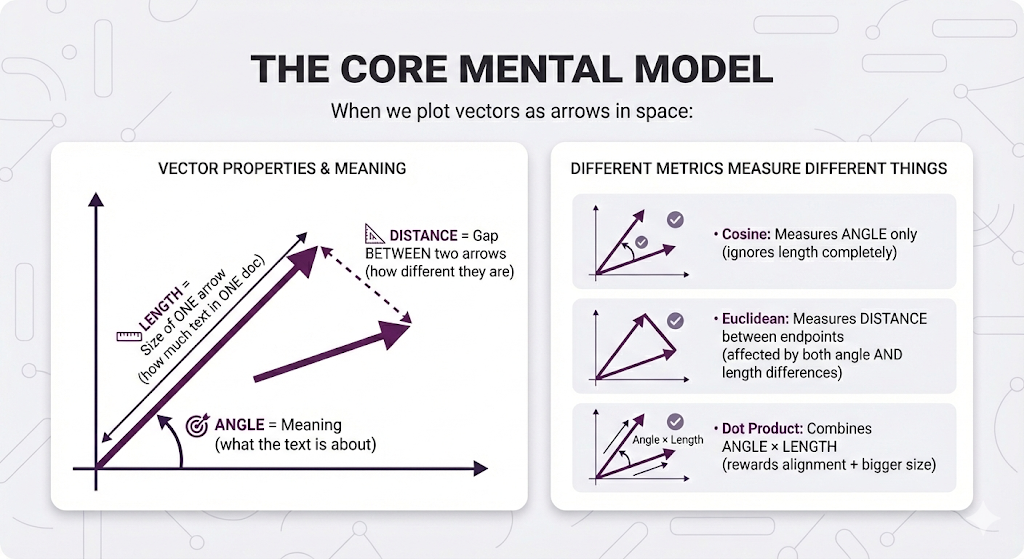
Key insight:
- ANGLE describes vector meaning
- LENGTH describes ONE vector size
- DISTANCE describes the relationship BETWEEN two vectors
In Post 2, we mentioned the three common ways to measure this.
- Cosine similarity.
- Euclidean distance.
- Dot product
Let's understand each one from first principles.
Think Visually First (2D Vectors)
let's visualize with simple 2D vectors (just 2 numbers instead of 768):
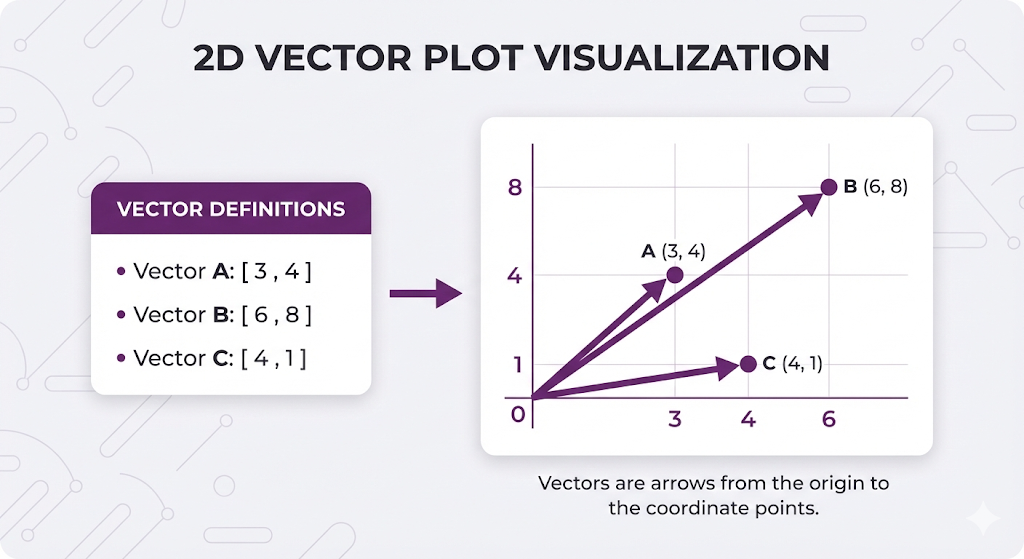
Key observations:
- A and B point the same direction (same angle) → Same MEANING
- B is longer than A → More SIZE (more text)
- C points a different direction (different angle) → Different MEANING
Method 1: Cosine Similarity - "Same meaning?"
What it measures: Just the angle between arrows. Ignores length completely.
Visual explanation:
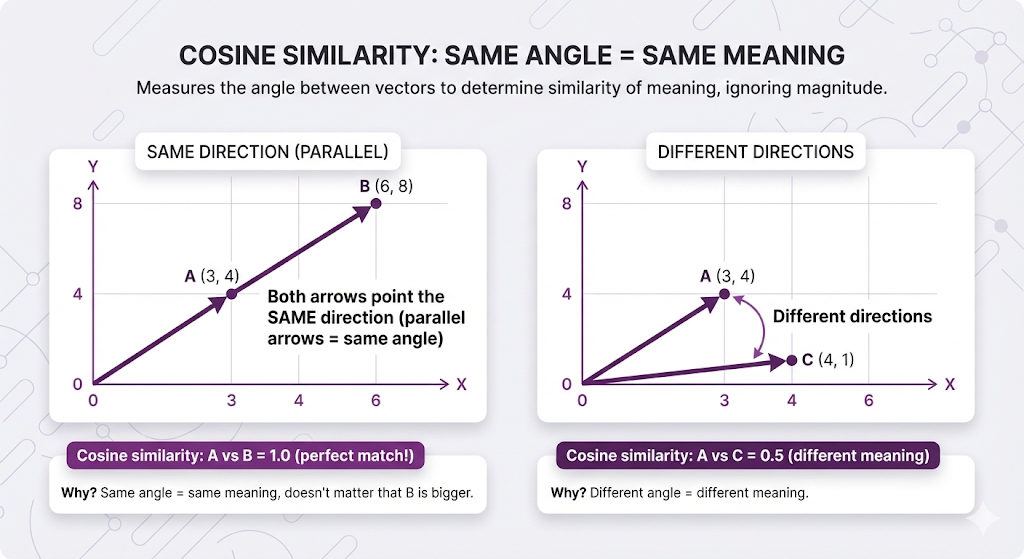
In RAG terms:
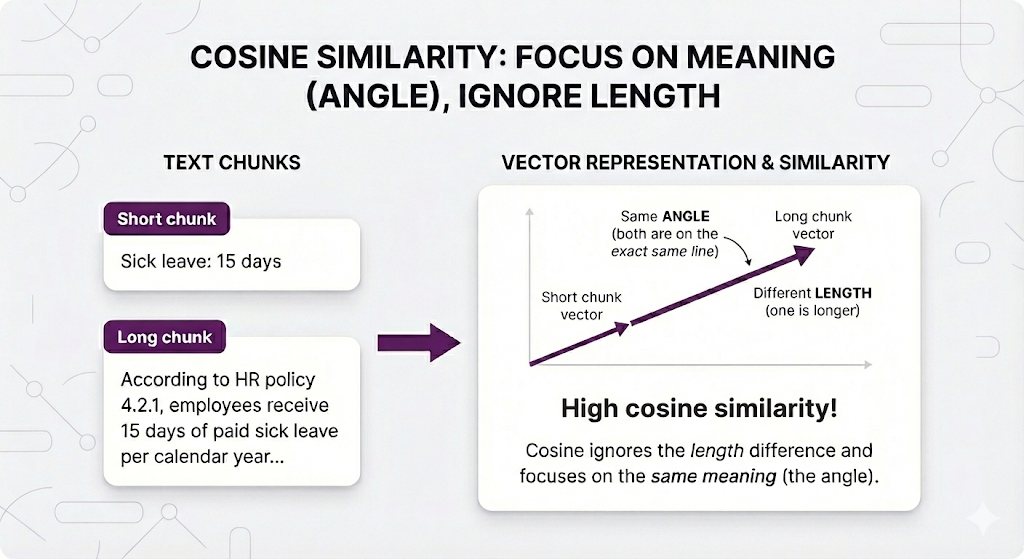
Why this is the default: In RAG, a short mention and a detailed explanation of the same topic should BOTH be considered relevant. Cosine makes that happen
Method 2: Euclidean Distance - "How far apart?"
What it measures: The straight-line distance between the arrow tips. This captures BOTH angle difference AND length difference.
Visual explanation:
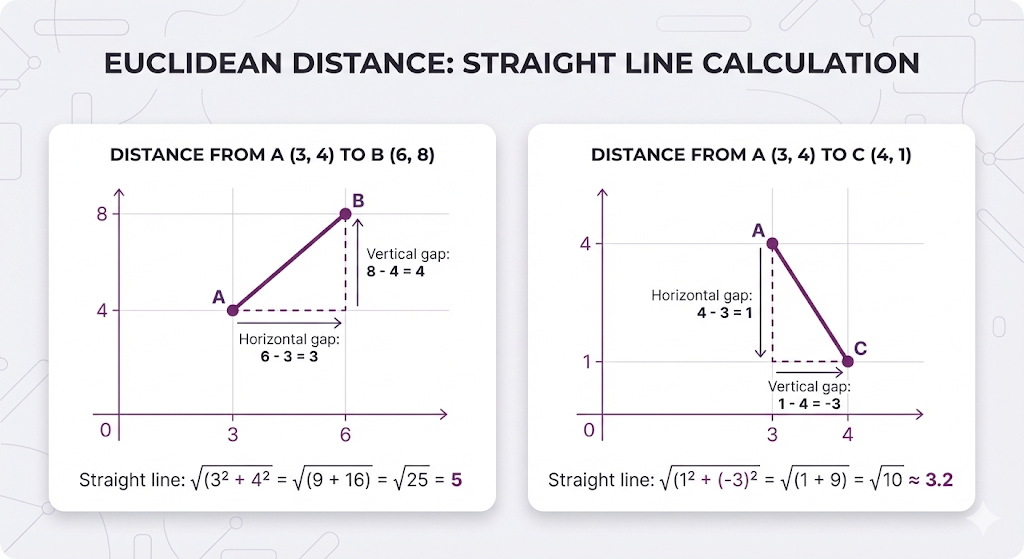
Important: Lower distance = more similar (backwards from similarity scores!)
In RAG terms:
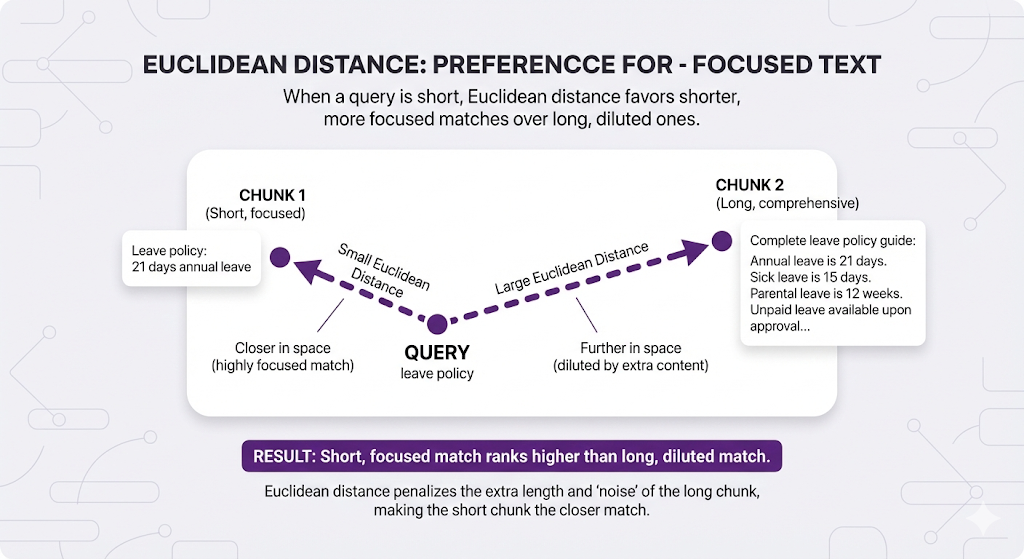
When to use: When you want focused, precise matches over comprehensive ones.
Method 3: Dot Product - "Same meaning AND more size?"
What it measures: Combines angle (meaning) with length (size). Rewards both alignment AND bigger size.
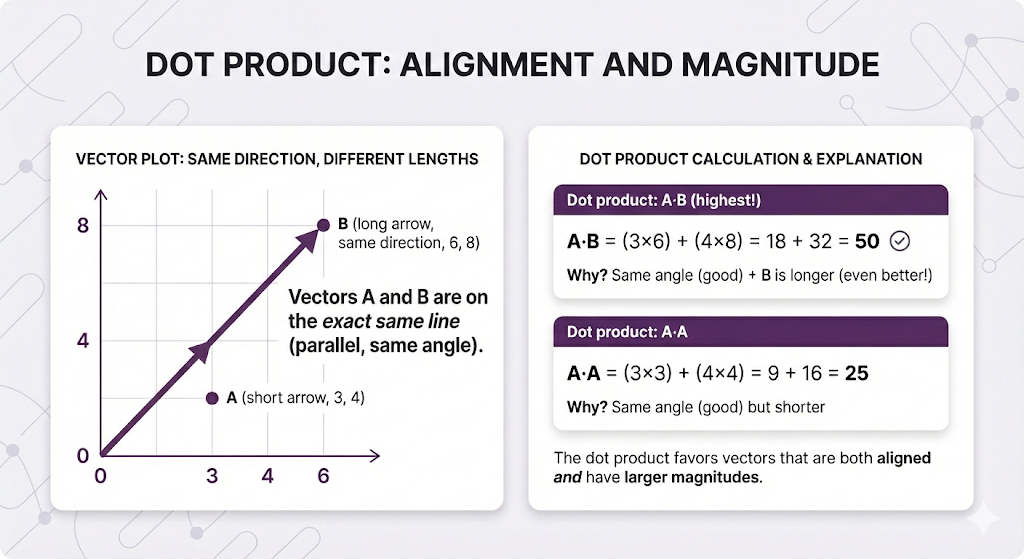
In RAG terms:
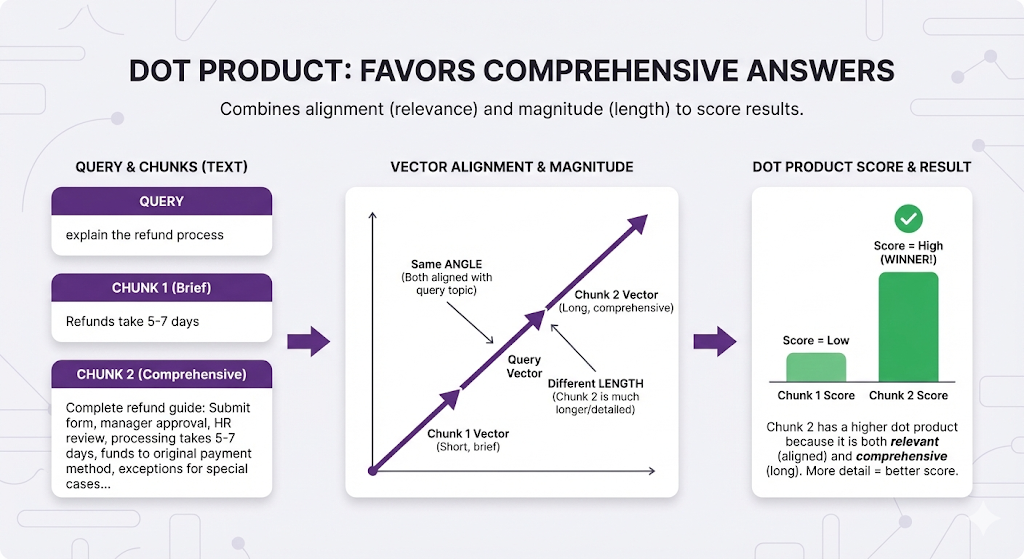
When to use: When comprehensive answers are better than brief ones.
The Comparison Table
| Metric | What It Measures | Best For | RAG Usage |
|---|---|---|---|
| Cosine | Direction (proportions) | Length-independent search | Default choice (80% of RAG systems) |
| Euclidean | Exact distance | Magnitude-sensitive search | When precision > comprehensiveness |
| Dot Product | Alignment + magnitude | Longer = better | When comprehensive docs preferred |
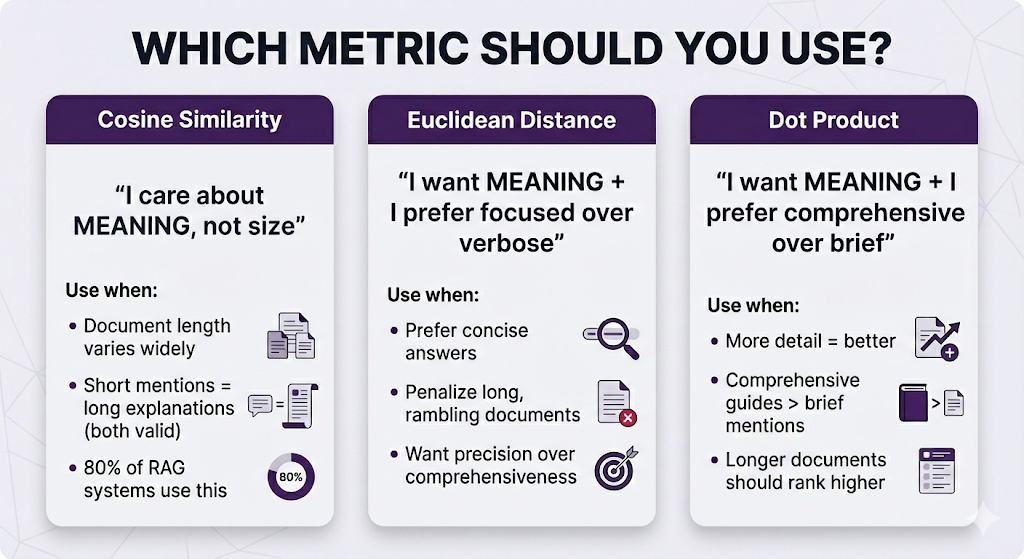
Default recommendation: Start with cosine similarity. Only switch if you have specific reasons.
Choosing Your Embedding Model
In Post 2, we listed popular embedding models. Now let's understand how to actually choose one.
The Key Decision Factors
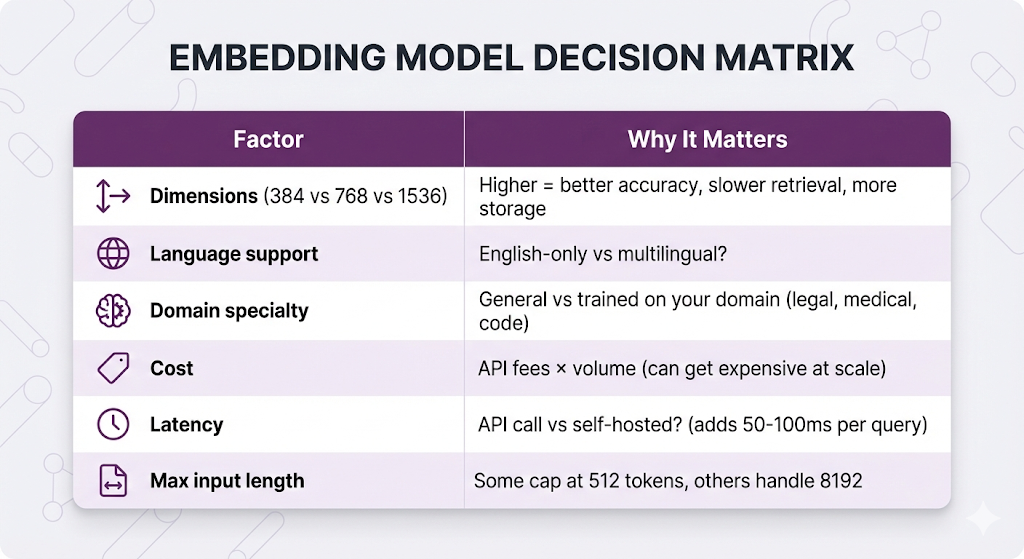
Popular Models Compared
| Model | Dimensions | Max Tokens | Cost | Best For |
|---|---|---|---|---|
| text-embedding-3-small (OpenAI) | 1536 | 8,191 | $$ | General purpose, good baseline |
| text-embedding-3-large (OpenAI) | 3072 | 8,191 | $$$ | Need highest accuracy |
| text-embedding-004 (Google) | 768 | 2,048 | $$ | Multilingual, Google ecosystem |
| embed-v3 (Cohere) | 1024 | 512 | $$ | Multilingual, compression |
| all-MiniLM-L6-v2 (Open Source) | 384 | 512 | Free | Fast, lightweight, self-hosted |
| bge-large-en (Open Source) | 1024 | 512 | Free | High quality, self-hosted |
The Decision Tree
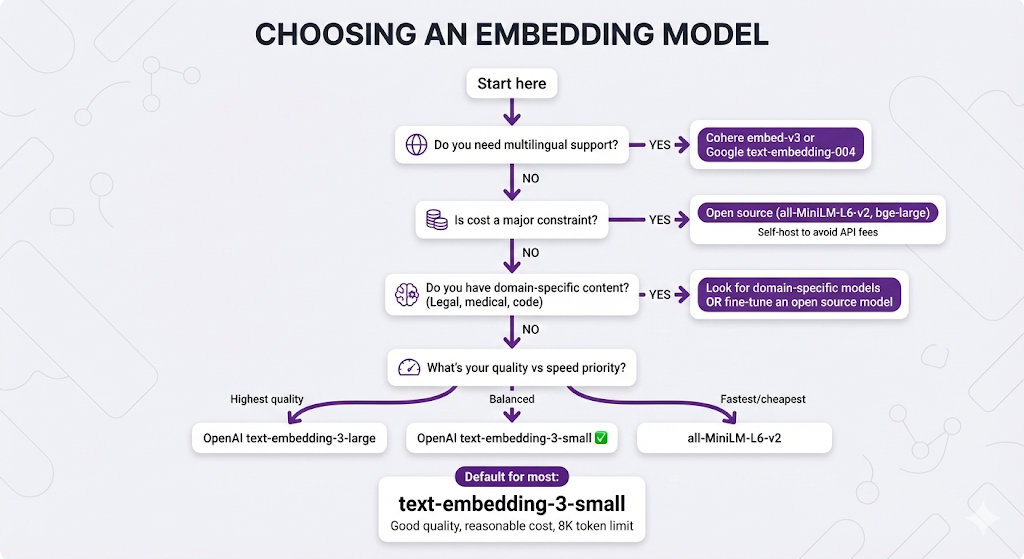
When to self-host:
- High query volume (>1M queries/month)
- Latency-sensitive applications
- Data privacy requirements
- Cost optimization at scale
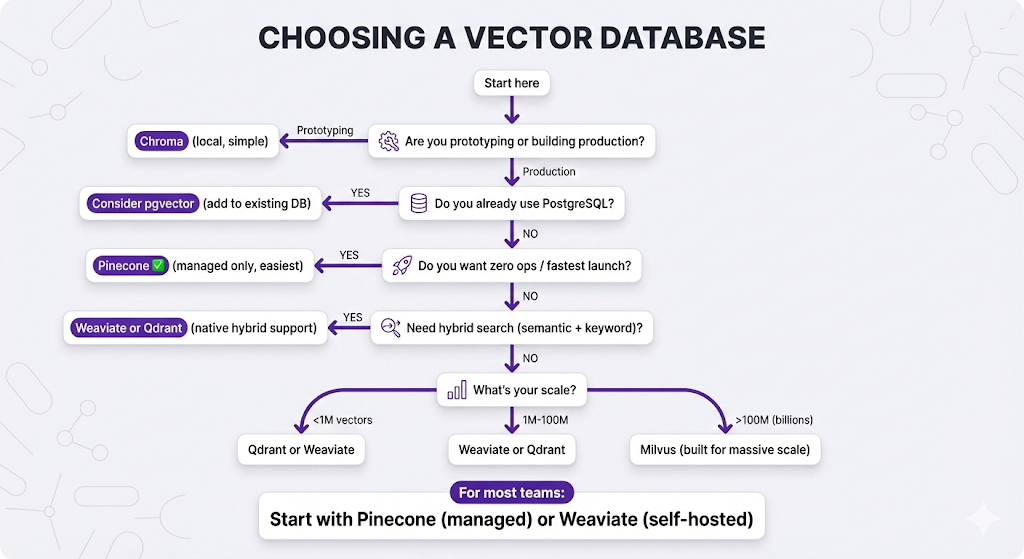
Choosing Your Vector Database
In Post 2, we explained why you need a vector database. Now let's choose one.
Managed vs Self-Hosted
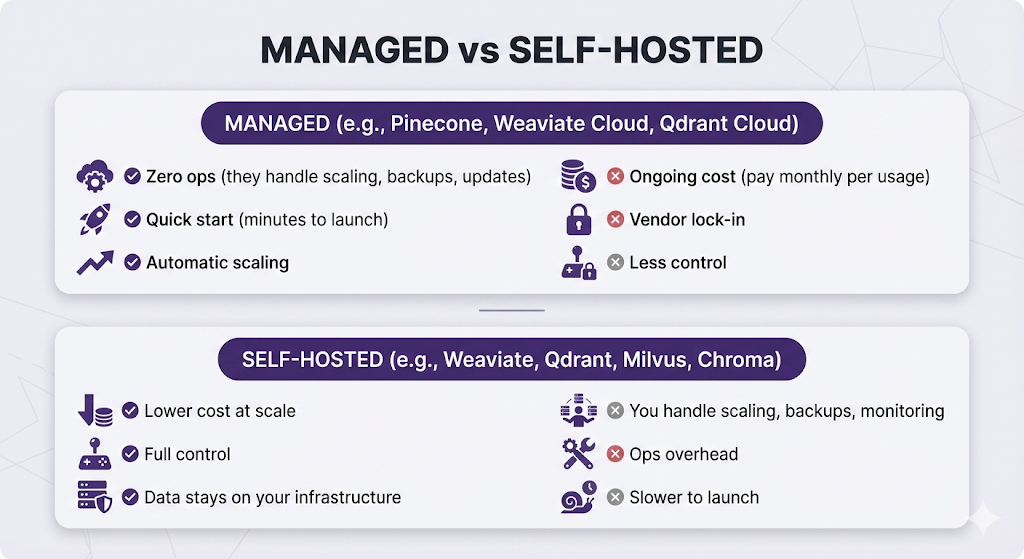
Popular Vector Databases
| Database | Type | Best For |
|---|---|---|
| Pinecone | Managed only | Zero ops, fastest to launch |
| Weaviate | Both | Hybrid search, multi-modal (text + images) |
| Qdrant | Both | High performance, rich filtering |
| Milvus | Both | Enterprise scale (billions of vectors) |
| Chroma | Self-hosted | Local dev, prototyping |
| pgvector | PostgreSQL extension | Already using Postgres |
Feature Comparison
| Feature | Pinecone | Weaviate | Qdrant | Milvus | Chroma |
|---|---|---|---|---|---|
| Managed option | ✅ Only | ✅ | ✅ | ✅ | ❌ |
| Self-hosted | ❌ | ✅ | ✅ | ✅ | ✅ |
| Hybrid search | ✅ | ✅ | ✅ | ✅ | ❌ |
| Metadata filtering | ✅ | ✅ | ✅ | ✅ | ✅ |
| Multi-tenancy | ✅ | ✅ | ✅ | ✅ | ❌ |
| Maturity | High | High | Medium | High | Low |
The Decision Tree
The Critical Rules
These are the non-negotiable rules. Break them and your RAG system will fail.
Rule 1: Same Model Everywhere
Use the EXACT same embedding model for indexing AND querying.
Why it matters:
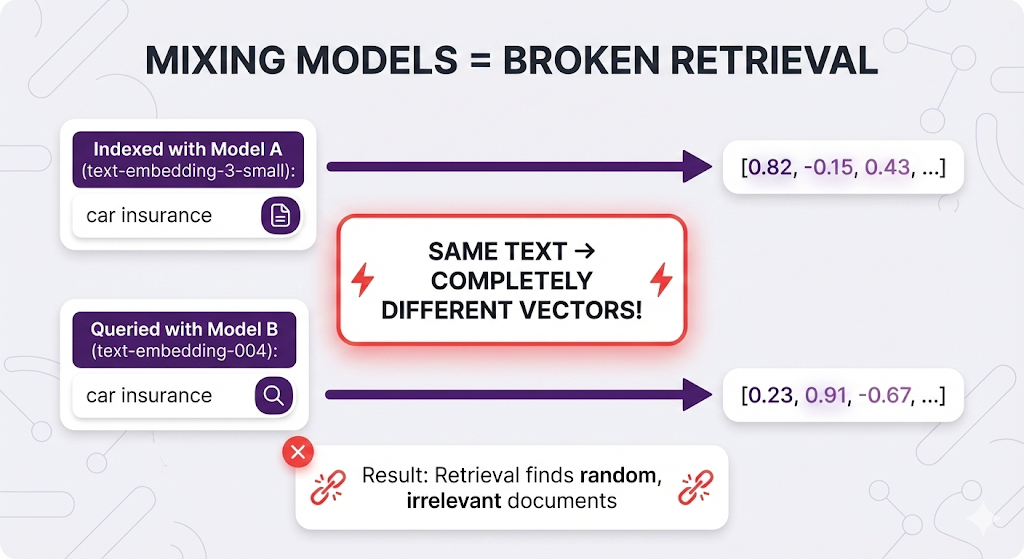
Think of it like coordinate systems:
- Model A uses latitude/longitude
- Model B uses street addresses
- You indexed with Model A (lat/long)
- You search with Model B (address)
- The coordinates don't match!
# ✅ CORRECT
indexing_model = "text-embedding-3-small"
query_model = "text-embedding-3-small"  # Same!

# ❌ WRONG
indexing_model = "text-embedding-3-small"
query_model = "text-embedding-004"  # Different - retrieval breaks!
Rule 2: Stay Within Token Limits
Never exceed your embedding model's max token limit.
Why it matters:
| Model | Max Tokens | What Happens If Exceeded |
|---|---|---|
| text-embedding-3-small | 8,191 | Silently truncates (you lose data) |
| text-embedding-004 | 2,048 | Truncates |
| embed-v3 | 512 | Truncates |
Example of silent failure:
Your chunk: 600 tokens
Model limit: 512 tokens

What gets embedded: First 512 tokens only
What you lose: Last 88 tokens (might contain the answer!)

User won't know chunks are truncated.
You won't know unless you check.
Make sure your chunk size is smaller than your model's token limit.
Rule 3: Match Dimensions
If you change embedding models, you must reindex everything.
Why it matters:
Old model: 768 dimensions
New model: 1536 dimensions

Your vector database expects 768-dimensional vectors.
New model produces 1536-dimensional vectors.
→ Dimension mismatch error!
Switching models = re-indexing all documents. Plan accordingly.
What Can Go Wrong
Let's cover the common pitfalls.
Pitfall 1: Choosing Based on Benchmarks Only
The mistake:
"text-embedding-3-large scores 0.92 on MTEB benchmark!
text-embedding-3-small scores 0.89!
Let's use large for 3% better quality!"
What you're missing:
- Large is 2x more expensive
- Large is slower to embed
- Large uses 2x storage (3072 vs 1536 dimensions)
- That 3% might not matter for your use case
Better approach: Start with a balanced model (text-embedding-3-small), measure your actual retrieval quality, only upgrade if you have specific quality issues.
Pitfall 2: Ignoring Domain Mismatch
The scenario:
Your documents: Legal contracts (specialized language)
Your model: text-embedding-3-small (trained on general web text)

Model sees: "force majeure", "estoppel", "indemnification"
Model thinks: These are rare words, not strongly connected to meaning
Result: Poor embeddings for legal concepts
When domain matters:
- Legal documents
- Medical records
- Scientific papers
- Code repositories
Use domain-specific models or fine-tune an open-source model on your domain.
Pitfall 3: Over-Optimizing Too Early
The mistake:
Day 1: "Let's use the absolute best embedding model and vector database!"
→ Spends weeks evaluating 10 different options
→ Builds complex infrastructure
→ Hasn't tested if users even want this feature
Better approach:
Week 1: Pinecone + text-embedding-3-small (default, works)
Week 2: Test with real users
Week 3: Measure what's actually failing
Week 4: Optimize the actual bottlenecks
Start with reasonable defaults, optimize based on real data, not hypotheticals.
Key Takeaways
You've now gone deep on embeddings and vector databases. Let's lock in what matters.
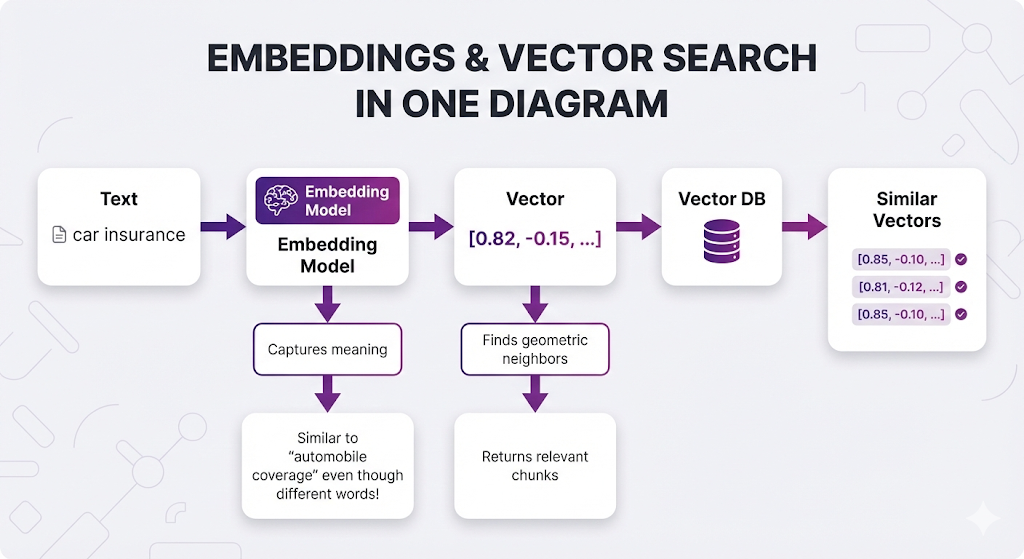
The Mental Model
Core Principles
1. Embeddings transform meaning into measurable math
- Similar meanings → similar vectors
- Learned from billions of examples
- Enables semantic search (not just keyword matching)
2. Vector databases are purpose-built for this
- As we covered in Post 2, traditional databases struggle with similarity search
- Vector databases use specialized indexes (HNSW, IVF) for fast retrieval
- Search millions of vectors in milliseconds
3. Similarity metrics measure different things
- Cosine: Measures angle (meaning only, ignores size) - default choice
- Euclidean: Measures distance (affected by both meaning and size)
- Dot product: Combines angle × length (rewards comprehensive docs)
4. The same-model rule is non-negotiable
- Index with Model A, query with Model A
- Mixing models = broken retrieval
- No exceptions
5. Choice depends on your constraints
- Most teams: Start with text-embedding-3-small + Pinecone
- Budget constrained: Open source models + self-hosted DB
- Scale-focused: Weaviate or Milvus
- Already use Postgres: Try pgvector
You understand embeddings and vector databases. Your chunks are being converted to vectors and stored efficiently.
But here's where it gets interesting.
Basic retrieval (embed query → find similar vectors → return chunks) works. But it's not perfect.
Remember these issues from Post 2?
Issue 1: Highest similarity ≠ most relevant
User asks: "How do I apply for leave?"
Top result: "Annual leave is 21 days" (high similarity, wrong answer)
Better result: "Submit form HR-101" (lower similarity, right answer)

Issue 2: Vague queries return everything
User asks: "leave policy"
Results: Sick leave, vacation, parental, unpaid... all score high
These problems require advanced retrieval techniques.
Post 5 Preview: Advanced Retrieval
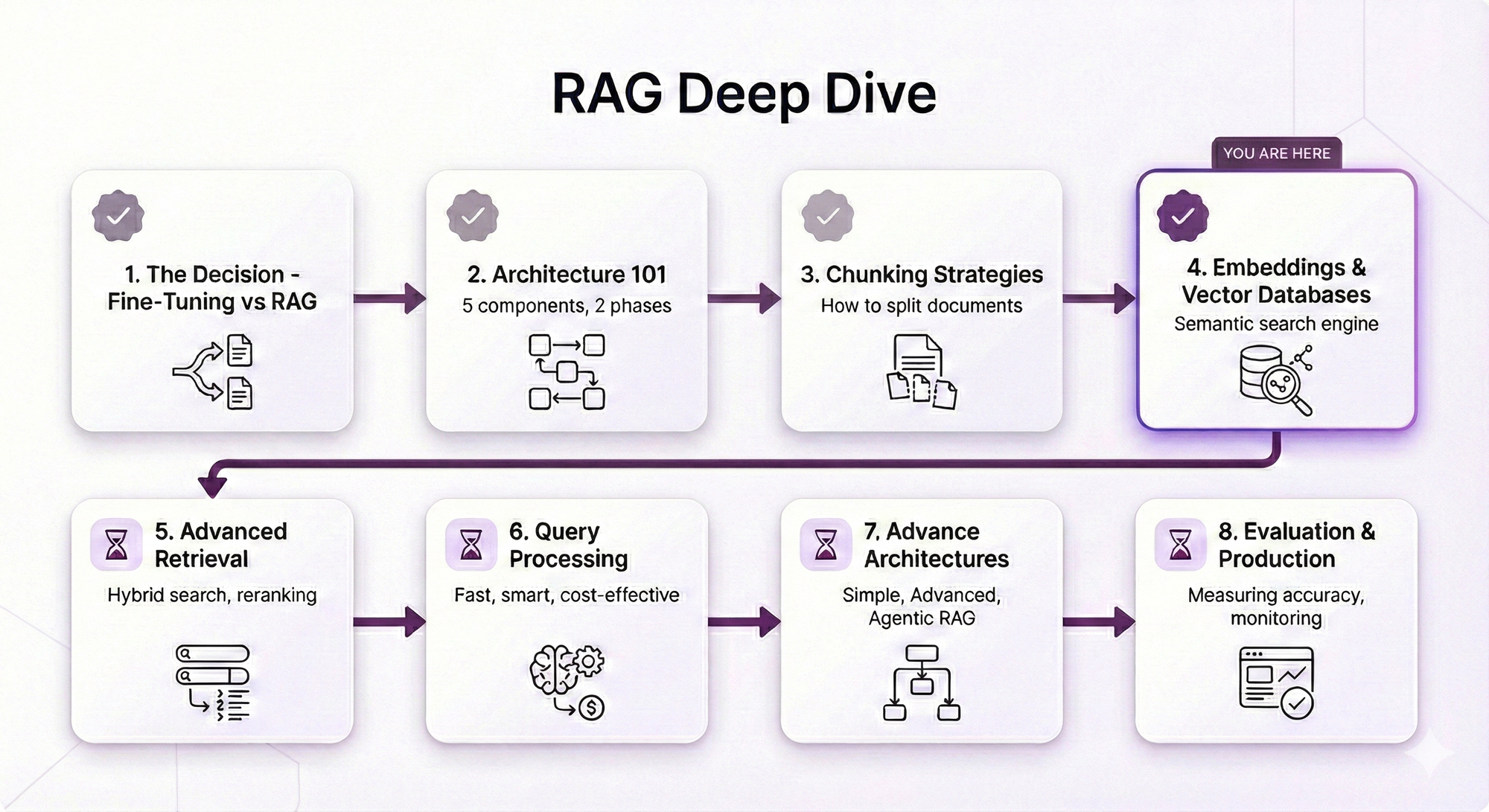
What Post 5 will cover:
Metadata Filtering:
- Narrowing search scope before semantic search
- Category filters, date ranges, permissions
- When filtering helps vs when it over-constrains
- Zero added latency (actually speeds things up!)
Reranking:
- Why similarity ≠ relevance (the core problem)
- Bi-encoders vs cross-encoders explained
- Using reranker models to re-score results
- When to rerank (and when it's overkill)
- Two-stage retrieval pipeline
Hybrid Search:
- Combining semantic (vector) + keyword (BM25) search
- When semantic search misses exact terms (names, codes, certifications)
- Score fusion strategies (RRF vs weighted combination)
- Implementation patterns (parallel vs native)
Parent-Child Retrieval:
- The chunking paradox: small chunks retrieve well, large chunks provide context
- How to search with small chunks but return large chunks
- Implementation approaches
- When you need it vs when basic retrieval works
Why Advanced Retrieval Matters
Basic retrieval gets you 70-80% accuracy. For many use cases, that's enough.
But if you need 90-95% accuracy:
- You've already optimized chunking
- You've chosen good embeddings
- You need better retrieval strategies
In Post 5, you'll learn the techniques that take RAG from "pretty good" to "production-grade."
See You in Post 5
You've built the foundation:
Next up: How to search better.
Ready to Build Your RAG System?
We help companies build production-grade RAG systems that actually deliver results. Whether you're starting from scratch or optimizing an existing implementation, we bring the expertise to get you from concept to deployment. Let's talk about your use case.


Part 4 of the RAG Deep Dive Series | Next up: Advanced Retrieval