RAG Deep Dive Series: Core Components
Part 2: RAG Architecture 101 — How It Actually Works

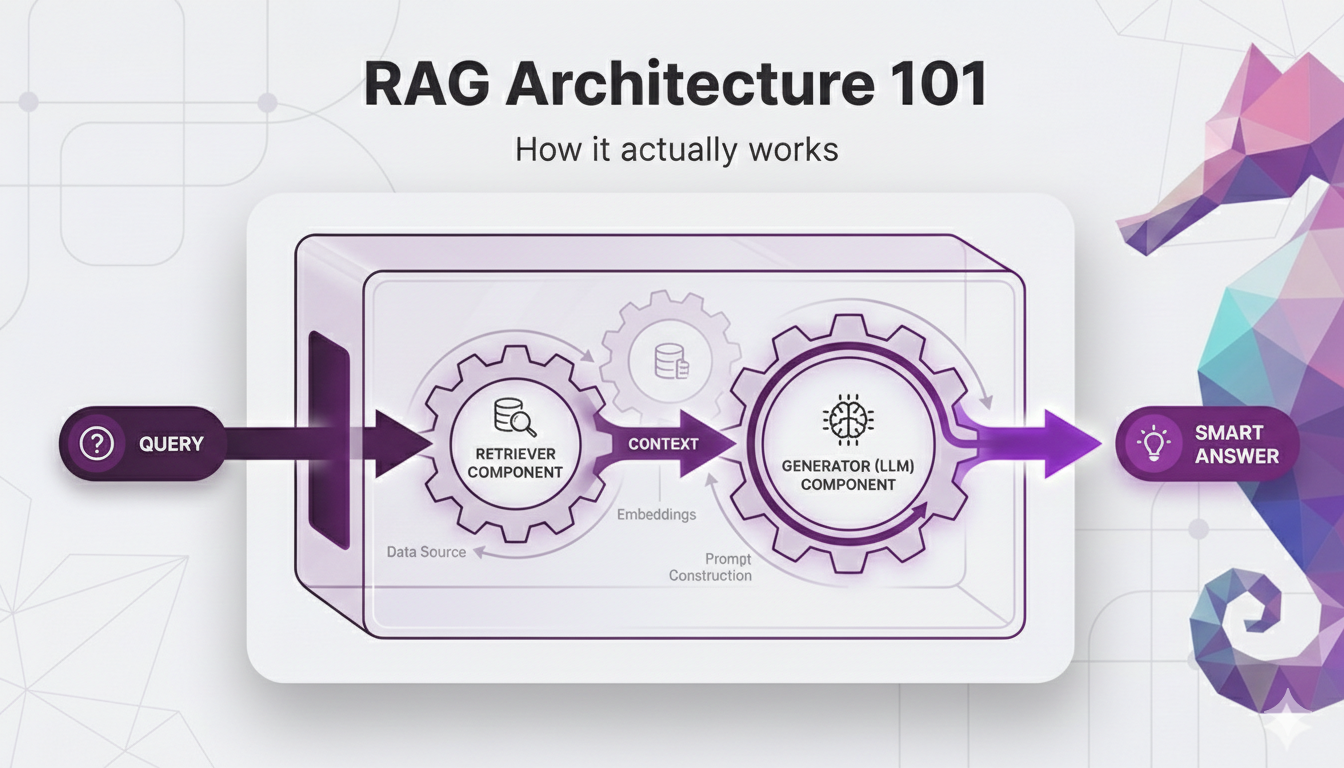
In Part 1, we answered the "why" RAG beats fine-tuning for most knowledge-intensive applications. We showed you the business case, the decision framework, and a real-world example of RAG in action.
But we intentionally kept the technical details light. We gave you the 30-second version: "user asks a question, system finds relevant documents, LLM generates an answer." That's what happens, but not how it happens.
Here's the thing: you can't make informed decisions about chunking strategies, embedding models, or retrieval techniques if you don't understand the architecture they fit into. It's like trying to optimize individual car parts without knowing how an engine works.
So in this post, we're popping the hood.
You'll learn:
- The 5 core components every RAG system has and what job each one does
- The two-phase architecture that separates preparation from runtime
- A complete walkthrough from "user asks a question" to "system returns a cited answer"
- Why each piece exists and how they work together
- Where things can go wrong and what that looks like
Same promise as Post 1: We're starting from absolute zero. If you've never heard terms like vector database, embedding model or chunking techniques that's fine. We'll explain each concept using analogies and examples that make the technical accessible. No code, no math just clear explanations of how the pieces fit together.
By the end of this post, you'll have the mental model you need to understand everything else in this series. Think of this as your foundation.
Let's build it.
Table of Contents
- The Big Picture: RAG as a System
- The Two Phases: Indexing vs. Query Time
- The 5 Core Components
- The Complete Flow: Question to Answer
- What Can Go Wrong (And Why)
- Key Takeaways
- What's Next
The Big Picture: RAG as a System
Let's start by refreshing your memory. Remember the open-book exam analogy we mentioned in Part 1? Let's revisit it, because it's the key to understanding everything else.
The Open-Book Exam Recap:
When a user asks a question in a RAG system, here's what happens under the hood:
- The RAG system searches for content in your documents that's related to the user's question
- It passes that relevant content to the LLM
- It tells the LLM: "Here's the user's question, and here's the related content. Answer the question using only this content."
That's it. That's the core idea.
A Simple Example
Let's say a user asks: "What's your refund policy?"
Here's what happens:
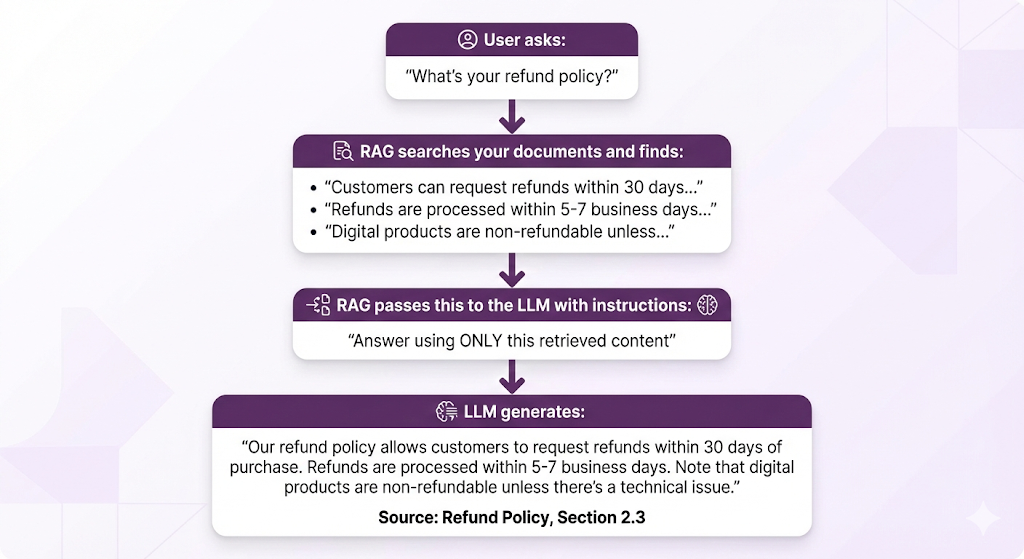
But How Does It Actually Do That Search?
This is where most explanations stop. "It searches your documents and finds relevant content." Cool. But how?
- How does it know which documents are "relevant"?
- How does it understand that "refund policy" and "return policy" and "money back guarantee" all mean similar things?
- How does it search through thousands of documents in milliseconds?
- Where is all this content stored?
- What happens if the relevant information is split across multiple documents?
These aren't trivial questions. The answers involve embedding models, vector databases, semantic similarity, and retrieval algorithms. But here's the good news: each of these concepts is actually pretty straightforward once you understand what problem it's solving.
So let's break it down. We'll start with the two phases of a RAG system, then dive into the five components that make it work.
The Two Phases: Indexing vs. Query Time
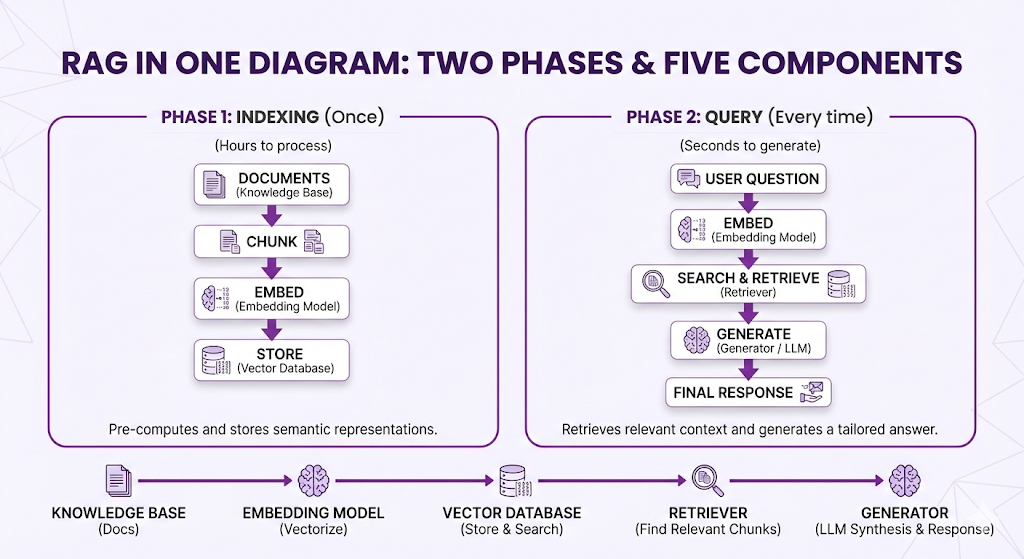
Here's the first thing you need to understand about RAG systems: they work in two completely separate phases.
Think of it like a library:
Phase 1: Setting Up the Library (Indexing)
- You organize all the books
- You create a cataloging system
- You put books on shelves in a logical order
- You create an index so people can find things
Phase 2: Helping Someone Find a Book (Query Time)
- A person walks in and asks a question
- You use your catalog/index to find relevant books
- You hand them the books they need
- They read and get their answer
RAG works exactly the same way. There's a preparation phase (indexing) that happens once, and a query phase that happens every time someone asks a question.
Let's break down each phase.
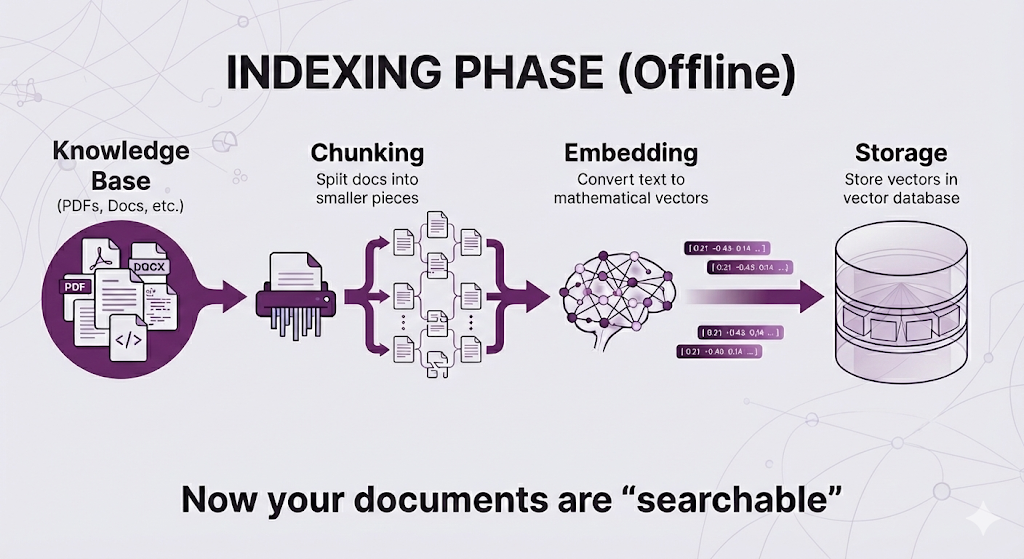
Phase 1: Indexing (The Preparation Phase)
When it happens: Once, when you first set up your RAG system. Then again whenever you add or update documents.
What happens:
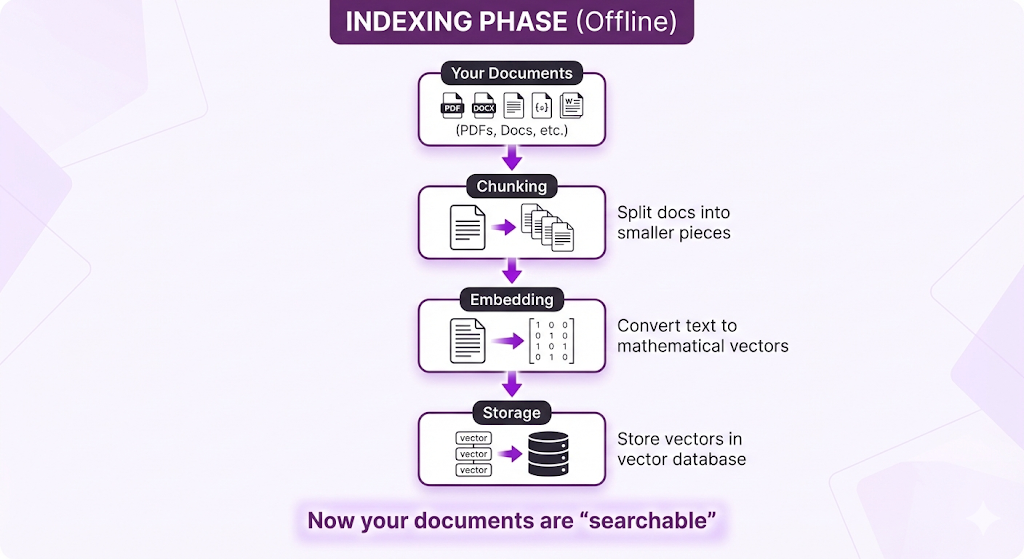
This is all preparation work. No user has asked a question yet. You're just organizing your knowledge base so it's ready to be searched.
How long does it take?
- For a few hundred documents: Minutes
- For thousands of documents: Hours
- For millions of documents: Could take days
But you only do this once or whenever documents change. It's not blocking users.
Phase 2: Query Time (The Runtime Phase)
When it happens: Every single time a user asks a question.
What happens:
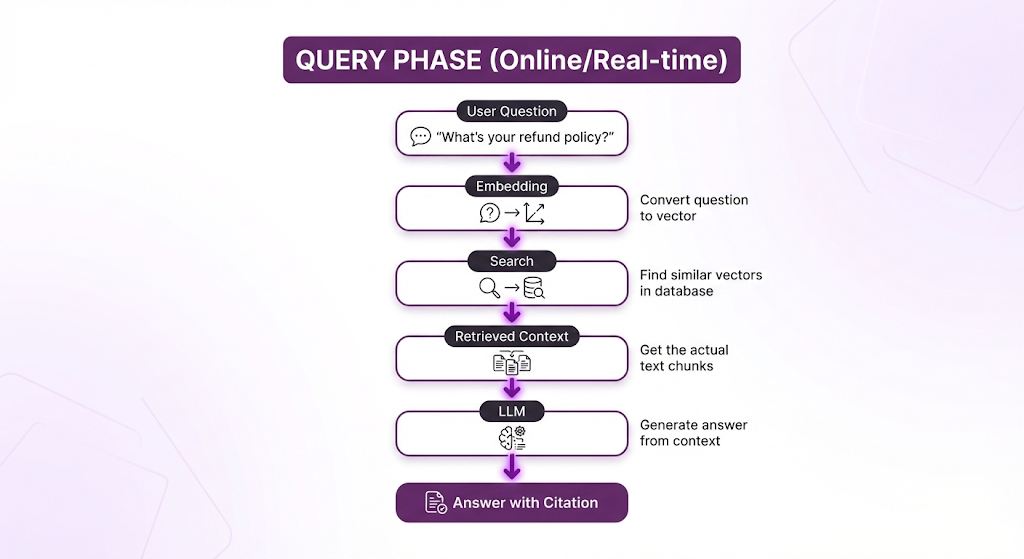
How fast is it?
- Embedding the query: ~50-100ms
- Vector search: ~50-200ms (even across millions of vectors!)
- LLM generation: 1-2 seconds
- Total: 2-3 seconds end-to-end
Why the Separation Matters
Because the preparation work is SLOW, but you only need to do it once.
The Trade-off:
| Phase | Speed | Frequency |
|---|---|---|
| Indexing | Slow (hours) | Rare (only when docs change) |
| Query Time | Fast (seconds) | Constant (every user question) |
This is why RAG can handle real-time queries even with massive document collections. All the heavy lifting happened beforehand.
Real-World Implications
When you add a new document:
- ❌ Users don't wait for it to be indexed
- ✅ Indexing happens in the background
- ✅ Document becomes searchable once indexing completes (minutes to hours later)
When a user asks a question:
- ✅ They get an answer in seconds
- ✅ The system searches already-indexed content
- ✅ No heavy processing needed
This is fundamentally different from fine-tuning:
| Approach | Update Time | Query Time |
|---|---|---|
| Fine-tuning | Days (retrain entire model) | Fast |
| RAG | Minutes/Hours (reindex new docs) | Fast |
Both are fast at query time, but RAG can incorporate new information orders of magnitude faster.
The Big Picture
So now you understand the two-phase split:
- Indexing Phase (Offline): Prepare your documents so they're searchable
- Query Phase (Online): Use those prepared documents to answer questions
But we still haven't answered the "how" questions:
- How do you convert text to "searchable vectors"?
- What even is a vector database?
- How does the system know which chunks are "similar" to the question?
That's where the 5 core components come in. Each component handles a specific job in this pipeline.
Let's dive into each one.
The 5 Core Components
Every RAG system has five core components. Some implementations might add extra bells and whistles, but these five are universal. If you're missing one of these, you don't have a RAG system.
Here's the lineup:
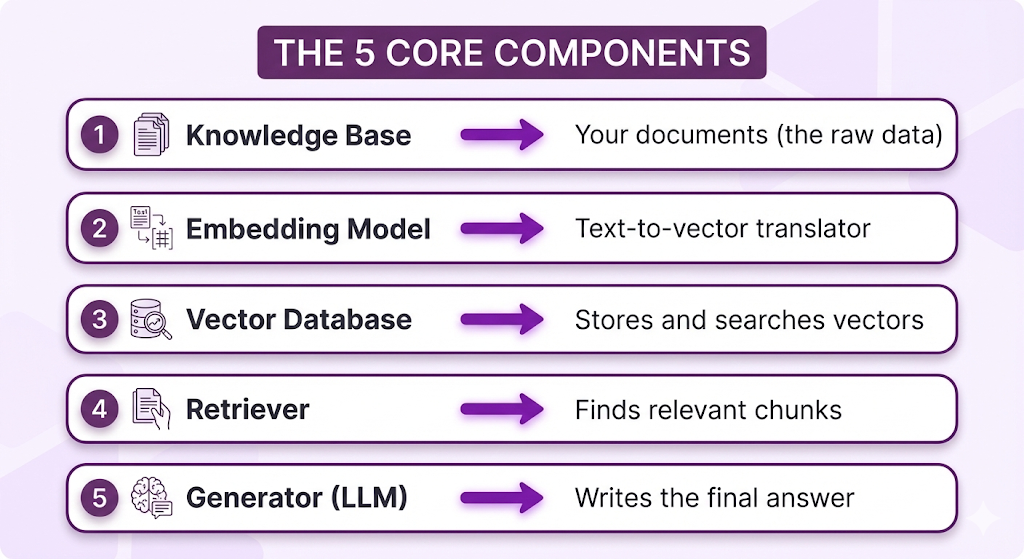
Let's break down each component and understand what job it does.
Component 1: Knowledge Base
What it is: Your collection of source documents PDFs, Word docs, web pages, databases, whatever information you want the RAG system to search through.
The job it does: Provides the raw material that everything else works with.
What Goes in a Knowledge Base?
Pretty much any text-based information:
- Documents: PDFs, Word files, Google Docs, Markdown files
- Structured data: FAQs, help articles, wikis, knowledge bases
- Policies & procedures: Employee handbooks, compliance docs, SOPs
- Technical content: API documentation, product manuals, troubleshooting guides
- Communications: Emails, Slack messages, meeting notes
- Databases: Product catalogs, customer records, transaction logs
The key principle: If a human could read it to find an answer, RAG can search it.
Quality In = Quality Out
Here's the brutal truth: your RAG system can only be as good as the documents you feed it.
This isn't like training an LLM where the model can learn patterns and generalize. With RAG, if the information isn't in your knowledge base, the system literally cannot answer the question. There's no creativity, no guessing, no filling in gaps.
Common quality issues that break RAG systems:
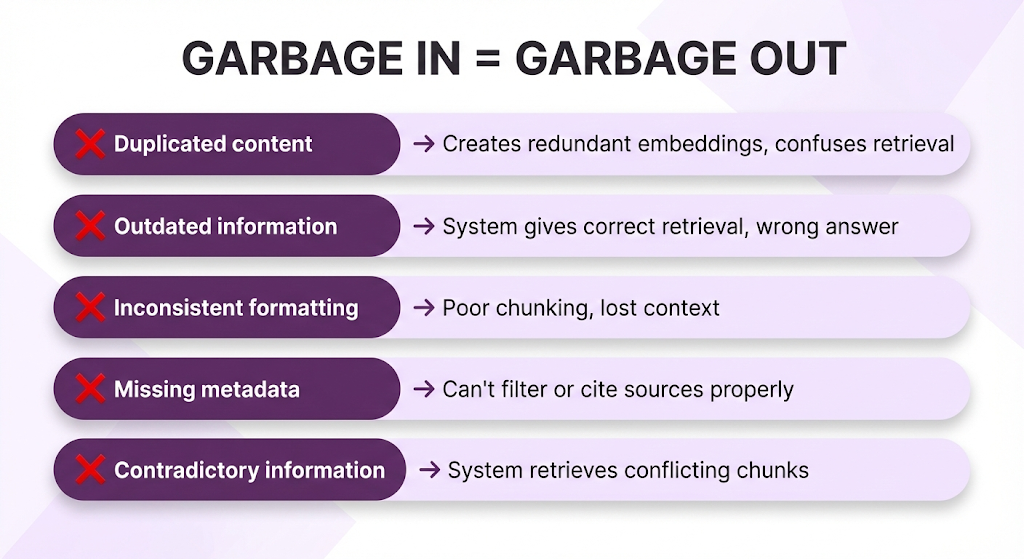
Real example:
Your knowledge base has:
- Version 1 of your refund policy (outdated): "30-day refunds"
- Version 2 of your refund policy (current): "14-day refunds"
When someone asks about refunds, the RAG system might retrieve BOTH chunks. The LLM then has to work with contradictory information. Best case: it gets confused. Worst case: it confidently tells a customer they have 30 days when they only have 14.
The fix? Clean your knowledge base. Deduplication and version control aren't optional they're critical.
The Knowledge Base Checklist
Before you index documents, make sure they're:
- Deduplicated – No repeated content across files
- Up-to-date – Latest versions only, old versions archived or deleted
- Properly formatted – Consistent structure (headings, lists, tables)
- Clean text – No garbled characters, broken encoding, or OCR errors
- Tagged with metadata – Source, date, category, version, author
Pro tip: Don't assume your documents are clean just because they "look fine" to humans. Run some test queries and see what gets retrieved. You'll be surprised what breaks.
Component 2: Embedding Model
What it is: A specialized AI model that converts text into mathematical vectors (lists of numbers) that capture semantic meaning.
The job it does: Translates human language into a format computers can mathematically compare.
The Problem Embeddings Solve
Let's start with why we even need this.
Imagine you have these three documents in your knowledge base:
- "How to request vacation days"
- "Annual leave policy"
- "Office parking information"
A user asks: "How do I take time off?"
How does the computer know that:
- "time off" = "vacation days" = "annual leave" ✅
- "time off" ≠ "parking" ❌
Words are different. But meanings are similar.
Traditional keyword search can't do this. It looks for exact matches:
- "time off" → No match in any document ❌
- Zero results returned
Embeddings solve this by capturing semantic meaning, not just keywords.
What Are Embeddings?
An embedding is a list of numbers typically hundreds of numbers that represents the meaning of a piece of text.
Simple example:
Notice anything? The first two questions have similar vectors (the numbers are close), even though they use completely different words. The third question has a different vector because it's asking about something else entirely.
This is the magic of embeddings: Similar meanings = similar vectors, regardless of the exact words used.
How Embedding Models Work (Conceptually)
You don't need to understand the neural network architecture. Here's the concept:
Embedding models are trained on massive amounts of text to learn that certain words and phrases tend to appear in similar contexts:
- "refund," "return," "money back," "reimbursement" all appear in similar contexts → similar vectors
- "lunch," "dinner," "breakfast," "meal" appear together → similar vectors
- "refund" and "lunch" rarely appear together → different vectors
The model learns these patterns from millions of examples and compresses that knowledge into vector representations.
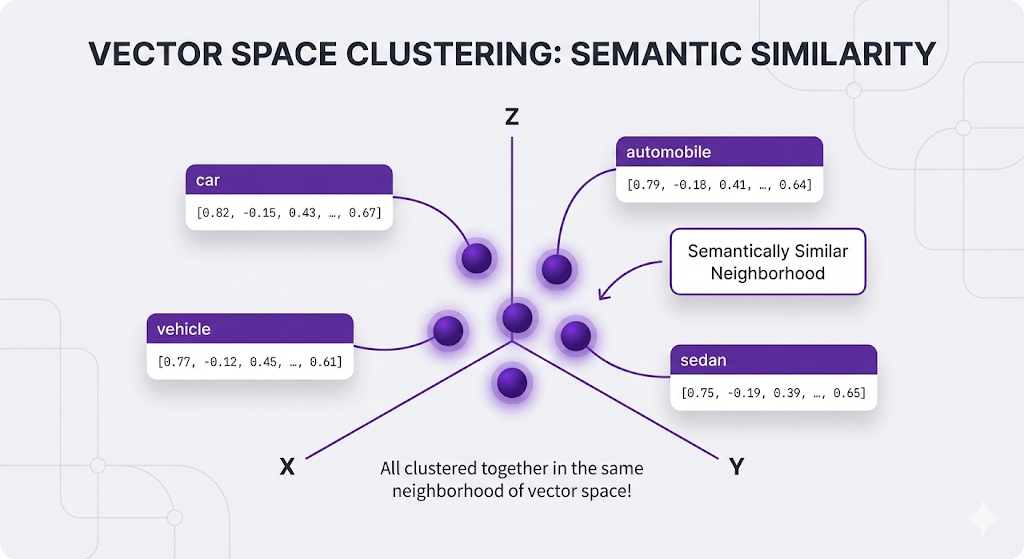
Instead of treating "car" as just the string "c-a-r", embeddings understand that "car" is connected to a whole cloud of related concepts:
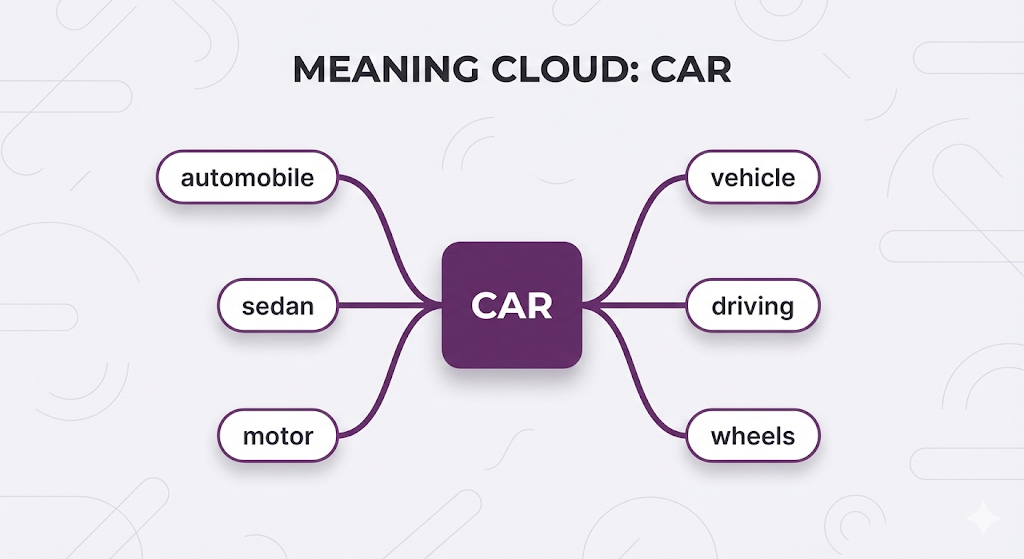
Think of it like a language-aware GPS:
- Instead of latitude/longitude, it maps words to a high-dimensional space
- Words with similar meanings end up close together
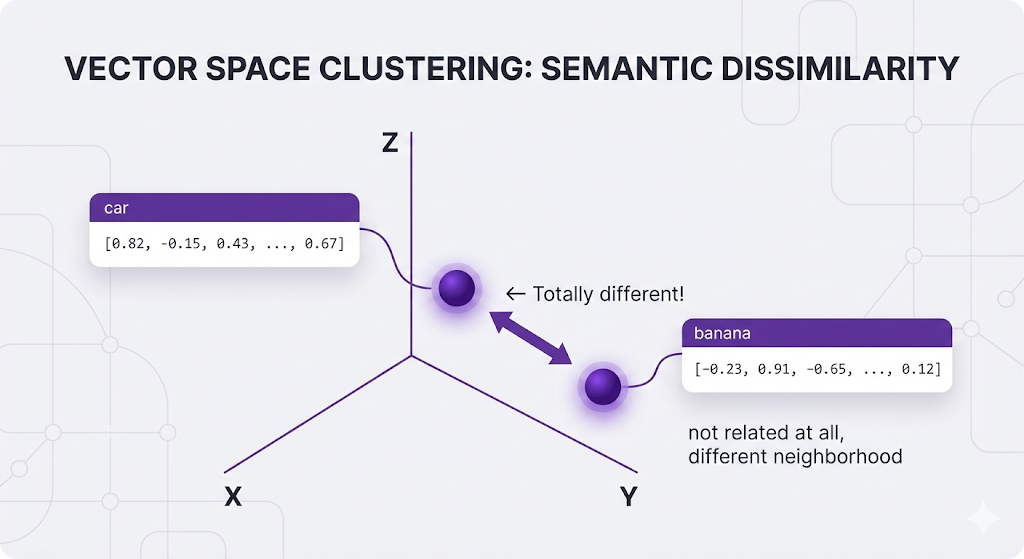
- Words with different meanings end up far apart
All of these related words end up with similar vectors:
Meanwhile, unrelated words live in completely different neighborhoods:
Why the Same Model for Everything?
Critical rule: You MUST use the same embedding model for both:
- Indexing your documents (preparation phase)
- Embedding user queries (query phase)
Why? Because different models create different "spaces."
Analogy:
- Model A uses latitude/longitude
- Model B uses street addresses
If you index with Model A but search with Model B, you're trying to compare coordinates to addresses. They're incompatible, even if they're describing the same location.
In practice:
- Index documents with
text-embedding-3-small - Must also embed queries with
text-embedding-3-small - Mixing models = broken retrieval
Popular Embedding Models
You don't need to pick one yet, but here are the common options:
| Model | Provider | Dimensions | Best For |
|---|---|---|---|
| text-embedding-3-small | OpenAI | 1536 | General purpose, good baseline |
| text-embedding-3-large | OpenAI | 3072 | Higher accuracy needs |
| text-embedding-004 | 768 | Multilingual support | |
| embed-v3 | Cohere | 1024 | Multilingual, compression |
| all-MiniLM-L6-v2 | Open Source | 384 | Fast, lightweight, self-hosted |
Key Properties of Good Embeddings
| Property | What It Means | Why It Matters |
|---|---|---|
| Dimensionality | Length of the vector (e.g., 384, 768, 1536) | Higher = more nuanced but slower |
| Semantic Clustering | Similar meanings → nearby vectors | Enables accurate retrieval |
| Domain Alignment | Trained on similar content | General models may miss domain jargon |
What are Dimensions? That's how many numbers are in each vector. More dimensions = more nuance, but slower and more expensive.
For now, just know the embedding model is the translator that makes semantic search possible. Without it, you're stuck with keyword matching.
Component 3: Vector Database
What it is: A specialized database designed specifically to store and search through vectors those lists of numbers from embeddings.
The job it does: Stores embeddings and finds the most similar ones to a query vector, fast.
Why Not Just Use a Regular Database?
You might think: "I already have PostgreSQL/MySQL/MongoDB. Can't I just store vectors there?"
Technically, yes. Practically, no.
Here's the problem:
Traditional databases were built to answer questions like:
- "Find all customers WHERE age > 30"
- "Show me products WHERE price < 100"
- "Get employees WHERE name = 'John'"
But RAG needs to ask:
- "Find the 5 vectors most similar to this query vector"
That's a completely different operation.
The Mathematical Difference
Traditional databases use exact matching and sorting:
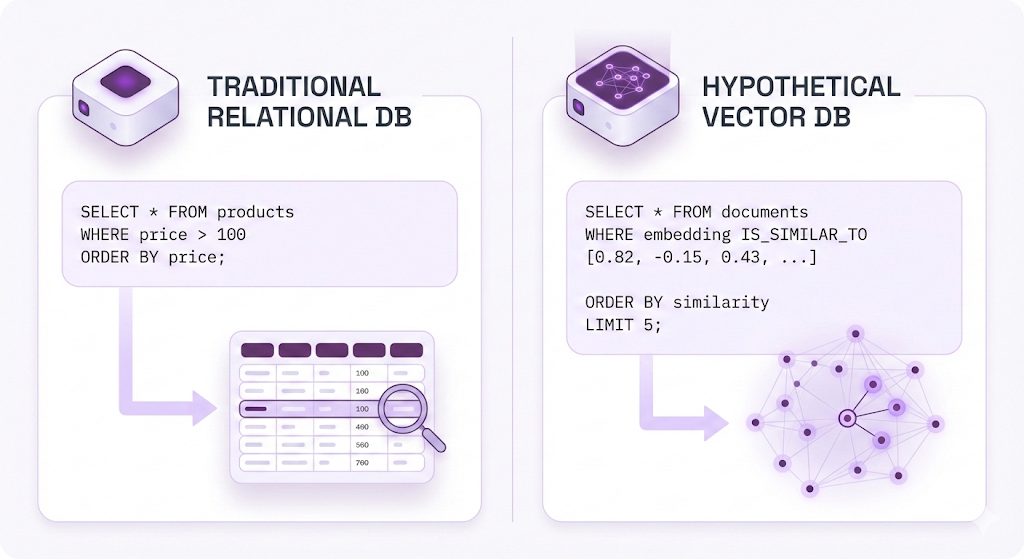
There's no IS_SIMILAR_TO operator in SQL. You'd have to manually compute similarity for EVERY row:
-- You'd have to do this (conceptually):
SELECT *,
  CALCULATE_SIMILARITY(embedding, query_vector) AS score
FROM documents
ORDER BY score DESC
LIMIT 5;
The problem with this approach:
| Issue | Why It Hurts |
|---|---|
| Full table scan | Must check EVERY single row, every query |
| Expensive math | Computing similarity = hundreds of multiplications per row |
| No index helps | B-tree indexes work for sorting numbers, not finding neighbors in 768-dimensional space |
| Scale nightmare | 1 million documents × 768 numbers each = 💀 |
For a million documents, this would take MINUTES per query. Users would leave before getting an answer.
Enter Vector Databases
Vector databases were designed from the ground up to solve this exact problem.
What they provide:
- Specialized indexes for high-dimensional vectors (HNSW, IVF, PQ - we'll cover these in a different Post)
- Approximate Nearest Neighbor (ANN) search. Trade tiny accuracy loss (99%→98%) for massive speed
- Built-in similarity functions. Cosine, Euclidean, Dot Product - ready to use
- Optimized for vector operations. Everything is designed around this one use case
Instead of complex SQL, you get simple APIs:
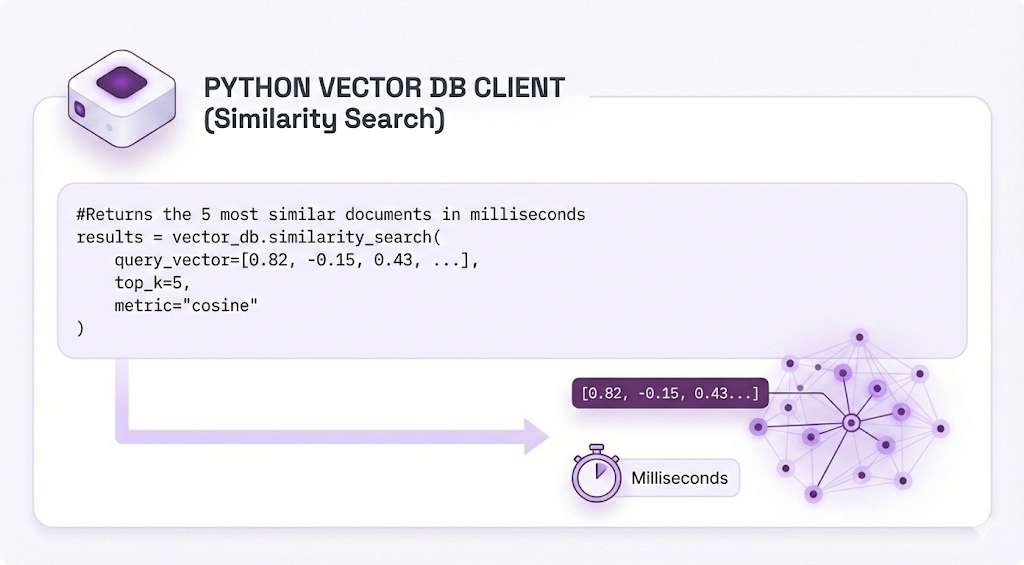
That's it. No manual math, no optimization headaches. Just fast similarity search.
What Gets Stored For each chunk of your documents, the vector database stores:
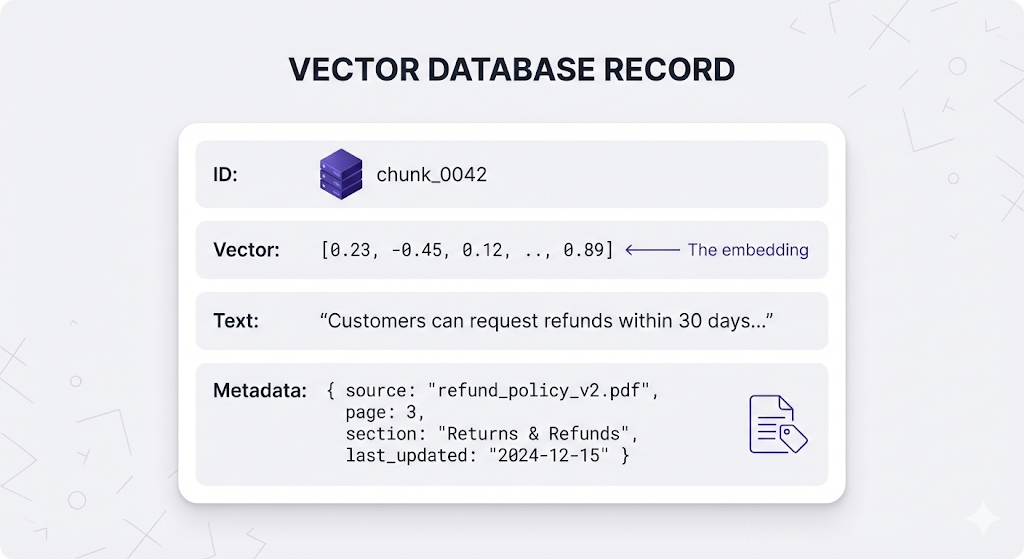
Why store both vector AND text?
The vector is for searching (finding similar chunks) -
The text is what gets passed to the LLM (the actual content)
You search with vectors, but you answer with text.
Popular Vector Databases
| Database | Type | Best For |
|---|---|---|
| Pinecone | Managed (Cloud) | Zero ops, quick start |
| Weaviate | Open Source / Managed | Hybrid search, multimodal |
| Qdrant | Open Source / Managed | High performance, rich filtering |
| Milvus | Open Source | Enterprise scale |
| Chroma | Open Source | Local dev, lightweight |
| pgvector | PostgreSQL Extension | Already using Postgres, want vector capabilities |
Different databases have different strengths, but they all solve the same core problem storing and searching vectors efficiently.
Component 4: Retriever
What it is: The orchestrator that takes a user's question, converts it to a vector, searches the vector database, and returns the most relevant chunks.
The job it does: Bridges the gap between a human question and the relevant documents.
The Retriever's Workflow The retriever is called every single time a user asks a question. Here's what it does:
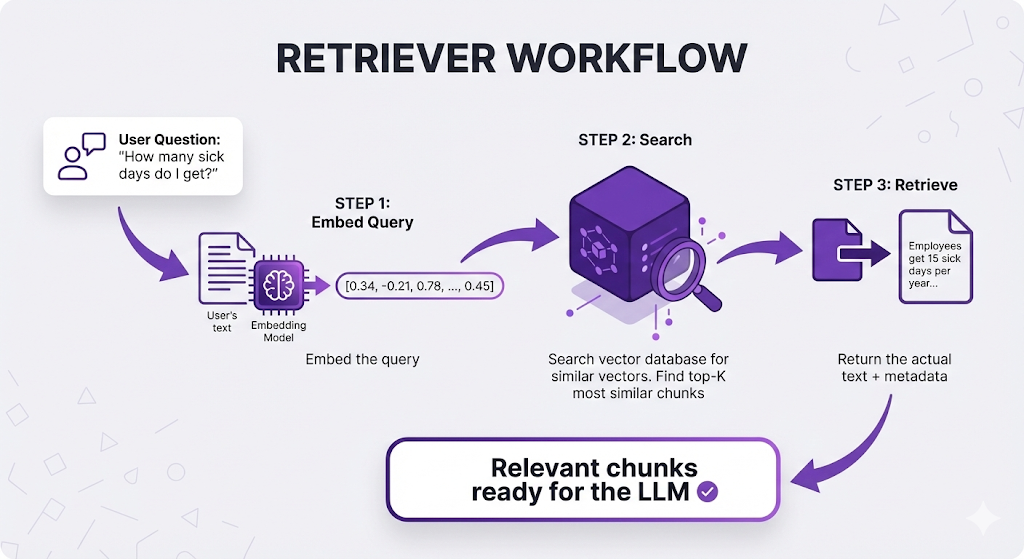
Why it's called the "retriever": It retrieves the relevant information. That's literally its only job, but it's the most critical part of the pipeline.
The Top-K Decision
K= the number of chunks to retrieve per query.
You might think: "Just grab the single best match, right?"
Not so fast. There are several reasons why you typically retrieve multiple chunks (K=3 to K=10):
Reason 1: Information Spread Across Chunks
The complete answer often lives in multiple chunks:
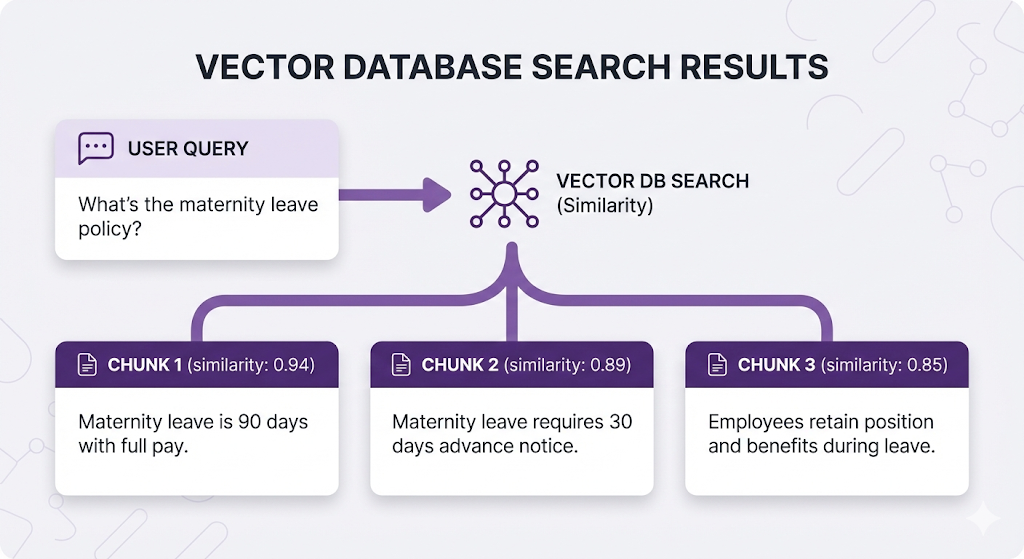
If K=1, the user only learns about the 90 days. They miss the application process and return rights.
Reason 2: Highest Similarity ≠ Most Useful
Sometimes the highest-scoring chunk talks ABOUT the topic but doesn't answer the question:
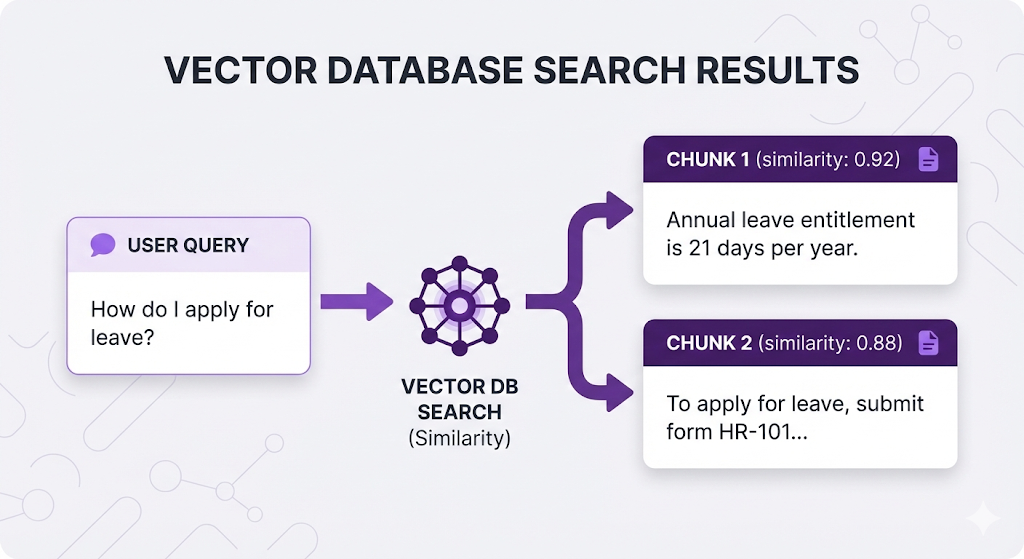
The first chunk scores higher (more similar to "leave") but doesn't answer "how to apply." The second chunk is what the user needs.
Reason 3: Ambiguous Queries
When queries are vague, multiple interpretations score high:
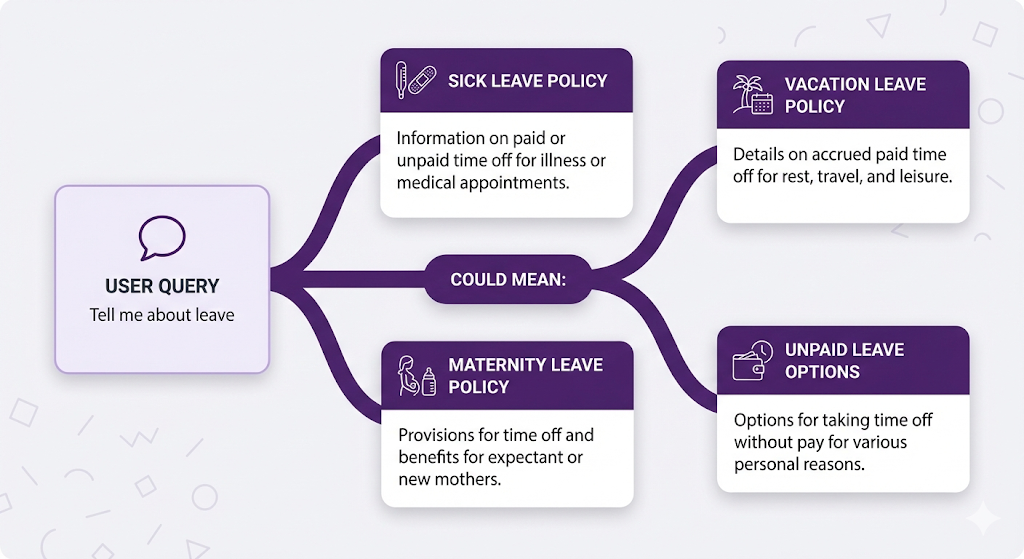
Retrieving multiple chunks (K=5-10) covers different interpretations.
The Trade-off
| K Value | Pros | Cons |
|---|---|---|
| Too few (K=1-2) | Fast, focused | Might miss info, incomplete answers |
| Sweet spot (K=3-10) | Balanced | Depends on chunk size and use case |
| Too many (K=20+) | Don't miss anything | Noise dilutes signal, slower, more expensive |
Most RAG systems use K=5 as a starting point, then tune based on results.
Semantic Search in Action
Here's the magic moment why embeddings make semantic search possible.
Three users ask about the same thing with different words:
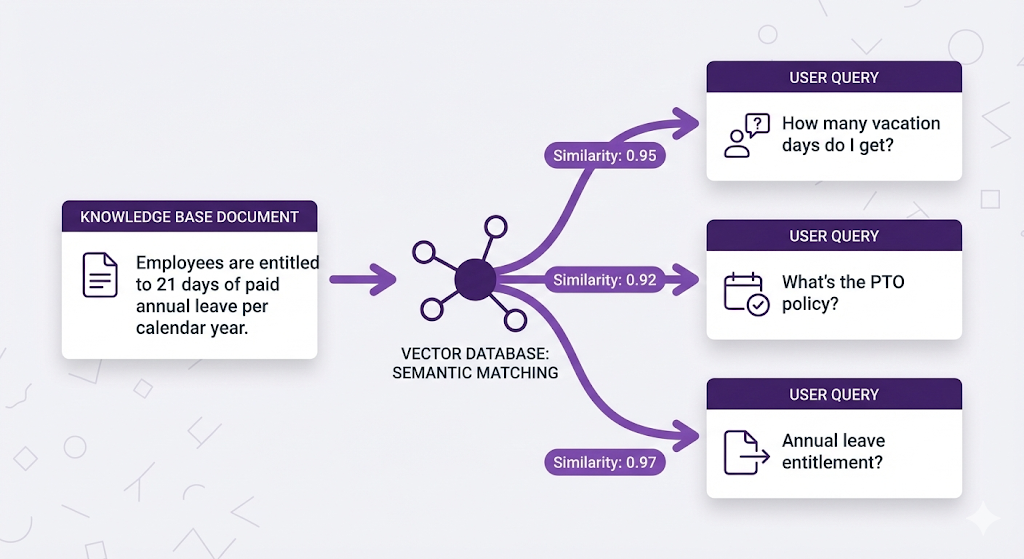
With keyword search: Only User C gets results (exact match on "annual leave")
With semantic search : ALL THREE users find the document
Why? Because the embedding model understands:
"vacation days" ≈ "annual leave" ≈ "paid time off" ≈ "PTO"
All these questions get embedded to similar vectors, which match the document's vector.
The retriever doesn't care about exact words it cares about meaning.
Component 5: Generator (LLM)
What it is: The Large Language Model (like GPT-4, Claude, or Gemini) that reads the retrieved chunks and writes the final answer.
The job it does: Synthesizes retrieved information into a coherent, natural language response.
The Open-Book Exam Revisited
Remember our analogy from the beginning? The Generator is where it all comes together.
The full picture:
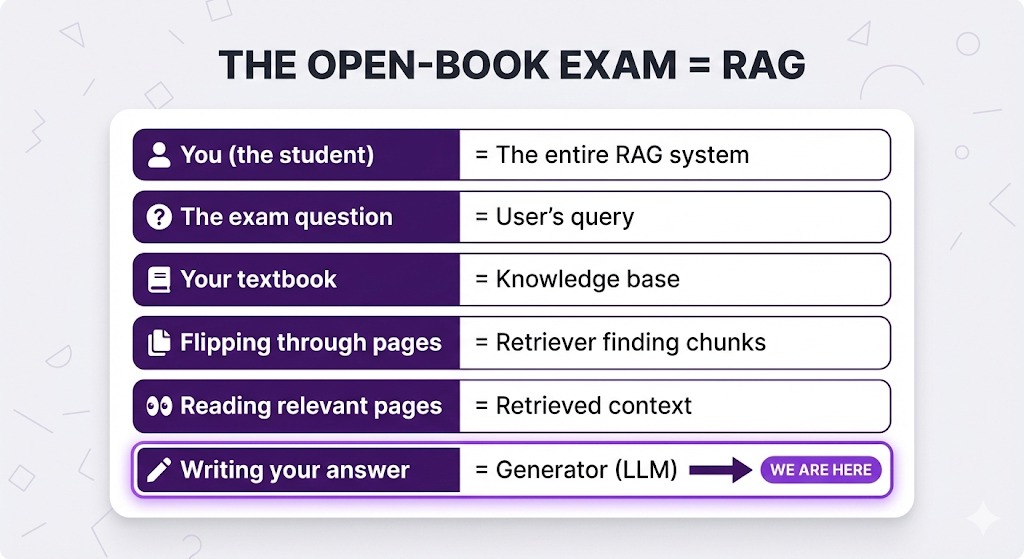
The retriever found the right pages. Now the LLM reads them and writes an answer.
What the LLM Receives
Here's what gets passed to the LLM:
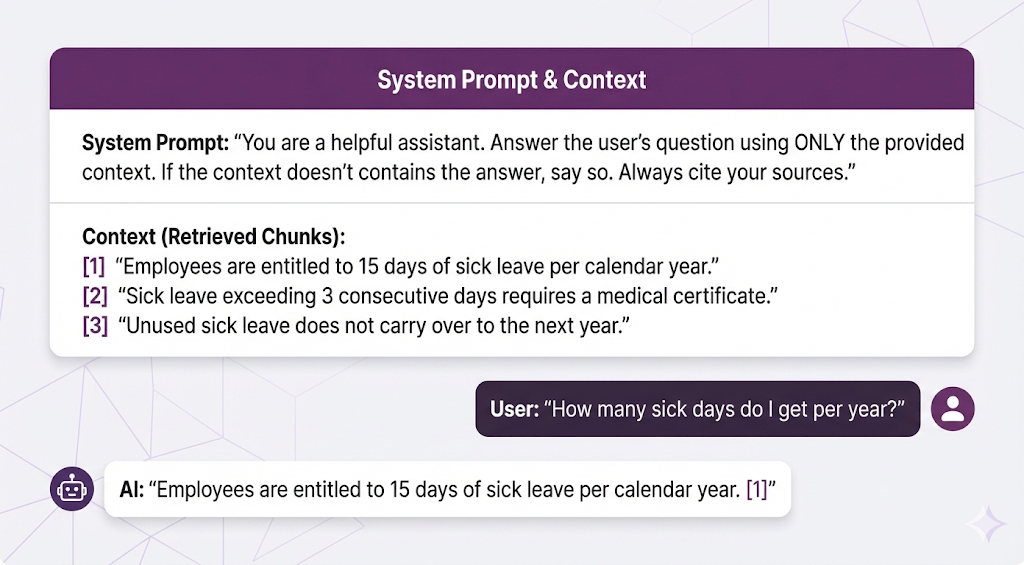
The LLM's job: Read the context, understand what's relevant, and write a clear answer.
What Makes the Generator Different from a Regular LLM Call
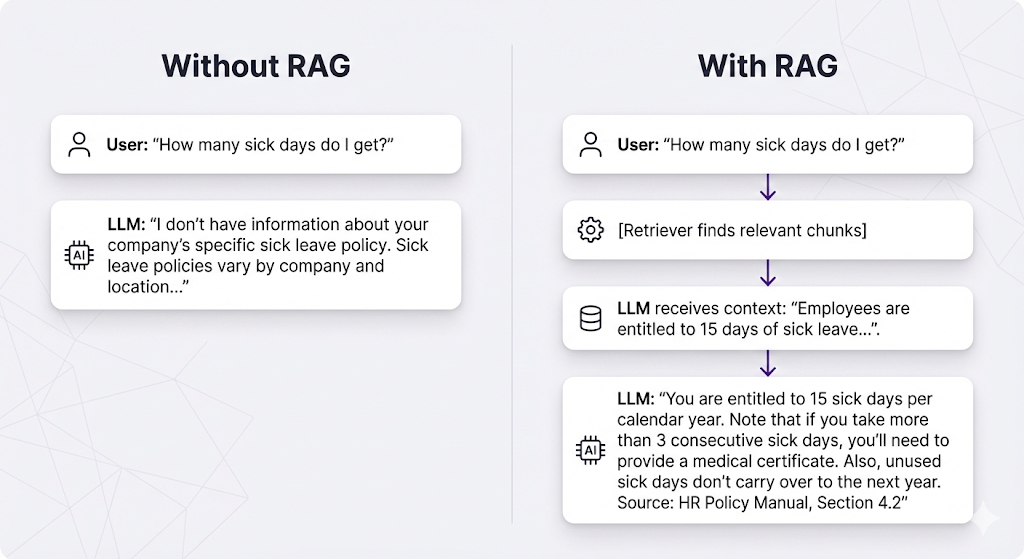
The System Prompt Matters
The system prompt is your instruction manual for the LLM. It tells the LLM how to use the retrieved context.
Critical instructions to include:
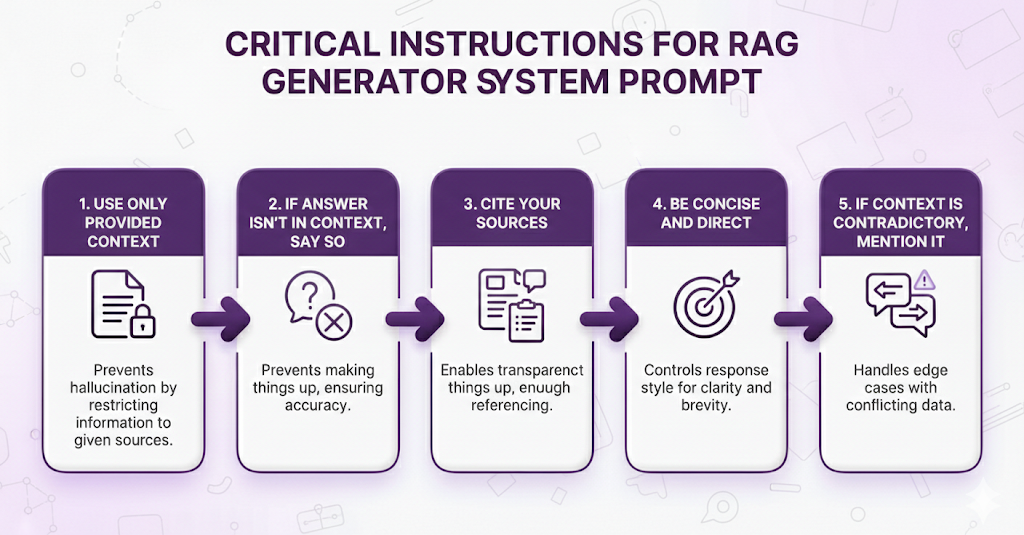
Bad system prompt:
Answer the user's question helpfully.This gives the LLM permission to use its training data, which defeats the purpose of RAG.
Good system prompt:
Answer using ONLY the provided context. If the context doesn't contain
enough information to answer confidently, say 'I don't have enough
information about that in the available documents.' Always cite which
document or section you're referencing.
This keeps the LLM grounded in your documents.
Why RAG Still Needs the LLM's Intelligence
You might wonder: "If we have the right chunks, why not just show them to the user?"
Because raw chunks are messy:
Retrieved Chunk 1: "Section 4.2.1: Sick Leave Entitlement Employees shall be entitled to fifteen (15) days of paid sick leave per annum, calculated on a calendar year basis (January 1 - December 31)."

Retrieved Chunk 2: "Section 4.2.3: Medical Certification Requirements In accordance with company policy, sick leave absences exceeding a period of three (3) consecutive business days shall require submission of valid medical certification from a licensed healthcare provider."

Retrieved Chunk 3: "Section 4.2.5: Leave Carry-Over Provisions Unused sick leave balances shall not be carried forward to subsequent calendar years and shall expire on December 31 of each year."
User asked: "How many sick days do I get?"
Just showing chunks: Legal jargon, scattered across three sections, hard to read.
LLM synthesis:
You get 15 sick days per year. Here are the key details:


- You're entitled to 15 days of paid sick leave annually (January 1 - December 31)

- If you're sick for more than 3 days in a row, you'll need a doctor's note

- Unused sick days don't roll over to next year they expire on December 31

Source: HR Policy Manual, Sections 4.2.1, 4.2.3, 4.2.5
What the LLM did:
- Extracted the key fact (15 days)
- Translated legal language to plain English
- Organized information logically
- Added helpful context (what happens if you're sick longer)
- Cited sources properly
This is why you need both: Retrieval gets you the right information.
The LLM makes it readable and actionable.
The LLM's Semantic Understanding
There's one more subtle thing happening here that's easy to miss.
Remember the retriever found documents about "annual leave" when the user said "PTO"?
Well, the LLM continues that semantic understanding in the answer.
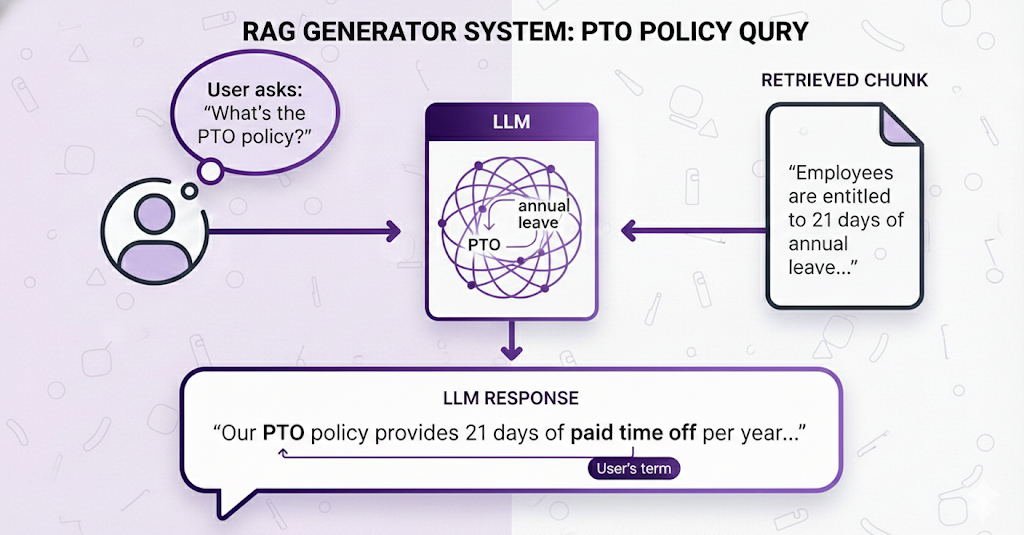
The LLM understands that:
- The retrieved chunk calls it "annual leave"
- The user calls it "PTO"
- They mean the same thing
- The user would prefer to see their own terminology in the response
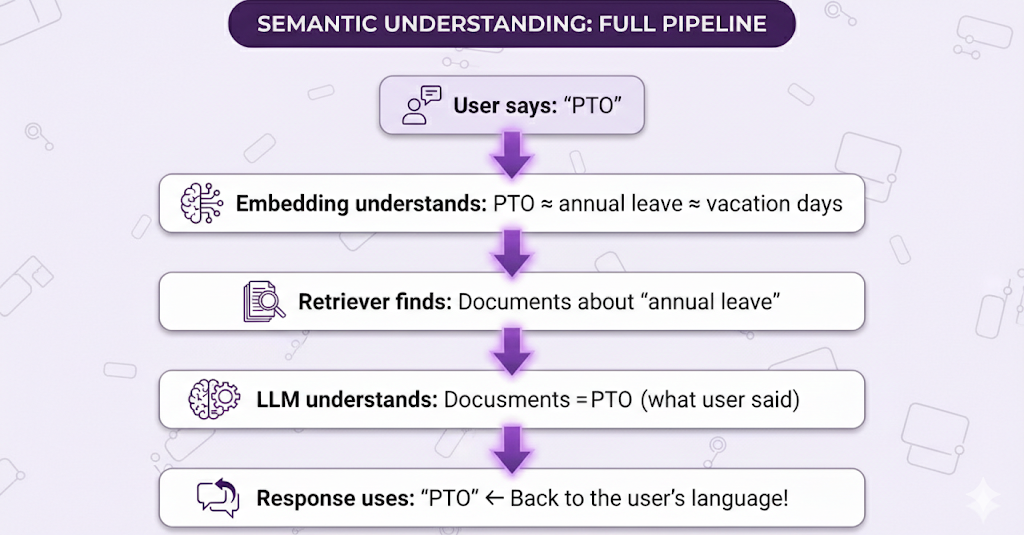
This is why embeddings + LLMs together are so powerful. The entire pipeline has semantic understanding from start to finish.
The Complete Flow: Question to Answer
You've seen the individual components. Now let's watch them work together in a real scenario.
The Setup:
You've built a RAG system for your company's HR department. Your knowledge base contains:
- Employee handbook
- Benefits guide
- Leave policies
- Payroll procedures
- Compliance documents
Everything has been indexed (the preparation phase is done). Now an employee opens the chat and asks a question.
Let's walk through what happens, step by step.
The Scenario
Employee asks: "How many sick days do I get per year?"
Goal: Give them an accurate, cited answer in under 3 seconds.
Phase 1: What Already Happened (Indexing)
Before this question was ever asked, during the indexing phase, your system did this:
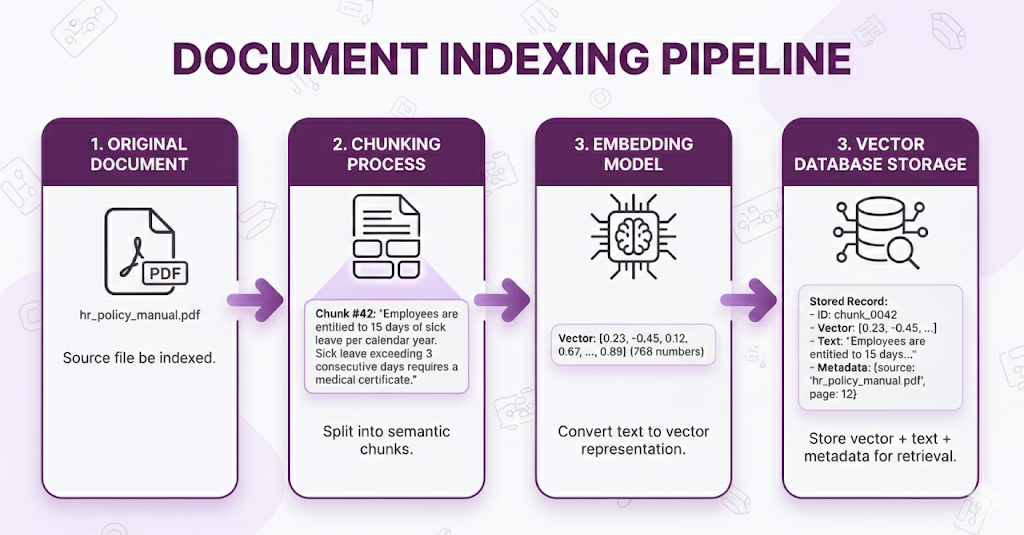
Time taken: Hours (for thousands of documents)
When it runs: Once during setup, then whenever documents are updated
Now all your documents are "searchable." The vector database is ready.
Phase 2: What Happens Now (Query Time)
The employee hits enter. The clock starts ticking.
⏱️ T+0ms: Question Received
User Input: "How many sick days do I get per year?"The RAG system receives the question. Time to find the answer.
⏱️ T+50ms: Step 1 - Embed the Query
Component in action: Embedding Model
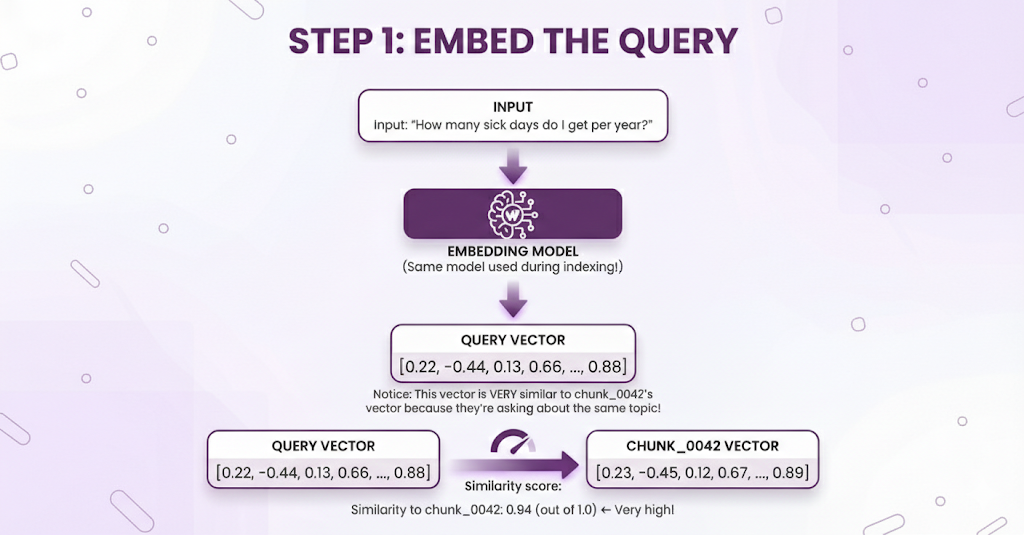
Why this is fast: Embedding models are optimized for speed. Converting one sentence to a vector takes milliseconds.
⏱️ T+100ms: Step 2 - Search the Vector Database
Component in action: Vector Database (via Retriever)
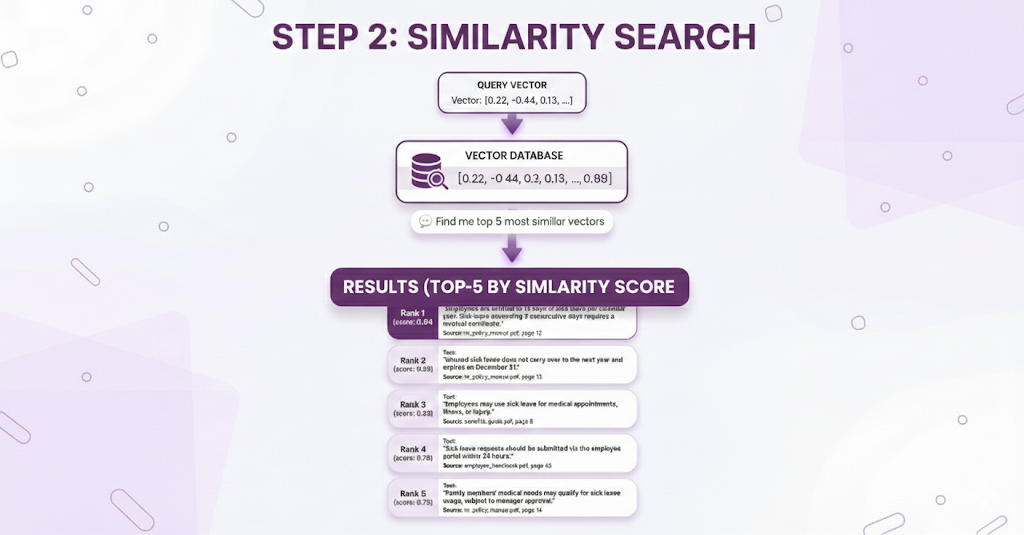
What just happened:
- Vector database compared the query vector against millions of stored vectors
- Found the 5 most similar chunks
- Returned them ranked by similarity score
Why this is fast: Specialized vector indexes make this search incredibly efficient, even with millions of vectors.
⏱️ T+150ms: Step 3 - Assemble the Context
Component in action: Retriever
The retriever takes those 5 chunks and formats them into a prompt for the LLM:
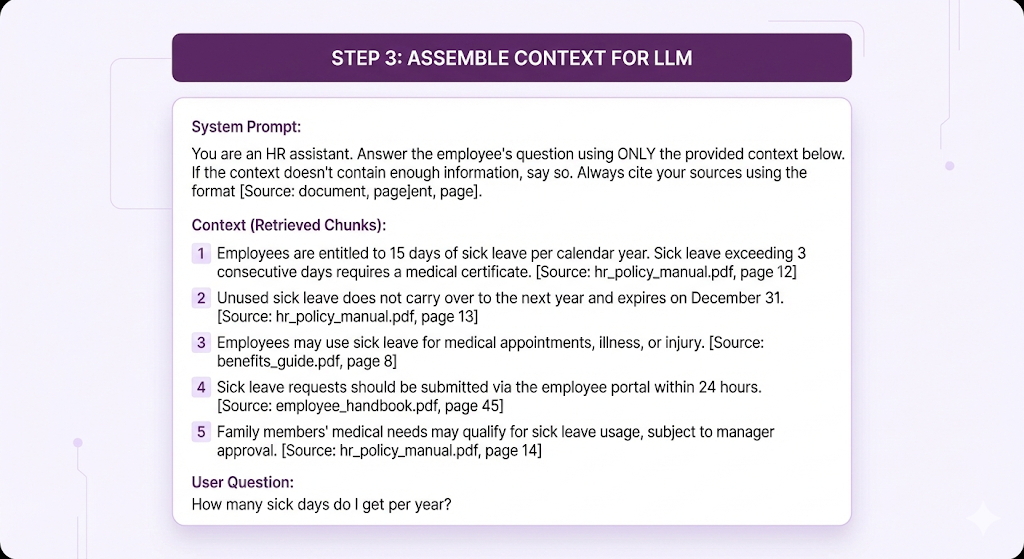
What the retriever did:
- Took the raw search results
- Formatted them with source citations
- Added the system prompt
- Added the user's original question
- Created one complete prompt ready for the LLM
⏱️ T+150ms - T+2500ms: Step 4 - Generate the Answer
Component in action: Generator (LLM)
The LLM receives the assembled prompt and generates a response:
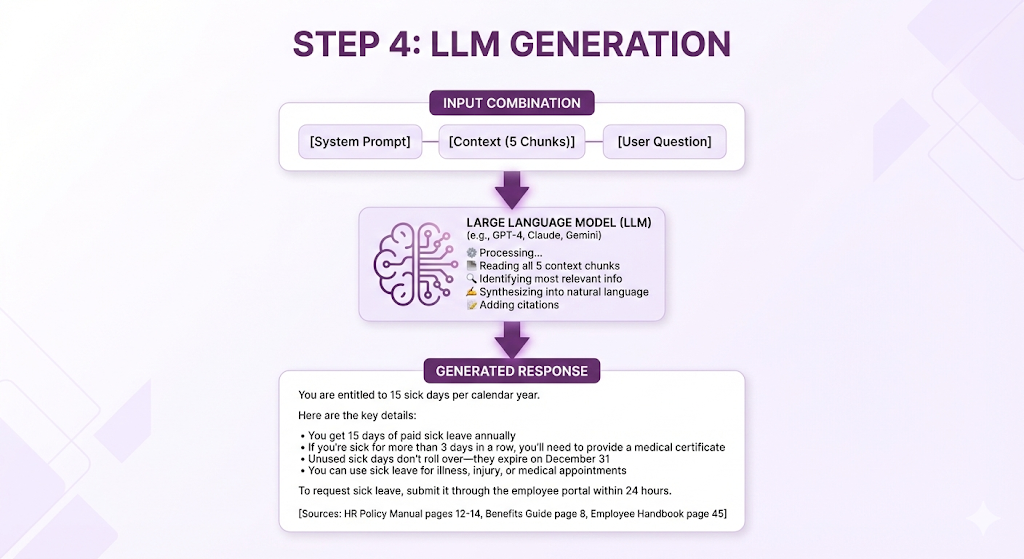
What the LLM did:
- Answered the direct question (15 days)
- Synthesized information from multiple chunks
- Organized it logically with bullet points
- Translated formal policy language to plain English
- Added relevant context the user might need
- Cited all sources
- Stayed grounded in the provided context (didn't hallucinate)
Typical LLM generation time: 1-2 seconds (depends on model and response length)
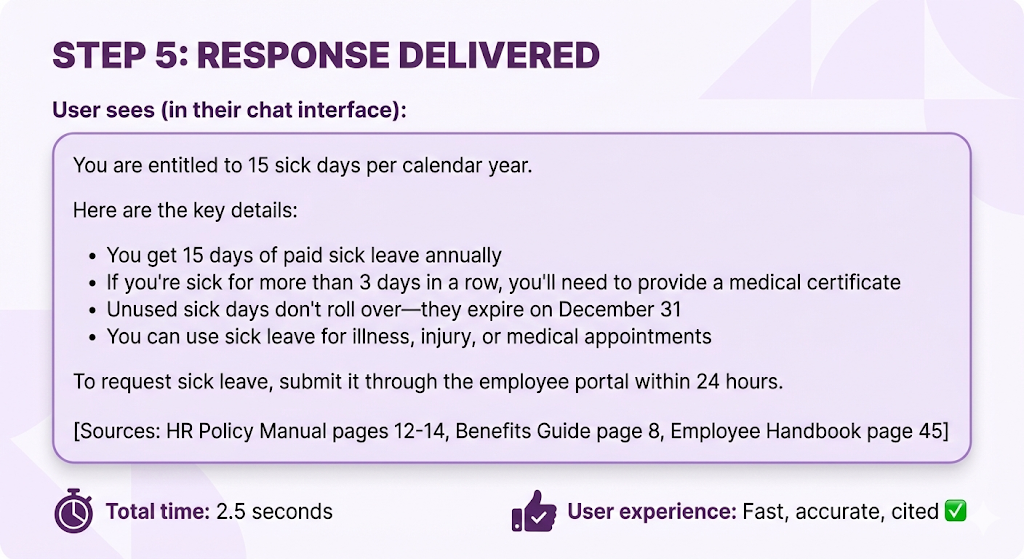
⏱️ T+2500ms: Step 5 - Return to User
The Full Timeline
Let's see the complete journey:
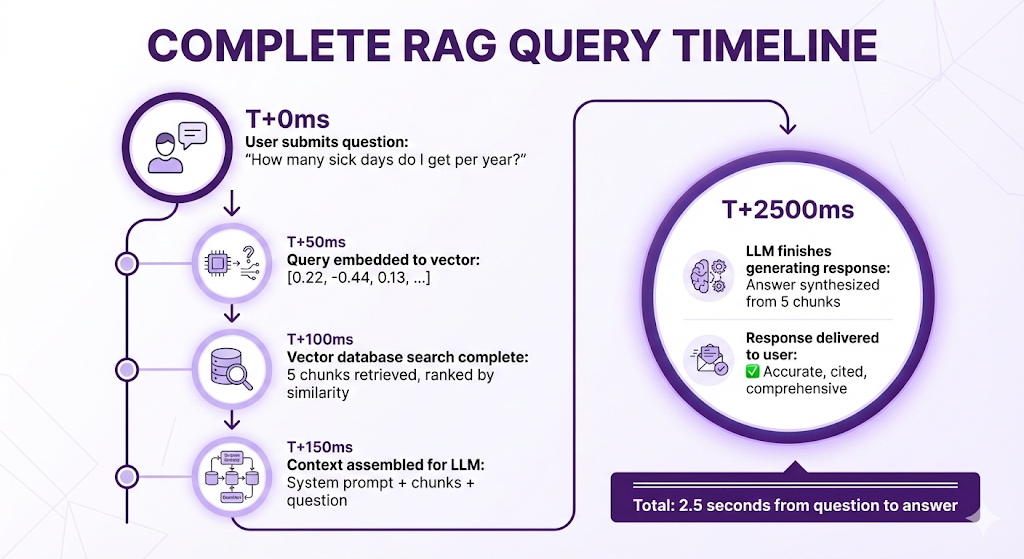
Where the time goes:
- Embedding: 50ms (fast)
- Vector search: 50ms (fast, even with millions of vectors!)
- Context assembly: 50ms (just text formatting)
- LLM generation: 2000ms (slowest step, but streaming makes it feel faster)
- Network overhead: ~300ms (user's internet, server latency)
The bottleneck: LLM generation is the slowest step, but:
- Most modern LLMs support streaming (user sees words appearing in real-time)
- 2-3 seconds total is acceptable for most use cases
- The accuracy/citation trade-off is worth it
What Made This Work?
Let's trace back and see why this query succeeded:
Good Chunking (Happened During Indexing)
- The sick leave policy wasn't split mid-sentence
- Related information (15 days + medical certificate requirement) stayed together in one chunk
- Each chunk had enough context to stand alone
Quality Embeddings (Both Phases)
- "sick days" (user's words) matched "sick leave" (document's words)
- The embedding model understood semantic similarity
- Same model used for indexing and querying
Effective Retrieval (Query Time)
- Vector database found highly relevant chunks (score 0.94 = excellent match)
- Top-5 retrieval captured the main answer + important context
- Chunks from multiple documents provided comprehensive coverage
Grounded Generation (Query Time)
- LLM used ONLY the provided context (no hallucination)
- Synthesized information from multiple chunks into one coherent answer
- Translated policy-speak to plain English
- Cited sources properly
Clean Knowledge Base (Preparation)
- No duplicate or contradictory information
- Up-to-date policy (not mixing old and new versions)
- Good metadata for source attribution
Where All 5 Components Showed Up
Let's map the components to the flow:
| Component | When Used | What It Did |
|---|---|---|
| Knowledge Base | Indexing phase (hours ago) | Provided the source documents with sick leave policy |
| Embedding Model | Indexing (hours ago) + Query time (now) | Converted both documents and query to vectors |
| Vector Database | Indexing (hours ago) + Query time (now) | Stored vectors, then searched them to find top-5 matches |
| Retriever | Query time | Orchestrated: embed query → search → assemble context |
| Generator (LLM) | Query time | Read context, synthesized answer, cited sources |
Every single component played a critical role. Remove any one, and the system breaks.
What Can Go Wrong (And Why)
Now that you've seen the happy path everything working perfectly let's talk about what can go wrong. Understanding failure modes is just as important as understanding how things work.
Failure Mode 1: Wrong Chunks Retrieved
Symptom: LLM gives a correct-sounding answer, but it's about the wrong topic.
Example:
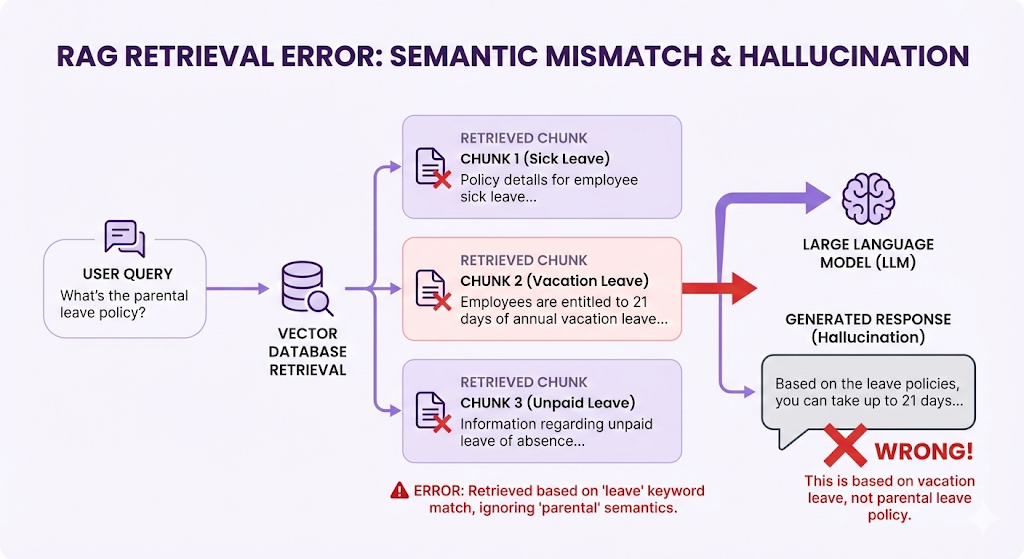
What went wrong:
- The query "parental leave" is semantically similar to all types of "leave"
- Vector search returned high-similarity chunks, but for the wrong leave type
- The actual parental leave policy got ranked 6th (below the top-5 cutoff)
Why it happened:
- Embedding model isn't specific enough (treats all "leave" similarly)
- OR: Chunks are too small (lost the "parental" context)
- OR: Top-K is too low (K=5 missed the relevant chunk at rank 6)
How to fix:
- Use hybrid search (keyword + semantic) to catch exact term "parental"
- Increase Top-K to 10 to cast a wider net
- Improve chunking to keep "parental leave" as a distinct semantic unit
- Add metadata filtering (category = "parental leave policies")
Failure Mode 2: Information Split Across Chunks
Symptom: LLM gives an incomplete answer.
Example:
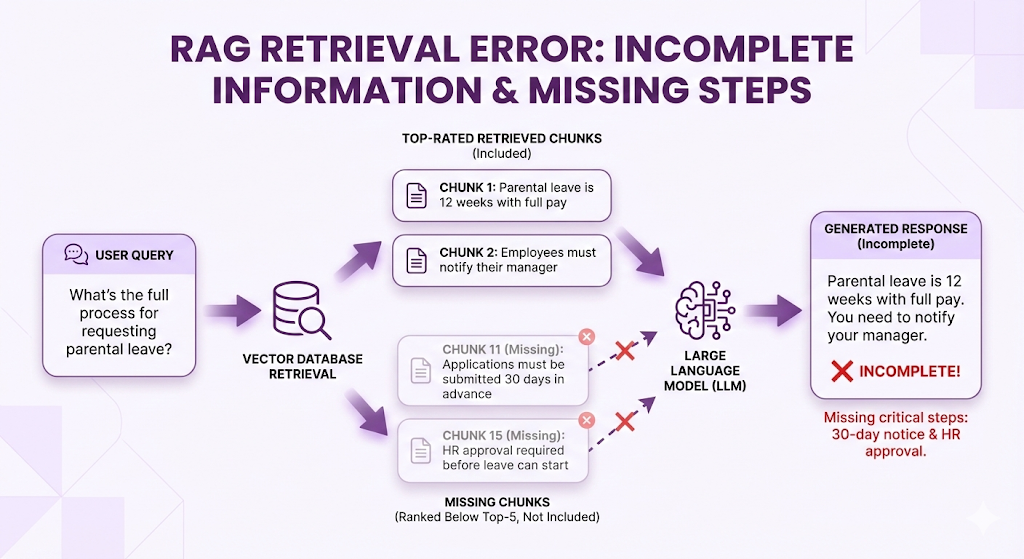
What went wrong:
- Complete answer required 4 chunks
- Only the first 2 were retrieved (Top-5 cutoff)
- Chunking split a multi-step process into separate chunks
- Those chunks didn't score high enough individually
How to fix:
- Increase Top-K (retrieve more chunks)
- Improve chunking strategy (keep related steps together)
- Use hierarchical retrieval (retrieve section headers, then sub-chunks)
Failure Mode 3: Contradictory Information
Symptom: LLM gets confused or gives hedged/uncertain answers.
Example:
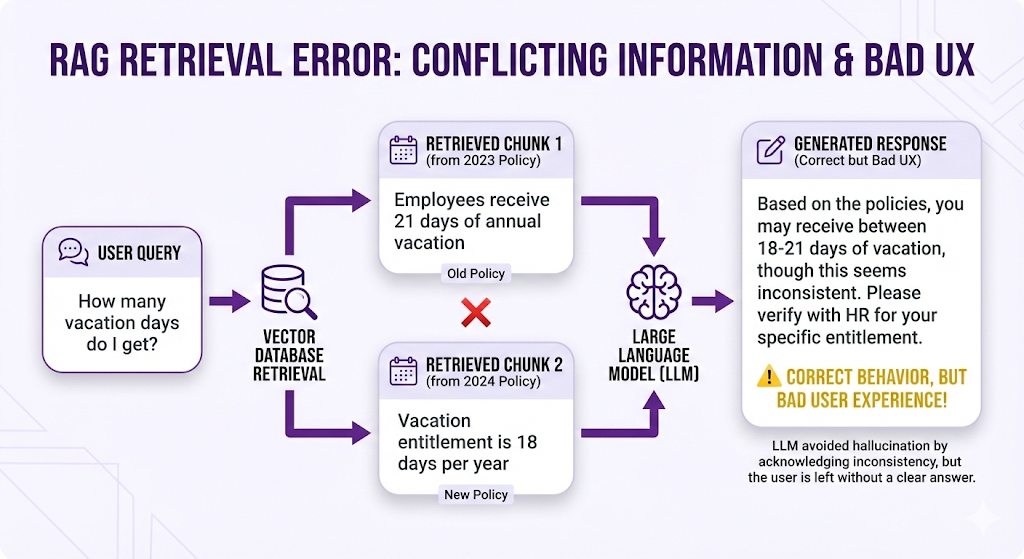
What went wrong:
- Knowledge base contained both old and new policy versions
- Both ranked highly (similar semantic meaning)
- LLM received contradictory information
How to fix:
- Clean knowledge base (remove outdated documents)
- Add metadata filtering (version = "current", year = 2024)
- Use document versioning in metadata
- Implement "last-updated" logic in retrieval
Failure Mode 4: Over-Generic Queries
Symptom: Too many irrelevant chunks retrieved.
Example:
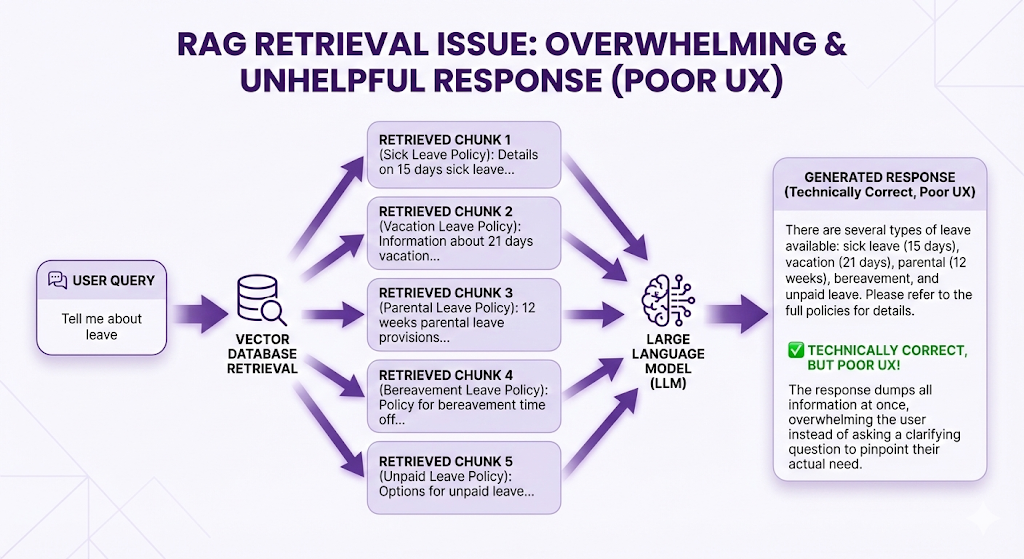
What went wrong:
- Query was too vague
- Everything about "leave" scored high
- User probably meant a specific leave type but didn't say which
How to fix:
- Query clarification (ask user: "Which type of leave?")
- Query expansion (LLM suggests: "Did you mean sick leave, vacation leave, or parental leave?")
- Multi-turn conversation (follow-up question to narrow scope)
Failure Mode 5: Hallucination Despite Context
Symptom: LLM adds information not in the retrieved chunks.
Example:
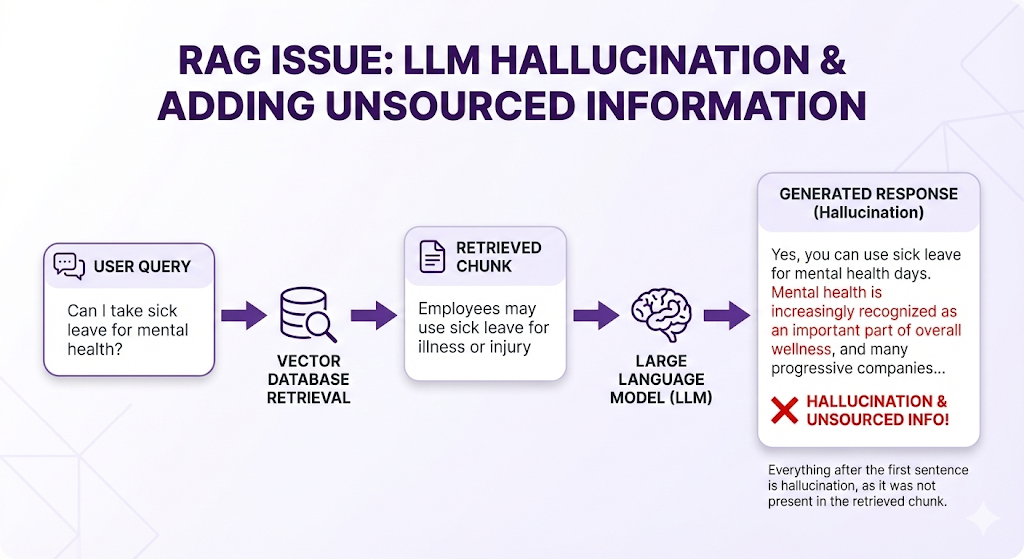
What went wrong:
- The retrieved chunk was vague ("illness")
- LLM filled in gaps with its training data
- System prompt wasn't strict enough
How to fix:
- Stricter system prompt: "Use ONLY the provided context. Do not add information from your training data."
- Shorter context window (less room for the LLM to "think" beyond context)
- Post-processing check (verify each sentence has a source chunk)
Failure Mode 6: Slow Retrieval
Symptom: System is accurate but too slow (>5 seconds).
What went wrong:
- Vector database not optimized
- Too many chunks to embed/search
- Inefficient indexing algorithm
How to fix:
- Use approximate nearest neighbor (ANN) search instead of exact
- Optimize vector database indexes
- Cache frequently-asked queries
- Use faster embedding model (smaller dimensions)
The Common Thread
Notice a pattern in these failures?
Most failures happen at the retrieval stage, not the LLM stage.
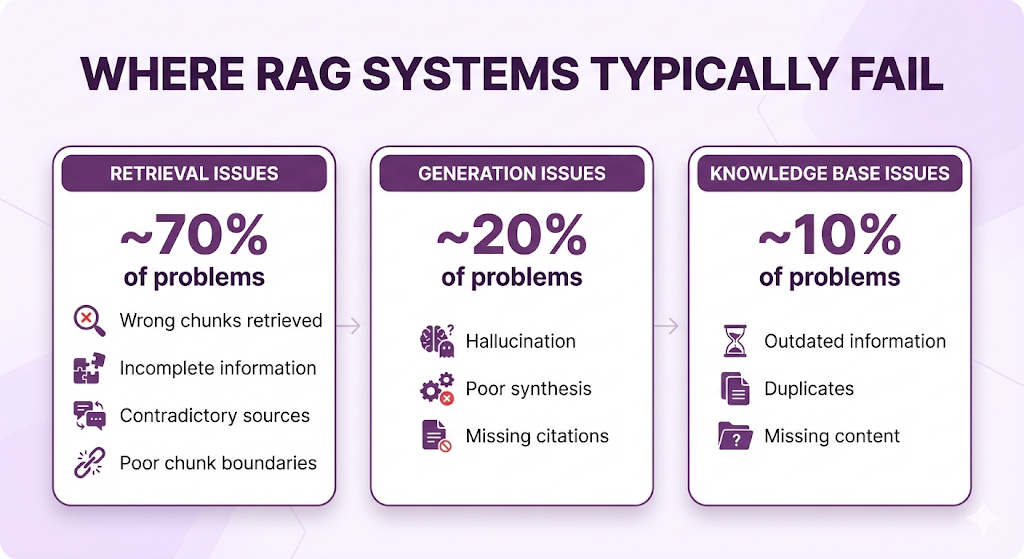
The insight: If you retrieve the RIGHT chunks, even a mediocre LLM will give good answers. But if you retrieve WRONG chunks, even the best LLM can't save you.
This is why the middle of this series (Posts 3-5) focuses heavily on retrieval: chunking, embeddings, and advanced retrieval techniques. Get retrieval right, and most of your problems disappear.
Key Takeaways
You've just built your mental model of RAG architecture. Let's crystallize the key concepts.
The Mental Model
The Core Principles
1. Two Phases, Two Speeds
- Indexing is slow but rare (only when documents change)
- Querying is fast and constant (every user question)
- This separation is what makes RAG scalable
2. Embeddings Are the Bridge
- They translate human language to mathematical space
- Similar meanings = similar vectors
- This enables semantic search (not just keyword matching)
3. Vector Databases Are Purpose-Built
- Traditional databases can't efficiently search high-dimensional vectors
- Vector databases use specialized indexes for fast similarity search
- They make searching millions of vectors possible in milliseconds
4. Retrieval Is the Bottleneck
- 70% of RAG failures happen at retrieval
- Getting the RIGHT chunks matters more than having the BEST LLM
- This is why Posts 3-5 focus heavily on retrieval techniques
5. The LLM Synthesizes, Not Memorizes
- The LLM doesn't "know" your data (it's not in the model weights)
- It reads retrieved chunks and writes an answer
- This is why RAG can stay current without retraining
The Questions You Can Now Answer
After reading this post, you should be able to explain:
What's the difference between indexing and query time?
- Indexing = preparation (slow, rare)
- Query time = answering questions (fast, constant)
Why do we need embeddings?
- To enable semantic search
- So "vacation days" can match "annual leave"
Why can't we just use a regular database?
- Traditional databases weren't built for high-dimensional similarity search
- Vector databases are optimized specifically for this
What does Top-K mean?
- The number of chunks to retrieve per query
- Typically K=3 to K=10 for most systems
What's the slowest part of a RAG query?
- LLM generation (1-2 seconds)
- But streaming makes it feel faster
Where do most RAG systems fail?
- Retrieval (wrong chunks, incomplete info, contradictions)
- Get retrieval right, and most problems disappear
What You Don't Need to Worry About Yet
We intentionally kept some details out of this post. You don't need to understand these yet:
- How to choose an embedding model (Post 4)
- What chunking strategy to use (Post 3)
- How HNSW or IVF indexes work (Post 4)
- Whether to use hybrid search or pure vector search (Post 5)
- How to evaluate your RAG system (Post 8)
For now, you have the foundation. Everything else builds on this mental model.
What's Next
You understand the architecture. You know the five components. You've seen the complete flow from question to answer.
But here's the thing: Building a RAG system is one thing. Building a GOOD RAG system is entirely different.
The difference between a RAG system that works 60% of the time and one that works 95% of the time? It's not the LLM. It's the decisions you make about chunking, embeddings, and retrieval.
The Journey Ahead
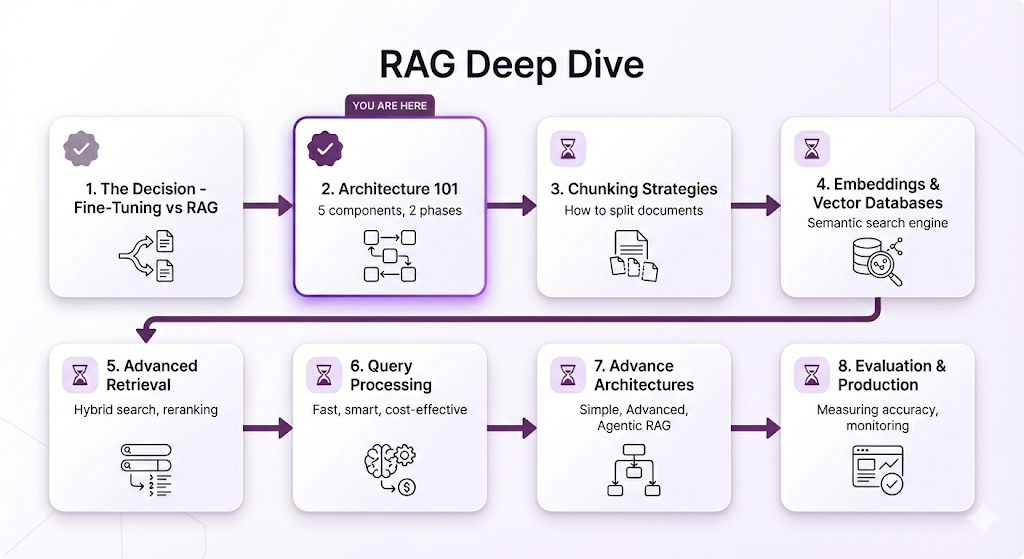
Post 3 Preview: Chunking Strategies
In the next post, we're diving into the decision that determines what your RAG system can find: how you chunk your documents.
Here's what we'll cover:
The Chunking Problem:
- Remember that sick leave example? The answer worked because the chunking kept "15 days" + "medical certificate requirement" in the same chunk
- What if the chunking had split mid-sentence? The answer would have been incomplete
- Chunking is the invisible decision that makes or breaks retrieval
What You'll Learn:
Fixed-Size vs. Semantic Chunking
- Should you split every 512 tokens? Or based on meaning?
- What's the trade-off between simplicity and accuracy?
Handling Structure
- What do you do with tables? Bullet points? Nested lists?
- How do you preserve context in hierarchical documents?
- When does structure matter, and when can you ignore it?
The Overlap Strategy
- Should chunks overlap? By how much?
- What's the trade-off between redundancy and lost context?
Chunk Size Optimization
- Too small = lost context, too many irrelevant retrievals
- Too large = irrelevant information dilutes the signal
- How do you find the sweet spot for YOUR documents?
Real-World Examples
- See side-by-side comparisons: good chunking vs. bad chunking
- Understand why the same query retrieves different results based on chunking strategy
- Learn the chunking decisions that took systems from 60% → 95% accuracy
Why Chunking Matters More Than You Think
Here's the brutal truth about RAG:
If you chunk poorly, no amount of fancy retrieval techniques will save you. You could use the best embedding model, the fastest vector database, and the most advanced reranking but if the right information isn't in a retrievable chunk, your system will fail.
Chunking is the foundation. Get it right, and everything else gets easier. Get it wrong, and you'll spend months debugging retrieval problems.
In Post 3, you'll learn:
- How to analyze your documents and pick the right chunking strategy
- The questions to ask before you start chunking
- Common chunking mistakes and how to avoid them
- When to use advanced techniques vs. simple approaches
See You in Post 3
You've got the architecture. Now let's master the first real implementation decision: how to prepare your documents so RAG can actually find what it needs.
If you missed Part 1 of this series, you can read it here.
Ready to Build Your RAG System?
We help companies build production-grade RAG systems that actually deliver results. Whether you're starting from scratch or optimizing an existing implementation, we bring the expertise to get you from concept to deployment. Contact us and Let's talk about your use case.


Part 2 of the RAG Deep Dive Series | Next up: Chunking Strategies