RAG Deep Dive Series: Chunking Strategies
Part 3: Chunking — The Foundation of Retrieval Quality

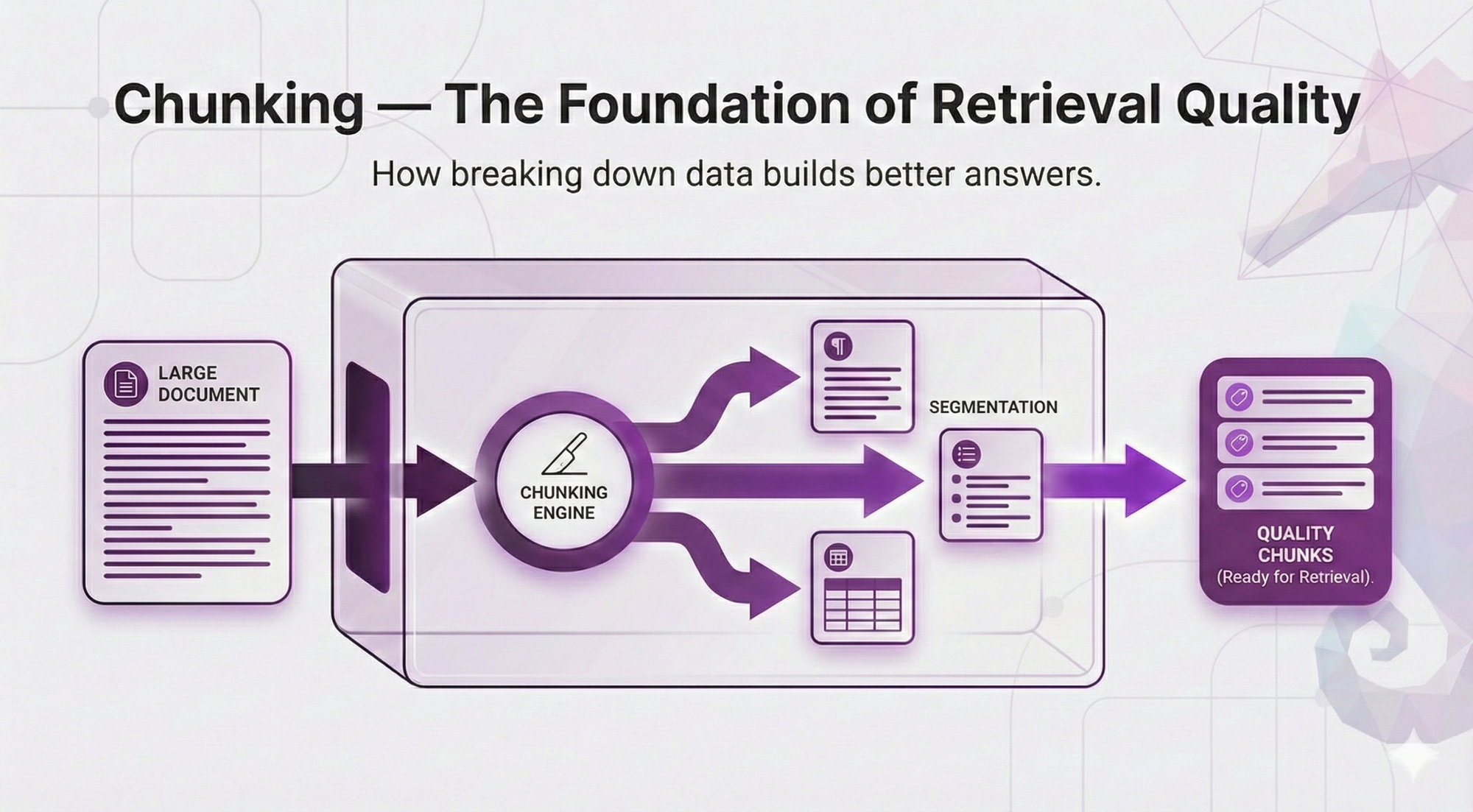
In Post 2, we built your mental model of RAG architecture. You learned the 5 core components, the two-phase split, and the complete flow from question to answer.
But there's something we glossed over. Something that seems simple on the surface but actually determines whether your RAG system gives brilliant answers or total garbage.
Chunking.
Remember that sick leave policy example from Post 2? The one that worked perfectly? Let me show you what we didn't tell you.
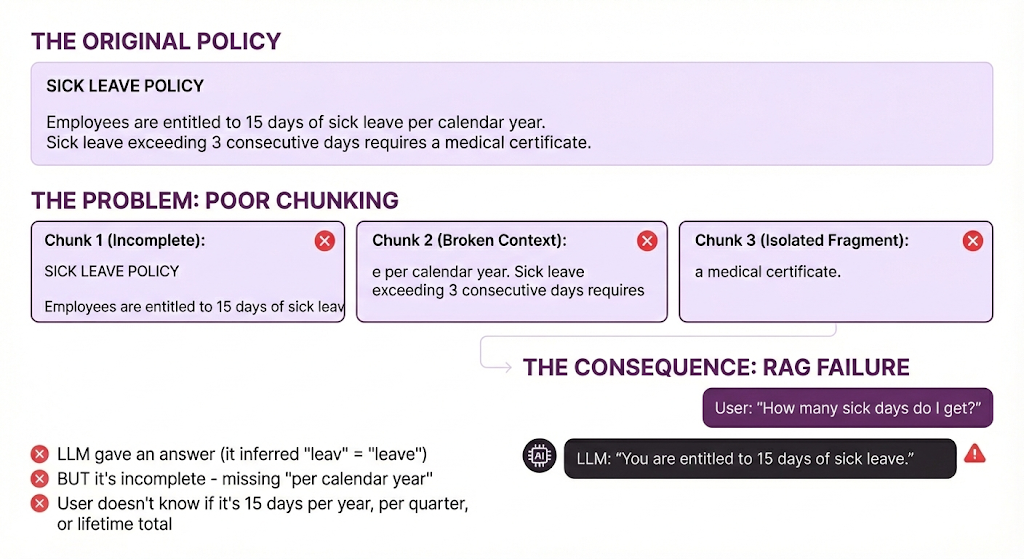
Even worse - if the user asks a different question:
User asks: "Do I need a doctor's note for sick leave?"
System retrieves: Chunk 1 (mentions "sick leave")
LLM sees: "Employees are entitled to 15 days of sick leav"
LLM responds: "Based on the policy, employees are entitled to 15 days of sick leave. I don't see information about doctor's notes in the provided context."
What went wrong:
- The information about medical certificates IS in the document (Chunk 3)
- But bad chunking split it into a different chunk
- That chunk didn't get retrieved
- So the LLM gives an incomplete answer without knowing it's incomplete
Same document. Same retrieval system. Different chunking. Completely broken.
This isn't a hypothetical. This is what happens when you naively split text every N characters without thinking about boundaries.
Here's the Thing
Chunking feels like a boring preprocessing step. It's not sexy like embeddings or vector databases. It doesn't have the AI magic of LLMs generating answers.
But chunking is where most RAG systems live or die.
You can have the best embedding model, the fastest vector database, and the most advanced LLM. But if your chunks are broken, you're retrieving garbage. And if you're retrieving garbage? The LLM can't save you.
Remember this from Post 2:
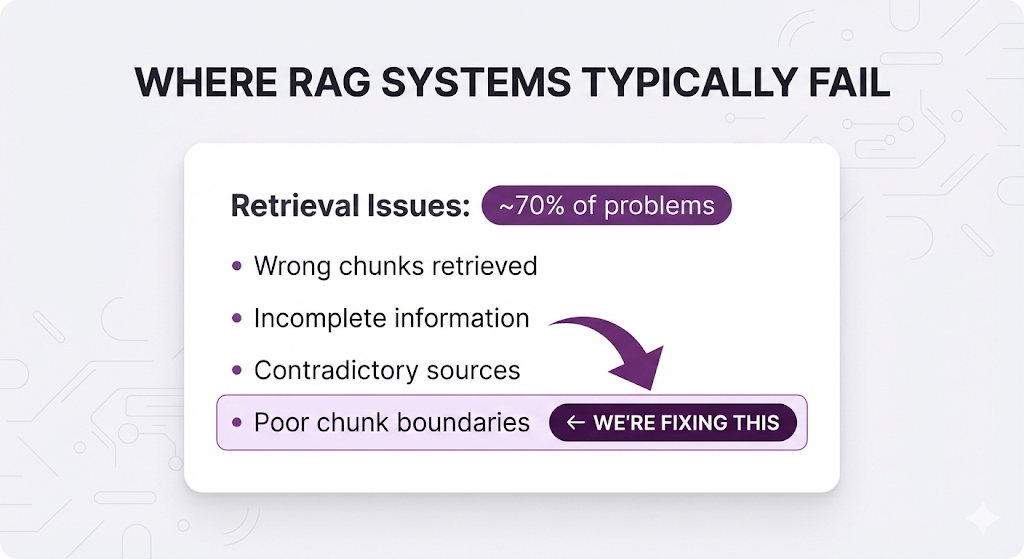
Chunking is the root cause of most retrieval problems. Get it right, and you solve 70% of your RAG issues before they even happen.
What You'll Learn
In this post, we're diving deep into chunking strategies not with code, but with clear explanations of how each strategy works and when to use it.
You'll understand:
- The 4 main chunking strategies (fixed-size, recursive, semantic, agentic)
- How to choose the right chunk size for your documents
- When overlap helps and when it just creates noise
- How to handle tables, code blocks, and special content
- The decision framework for picking your strategy
- Common mistakes that break retrieval
Same promise as always: Starting from zero. No code. Just concepts, analogies, and the mental models you need to make smart decisions.
By the end of this post, you'll understand why chunking matters more than almost any other decision in your RAG pipeline and how to get it right.
Let's start with the fundamentals.
Table of Contents
- What Is Chunking?
- The Chunking Problem
- The Four Chunking Strategies
- Strategy 1: Fixed-Size Chunking
- Strategy 2: Recursive Chunking
- Strategy 3: Semantic Chunking
- Strategy 4: Agentic Chunking
- Chunk Size: The Goldilocks Problem
- Overlap: The Safety Net
- Beyond the Basics
- The Decision Framework
- Key Takeaways
- What's Next
What Is Chunking?
Chunking = splitting your documents into smaller pieces before indexing them.
That's it. That's the concept.
But here's why it matters: embedding models and LLMs have token limits.
From Post 2, you know that:
- The embedding model converts text to vectors
- The vector database stores these vectors
- The LLM reads retrieved chunks to generate answers
The problem: You can't just throw an entire 100-page policy manual at an embedding model. It has limits:
| Model | Max Tokens |
|---|---|
| text-embedding-3-small (OpenAI) | 8,191 tokens (~6,000 words) |
| text-embedding-004 (Google) | 2,048 tokens (~1,500 words) |
| embed-v3 (Cohere) | 512 tokens (~380 words) |
So you have to split. That's chunking.
The Database Analogy
Think of chunking like designing a database schema.
| Database Design | Chunking |
|---|---|
| Defines how data is stored | Defines how knowledge is stored |
| Affects every query's performance | Affects every retrieval's quality |
| Hard to change after launch | Hard to re-index thousands of documents |
| Poor design → slow queries | Poor chunks → wrong answers |
| Get it right early → smooth sailing | Get it right early → accurate retrieval |
Just like you wouldn't design a database without thinking about how you'll query it, you shouldn't chunk documents without thinking about what questions users will ask.
The Chunking Problem
Before we dive into strategies, let's understand what makes chunking hard.
The Three Chunking Goals (That Conflict)
Every chunk should be:
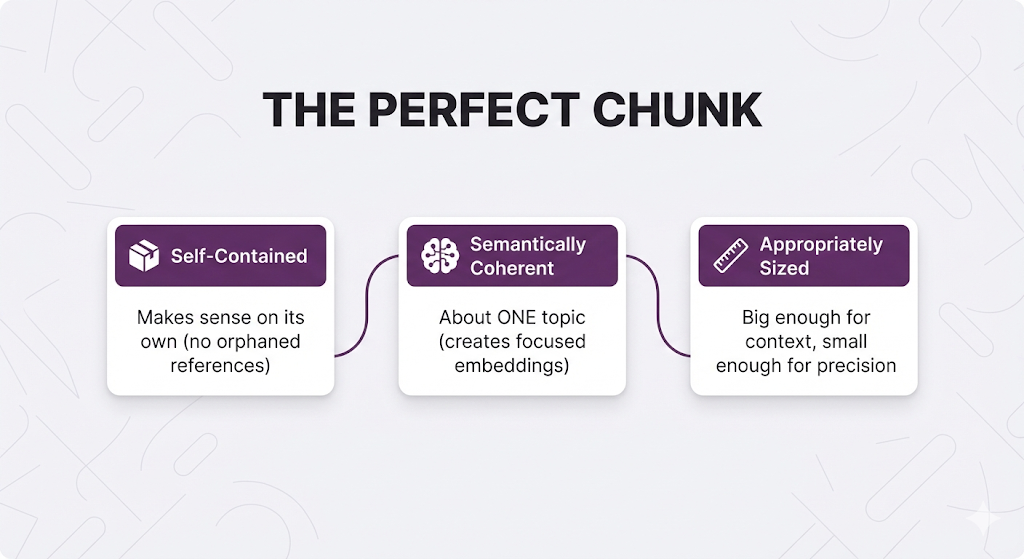
The problem: These goals conflict.
Example:
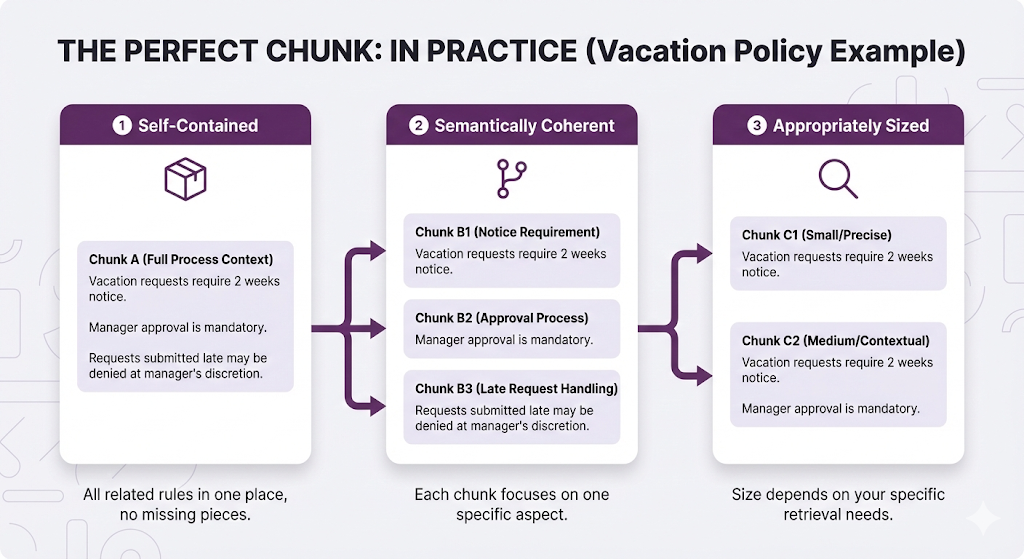
You can't satisfy all three perfectly.
Chunking is about trade-offs.
What Happens When You Get It Wrong
Let's see the failure modes:
❌ Chunks Too Small:
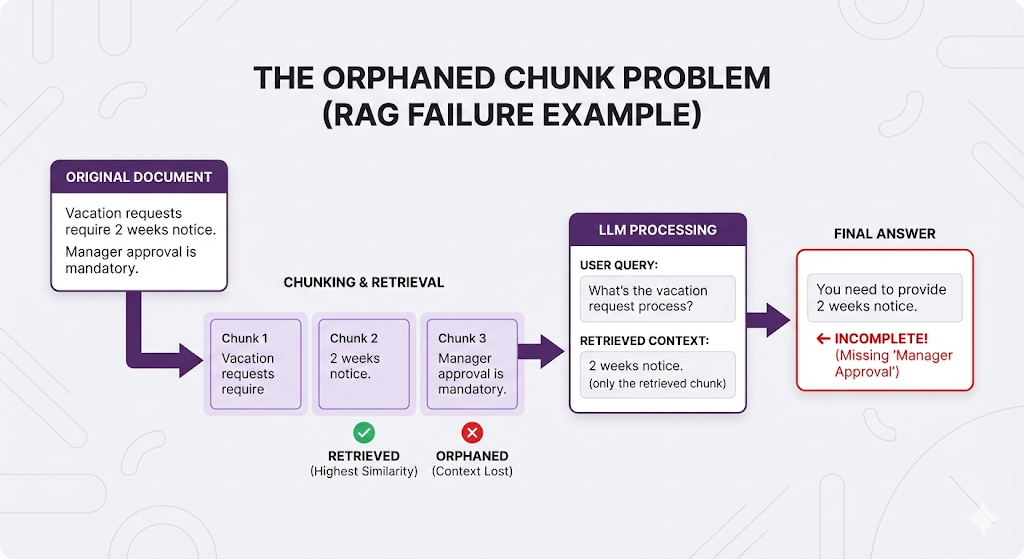
❌ Chunks Too Large:
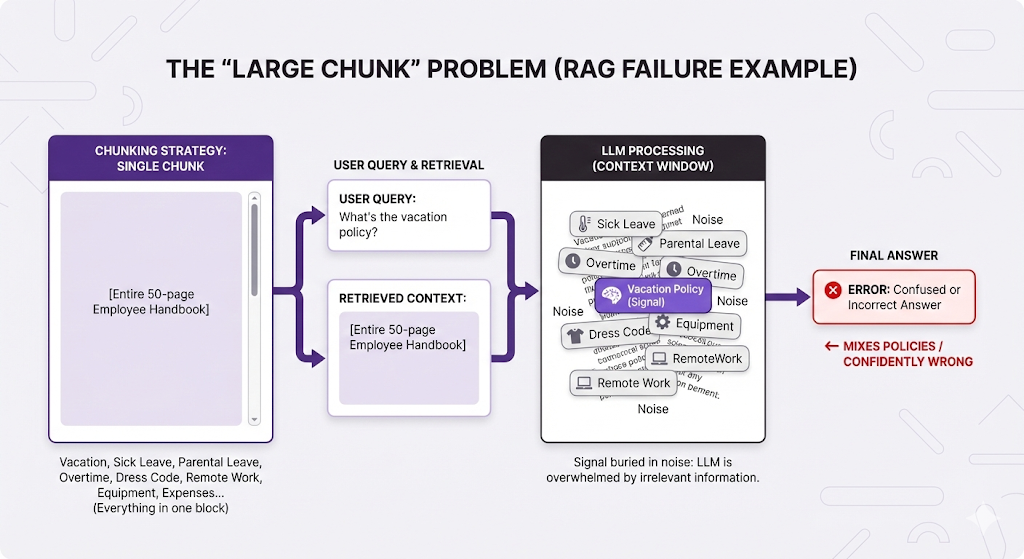
❌ Bad Boundaries (Split Mid-Sentence):
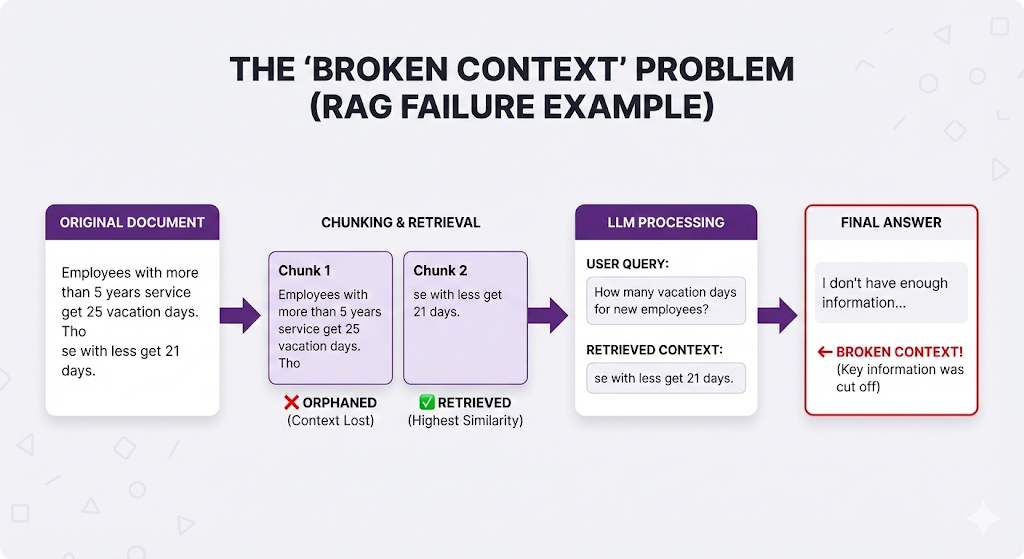
The pattern: Bad chunking → wrong retrieval OR incomplete context → poor answers.
The Four Chunking Strategies
There are four main approaches to chunking, each with different trade-offs. Let's explore them from simplest to most sophisticated.
Strategy 1: Fixed-Size Chunking
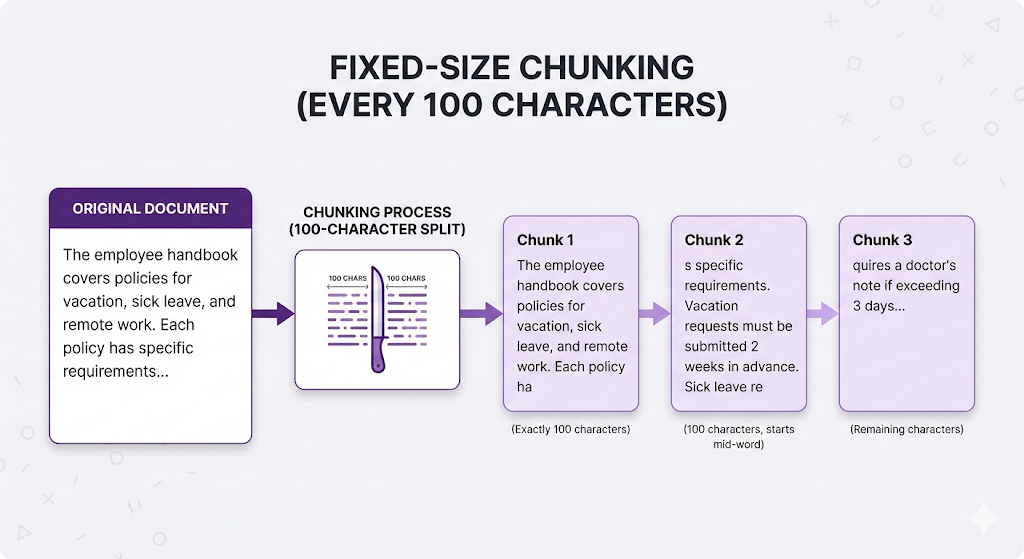
The approach: Split text every N characters or tokens, regardless of content.
Think of it like: Cutting a cake with a ruler. Every slice is exactly 2 inches, whether it cuts through frosting, filling, or both.
How It Works
The Good
| Advantage | Why It Matters |
|---|---|
| Dead simple | Just count and split no analysis needed |
| Predictable | Every chunk is roughly the same size |
| Fast | No computational overhead |
| Universal | Works on any text, any language |
The Bad
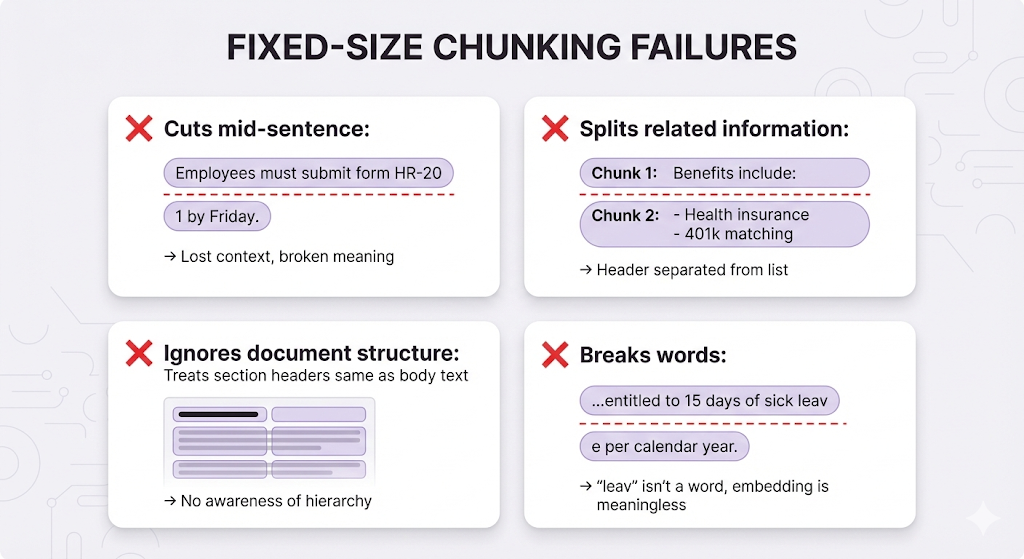
When to Use It
Use fixed-size chunking when:
- You're prototyping (need something working NOW)
- Your content is extremely uniform (e.g., log entries, simple records)
- You need predictable chunk sizes for downstream processing
- Speed matters more than quality
Don't use it when:
- Document structure matters (which is almost always)
- You care about retrieval quality
- You're going to production
Real talk: Fixed-size chunking is the "hello world" of RAG. It's where you start, not where you stay.
Strategy 2: Recursive Chunking
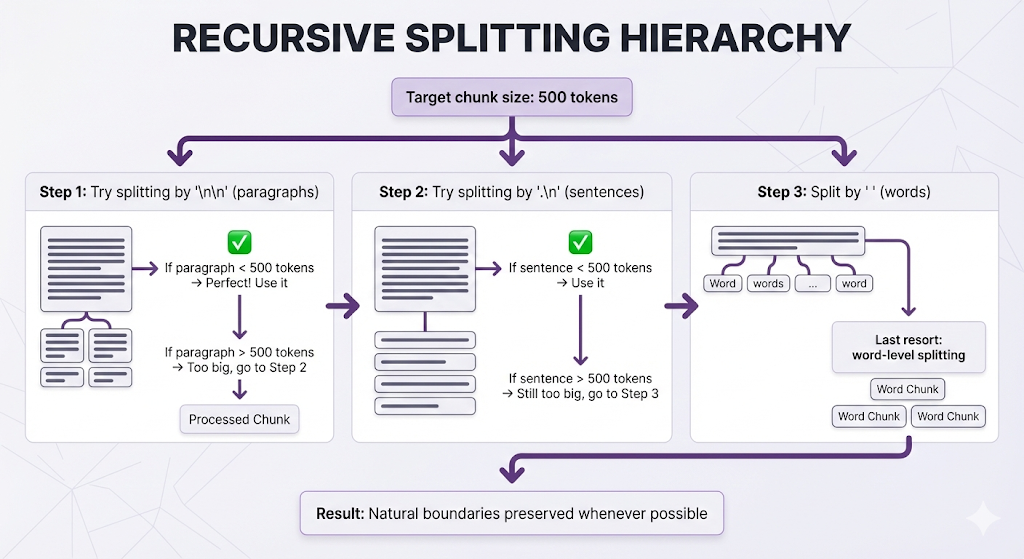
The approach: Try to split at natural boundaries (paragraphs, then sentences, then words), falling back to smaller units only when needed.
Think of it like: Cutting a cake along the layers. First try to separate by frosting layers. If a layer is too big, cut it at the cake's natural divisions. Only cut through the middle as a last resort.
How It Works
The hierarchy:
Example in Action
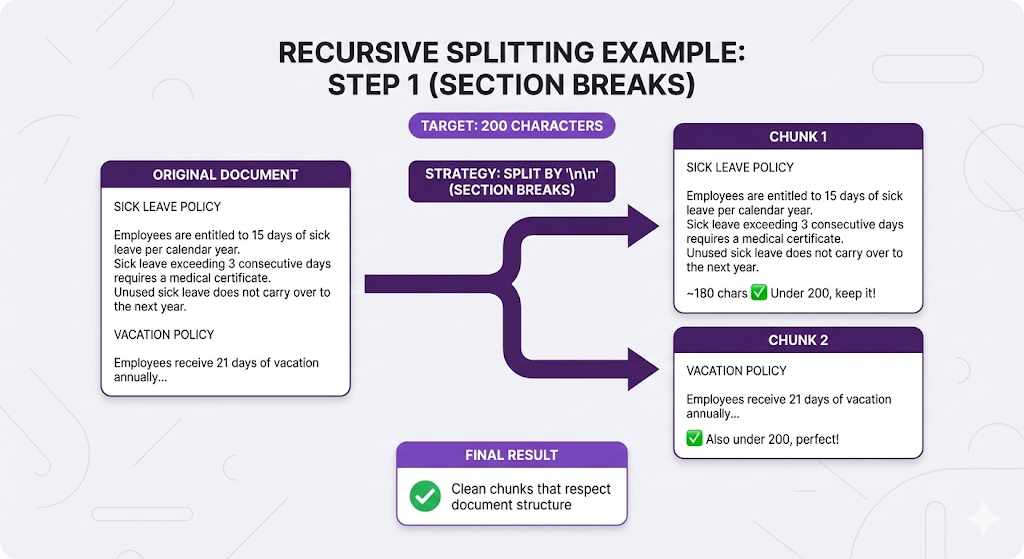
Compare to fixed-size (every 100 chars):
Chunk 1: "SICK LEAVE POLICY\n\nEmployees are entitled to 15 days of sick leave per calendar year. Sick leav"
Chunk 2: "e exceeding 3 consecutive days requires a medical certificate. Unused sick leave does not carry o"
Chunk 3: "ver to the next year.\n\nVACATION POLICY\n\nEmployees receive 21 days..."

❌ Breaks sentences, loses structure
The Good
| Advantage | Why It Matters |
|---|---|
| Respects structure | Keeps related content together |
| Graceful degradation | Falls back intelligently when needed |
| No broken sentences | Worst case is word-level, not character-level |
| Configurable | You control the separator hierarchy |
The Bad
| Limitation | Why It Matters |
|---|---|
| Still size-based | Eventually splits when size limit is hit |
| Doesn't understand meaning | A paragraph might contain 3 different topics |
| Separator-dependent | Only works well on formatted text |
When to Use It
Recursive chunking is the default for most production RAG systems. Use it when:
- You have structured documents (sections, paragraphs)
- You want better quality than fixed-size without complexity
- You're building a production system (not just prototyping)
This is the sweet spot. 80% of RAG systems should start here.
Strategy 3: Semantic Chunking
The approach: Split based on meaning, not size or formatting.
Think of it like: Asking an editor to break up an article. They read it, understand the topics, and split where the subject changes regardless of paragraph breaks or word count.
The Problem It Solves
Consider this document:
"""
Our company was founded in 2010 in San Francisco. We started with
just 5 employees in a small garage. Today, we have over 500 staff
across three continents.

Our mission is to make AI accessible to everyone. We believe that
artificial intelligence should be a tool for empowerment, not
replacement. Every product we build reflects this philosophy.
"""
Recursive chunking might keep this as one chunk (it's short enough).
But there are two distinct topics:
- Company history
- Company mission
If someone asks "What's the company's mission?" they get company history as baggage, which dilutes the embedding and might cause the retriever to miss better chunks about mission statements elsewhere.
How Semantic Chunking Works
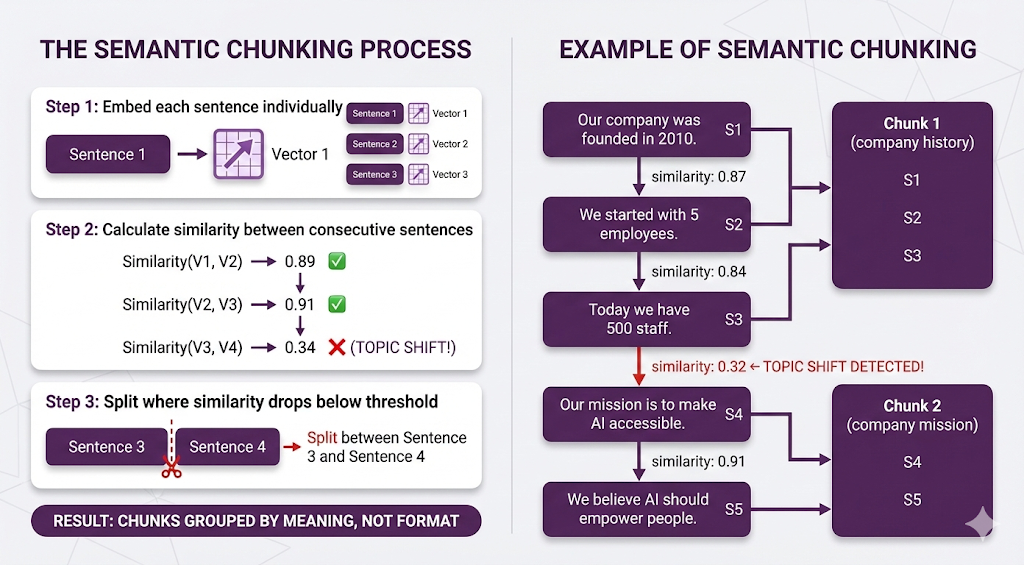
Result: Each chunk is topically coherent, even though there were no paragraph breaks.
The Good
| Advantage | Why It Matters |
|---|---|
| Topic-aware | Understands what text is about |
| Format-independent | Works on unstructured text |
| High-quality chunks | Better retrieval precision |
The Bad
| Limitation | Why It Matters |
|---|---|
| Computationally expensive | Must embed every sentence |
| Slower | Adds significant indexing time |
| Requires tuning | Similarity threshold affects results |
| Can miss structure | Ignores formatting cues |
When to Use It
Use semantic chunking when:
- Your documents are unstructured (no clear sections/paragraphs)
- Content quality matters more than indexing speed
- You have transcripts, conversations, or stream-of-consciousness text
- Recursive chunking isn't giving good results
Don't use it when:
- You have well-structured documents (recursive is faster and equally good)
- Indexing speed is critical
- You're working with thousands of documents
Strategy 4: Agentic Chunking
The approach: Use an LLM to read the document and decide how to chunk it.
Think of it like: Hiring a professional editor to organize your content. They read it, understand the structure and meaning, then chunk it intelligently based on both.
How It Works
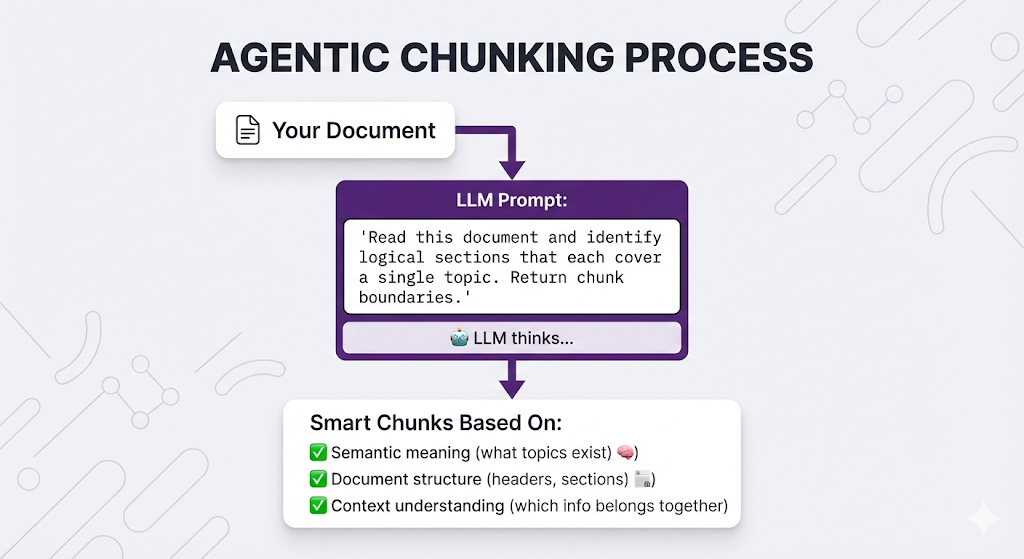
Example Prompt
"Given the following document, identify logical chunks where each chunk:
1. Covers a single coherent topic
2. Is self-contained and understandable on its own
3. Is between 100-500 words

Return chunk boundaries with start/end positions."

Document:
[Your document here]
The Good
| Advantage | Why |
|---|---|
| Highest quality | LLM "reads" like a human |
| Handles edge cases | Can deal with unusual structures |
| Can add metadata | LLM can summarize or tag each chunk |
The Bad
| Limitation | Why It Matters |
|---|---|
| Expensive | LLM API call for every document |
| Slow | Adds minutes to indexing |
| Non-deterministic | Same document might chunk differently each time |
| Overkill | Using a cannon to kill a fly for most documents |
When to Use It
Use agentic chunking when:
- You have a small number of high-value documents
- Documents are complex and unstructured
- You need metadata/summaries per chunk
- Cost and speed aren't concerns (one-time indexing)
Don't use it when:
- You have thousands of documents (cost explodes)
- You need fast, deterministic results
- Your documents are simple/structured
Strategy Comparison
| Strategy | Speed | Quality | Complexity | Best For |
|---|---|---|---|---|
| Fixed-Size | ⚡⚡⚡ | ⭐ | Simple | Prototypes |
| Recursive | ⚡⚡ | ⭐⭐⭐ | Moderate | Production (default) |
| Semantic | ⚡ | ⭐⭐⭐⭐ | Complex | Unstructured text |
| Agentic | 🐢 | ⭐⭐⭐⭐⭐ | Complex | High-value documents |
The 80/20 rule: Recursive chunking solves 80% of use cases. Only move to semantic/agentic if you have specific quality issues.
Chunk Size: The Goldilocks Problem
You've picked your chunking strategy. Now you need to decide: how big should each chunk be?
This is where most people get stuck. Because there's no universal answer it depends on your documents, your queries, and your use case.
But there are principles to guide you.
The Trade-Off
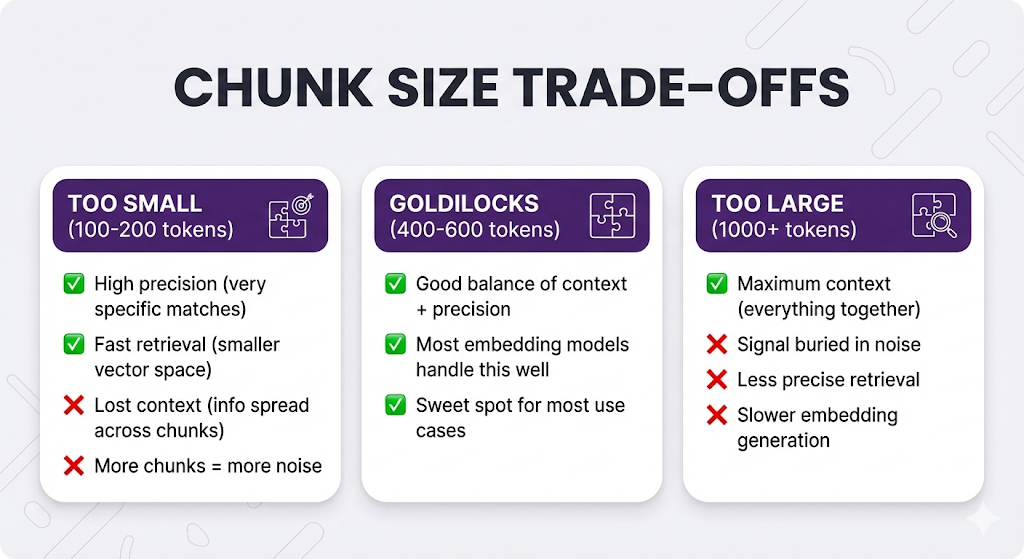
The Context vs. Precision Problem
Let's see this trade-off in action with a real example.
Document:
PARENTAL LEAVE POLICY

Eligibility:
- Full-time employees with 1+ year tenure
- Part-time employees with 2+ years tenure

Entitlement:
- Primary caregivers: 16 weeks paid leave
- Secondary caregivers: 6 weeks paid leave

Application Process:
- Submit form HR-305 at least 30 days before expected date
- Attach medical documentation
- Manager approval required
- HR approval required

Benefits During Leave:
- Health insurance continues
- 401k matching paused
- Paid time off accrual paused
User asks: "How do I apply for parental leave?"
Scenario 1: Small Chunks (100-150 tokens each)
Chunk 1: "Eligibility: Full-time employees with 1+ year tenure.
          Part-time employees with 2+ years tenure."

Chunk 2: "Entitlement: Primary caregivers get 16 weeks paid leave.
          Secondary caregivers get 6 weeks paid leave."

Chunk 3: "Application Process: Submit form HR-305 at least 30 days
          before expected date. Attach medical documentation."

Chunk 4: "Manager approval required. HR approval required."

Chunk 5: "Benefits During Leave: Health insurance continues.
          401k matching paused. Paid time off accrual paused."
Query: "How do I apply for parental leave?"
Retrieved (Top-3):
- Chunk 3 (high similarity: "application process")
- Chunk 4 (medium similarity: "approval")
- Chunk 2 (medium similarity: "parental leave")
LLM sees:
[3] Submit form HR-305 at least 30 days before expected date.
    Attach medical documentation.
[4] Manager approval required. HR approval required.
[2] Primary caregivers get 16 weeks paid leave...
LLM response:
"To apply for parental leave, submit form HR-305 at least 30 days
before your expected date with medical documentation. You'll need
both manager and HR approval."
Result: Correct answer! But notice Chunk 2 (entitlement) was retrieved even though it's not relevant to "how to apply." That's noise.
Scenario 2: Large Chunks (500+ tokens each)
Chunk 1: [Everything about eligibility + entitlement + application]

"Eligibility: Full-time employees with 1+ year tenure. Part-time
employees with 2+ years tenure. Entitlement: Primary caregivers
get 16 weeks paid leave. Secondary caregivers get 6 weeks paid
leave. Application Process: Submit form HR-305 at least 30 days
before expected date. Attach medical documentation. Manager
approval required. HR approval required."
Query: "How do I apply for parental leave?"
Retrieved (Top-1):
- Chunk 1 (contains "application process")
LLM sees:
[1] Eligibility: Full-time employees with 1+ year tenure...
    Entitlement: Primary caregivers get 16 weeks...
    Application Process: Submit form HR-305...
    [All the details]
LLM response:
"To apply for parental leave, submit form HR-305 at least 30 days
before your expected date with medical documentation. You'll need
both manager and HR approval.

Note: Full-time employees need 1+ year tenure, part-time need 2+ years.
Primary caregivers get 16 weeks paid, secondary get 6 weeks."
Result: Correct answer, but includes eligibility/entitlement info the user didn't ask for. The signal (application process) is diluted by noise (eligibility rules, leave duration).
Scenario 3: Medium Chunks (300-400 tokens each)
Chunk 1: "Eligibility: Full-time employees with 1+ year tenure.
          Part-time employees with 2+ years tenure.

          Entitlement: Primary caregivers get 16 weeks paid leave.
          Secondary caregivers get 6 weeks paid leave."

Chunk 2: "Application Process: Submit form HR-305 at least 30 days
          before expected date. Attach medical documentation.
          Manager approval required. HR approval required.

          Benefits During Leave: Health insurance continues.
          401k matching paused. Paid time off accrual paused."
Query: "How do I apply for parental leave?"
Retrieved (Top-1):
- Chunk 2 (high similarity: "application process")
LLM sees:
[2] Application Process: Submit form HR-305 at least 30 days before
    expected date. Attach medical documentation. Manager approval
    required. HR approval required.

    Benefits During Leave: Health insurance continues. 401k matching
    paused. Paid time off accrual paused.
LLM response:
"To apply for parental leave, submit form HR-305 at least 30 days
before your expected date with medical documentation. You'll need
both manager and HR approval.

During your leave, your health insurance will continue, but 401k
matching and PTO accrual will pause."
Result: Perfect! Application process + relevant adjacent info (what happens during leave). No noise about eligibility.
The Pattern
| Chunk Size | Precision | Context | Best For |
|---|---|---|---|
| Small (100-200) | High (very specific) | Low (fragmented) | Simple Q&A, FAQs |
| Medium (300-600) | Balanced | Balanced | Most use cases |
| Large (800+) | Low (diluted signal) | High (everything) | Research, summaries |
The sweet spot for most RAG systems: 400-600 tokens (~300-450 words).
Tokens vs. Characters vs. Words
Quick conversion guide (approximate, English text):
| Tokens | Words | Characters | Approximate Length |
|---|---|---|---|
| 100 | ~75 | ~400 | 1 paragraph |
| 200 | ~150 | ~800 | 2 paragraphs |
| 400 | ~300 | ~1600 | 4 paragraphs |
| 500 | ~375 | ~2000 | 5 paragraphs |
| 1000 | ~750 | ~4000 | 2-3 pages |
Remember: Embedding models have max token limits. Don't exceed them or your chunks get truncated!
| Model | Max Tokens |
|---|---|
| text-embedding-3-small (OpenAI) | 8,191 |
| text-embedding-004 (Google) | 2,048 |
| embed-v3 (Cohere) | 512 |
If your target chunk size is 500 tokens but your model maxes at 512, you're cutting it close. Leave headroom.
Overlap: The Safety Net
So far, we've talked about splitting documents. But what if the perfect answer sits right at a chunk boundary?
Example:
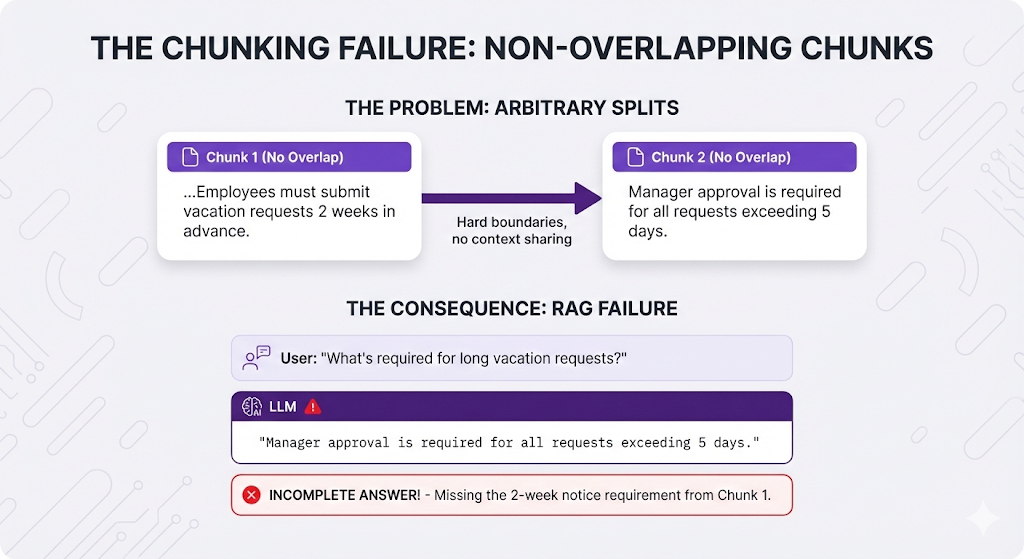
Perfect answer spans BOTH chunks, but:
- Chunk 1 doesn't mention the approval requirement
- Chunk 2 doesn't mention the 2-week notice
If only One Chunk is retrieved → Incomplete answer!
Overlap solves this.
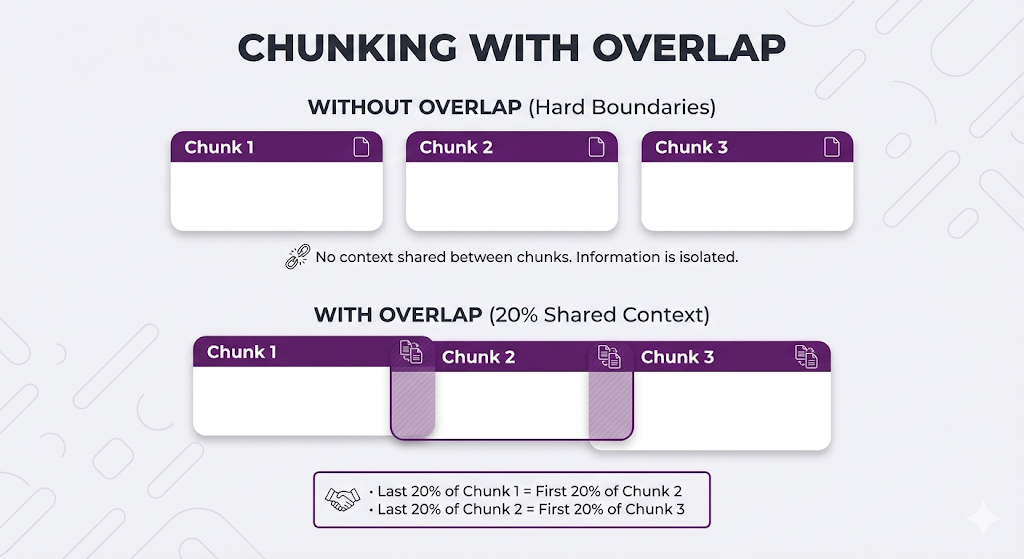
What Is Overlap?
Overlap = including some text from the previous chunk in the next chunk.
Overlap in Action
Original text:
"Vacation requests require 2 weeks advance notice. Requests
submitted late may be denied. Manager approval is mandatory for
all requests exceeding 5 consecutive days."
Chunking without overlap (split after "denied"):
Chunk 1: "Vacation requests require 2 weeks advance notice.
          Requests submitted late may be denied."

Chunk 2: "Manager approval is mandatory for all requests
          exceeding 5 consecutive days."
Chunking with 30% overlap:
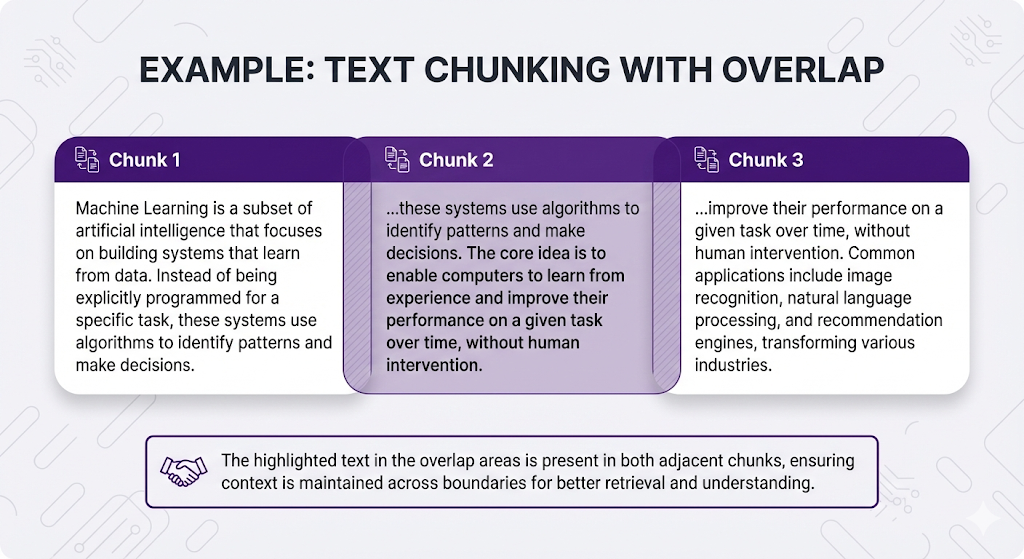
Now when someone asks: "What happens if I request a long vacation?"
Both chunks are relevant:
- Chunk 1 mentions advance notice
- Chunk 2 mentions manager approval for long requests
- The overlap ensures context continuity
The Good and Bad of Overlap
| Aspect | Without Overlap | With Overlap |
|---|---|---|
| Storage | Smaller (no redundancy) | Larger (duplicate content) |
| Edge cases | Risky (can lose context) | Safer (context preserved) |
| Retrieval | Clean boundaries | Better coverage at boundaries |
| Cost | Lower | Higher (more vectors to store/search) |
How Much Overlap?
Common overlap percentages:
| Overlap | When to Use | Notes |
|---|---|---|
| 0% (None) | Chunks are very clean, no boundary issues | Risk: Missing context at edges |
| 10-20% | Standard use case, want safety net | Sweet spot for most systems ✅ |
| 30-50% | Context is critical, edge cases frequent | Risk: Too much redundancy, noise in retrieval |
| 50%+ | Almost never | Creates massive redundancy ❌ |
Recommendation: Start with 10-20% overlap (e.g., 50 token overlap on 500 token chunks). Only increase if you're seeing retrieval issues at chunk boundaries.
When Overlap Doesn't Help
Overlap is not a fix for bad chunking strategy.
Problem: Fixed-size chunking breaks sentences
Solution attempt: Add 50% overlap
Result: Still broken sentences, just duplicated across more chunks!
Better solution: Switch to recursive chunking
Think of overlap as insurance, not a cure. It helps at the margins but won't fix fundamental chunking problems.
Beyond the Basics
The four strategies we covered are starting points, not laws. Let's explore advanced techniques.
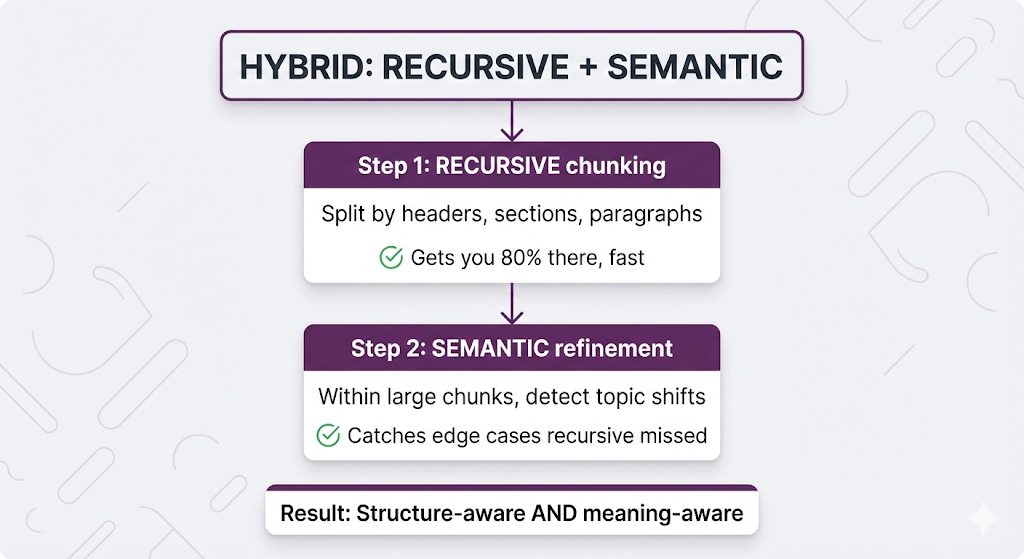
Combining Strategies: Recursive + Semantic
The most powerful combination: use recursive chunking for structure, then semantic chunking to refine.
Example:
Document (poorly formatted, no section breaks):

"Our company was founded in 2010 by Jane Smith. We started with 3
employees and a dream. Today we have 500 staff across 3 continents.
Our mission is to democratize AI. We believe AI should empower
everyone, not replace them. Every product reflects this."
Recursive chunking: Keeps it all together (no paragraph breaks)
Hybrid approach:
- Recursive finds no obvious split points → keeps as one chunk
- Semantic analyzes sentence similarity
- Detects topic shift: company history → company mission
- Splits into two chunks
Result: Clean topical chunks even from unstructured text.
Custom Chunking for Document Types
Different document types need different strategies:
| Document Type | Strategy | Why |
|---|---|---|
| HR Policies | Recursive (large chunks, 500-800 tokens) | Need full context, policies often have multi-step processes |
| FAQs | Custom (Q+A pairs) | Question meaningless without answer |
| API Docs | Code-aware chunking | Keep code examples with explanations |
| Chat Logs | Small chunks (100-200 tokens, by turn) | Each message is self-contained |
| Product Catalogs | One product = one chunk | Each product is independent |
| Legal Contracts | Clause-based chunking | Legal clauses are semantic units |
| Research Papers | Section-based recursive | Respect academic structure |
Handling Special Content
Some content needs special treatment:
Tables:
❌ Bad: Splitting table across chunks
   Chunk 1: Headers
   Chunk 2: Data rows
   → Headers separated from data, meaningless

✅ Good options:
   Option A: Keep entire table as one chunk
   Option B: Convert to prose ("Product X costs $50...")
   Option C: One row = one chunk (if rows are independent)
Code Blocks:
❌ Bad: Splitting a function mid-way
   Chunk 1: def calculate_total(items):
   Chunk 2:     return sum([i.price for i in items])

✅ Good: Keep functions/classes together
   Detect code fences (```) and preserve entire blocks
Lists with Context:
❌ Bad:
   Chunk 1: "Required documents:"
   Chunk 2: "- Passport\n- Visa\n- Ticket"
   → Header separated from items

✅ Good: Keep header + items together
Pre-Processing: Clean Before You Chunk
Chunking garbage = garbage chunks.
Before chunking, clean your documents:
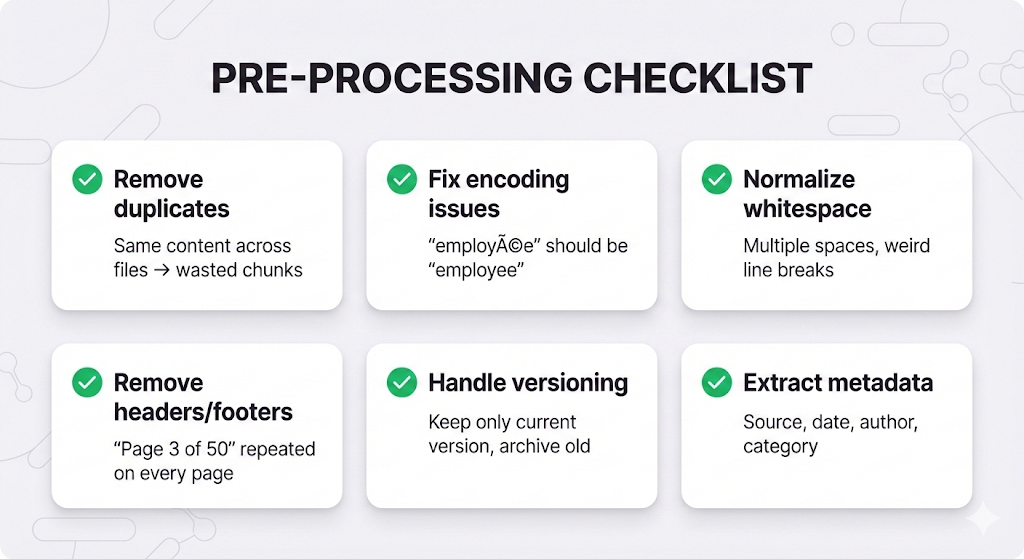
Real example of why this matters:
Before cleaning:
"Our refund policy is 30 days." (2023 version)
"Our refund policy is 14 days." (2024 version)

Chunks created:
Chunk 1: "30 days" (old)
Chunk 2: "14 days" (current)

User asks: "What's the refund policy?"
Retrieved: BOTH chunks
LLM: "Your refund policy is 14-30 days..." ← WRONG!

After cleaning (remove old version):
Only one chunk with current 14-day policy ✅
The Decision Framework
You're ready to chunk. How do you decide which strategy to use?
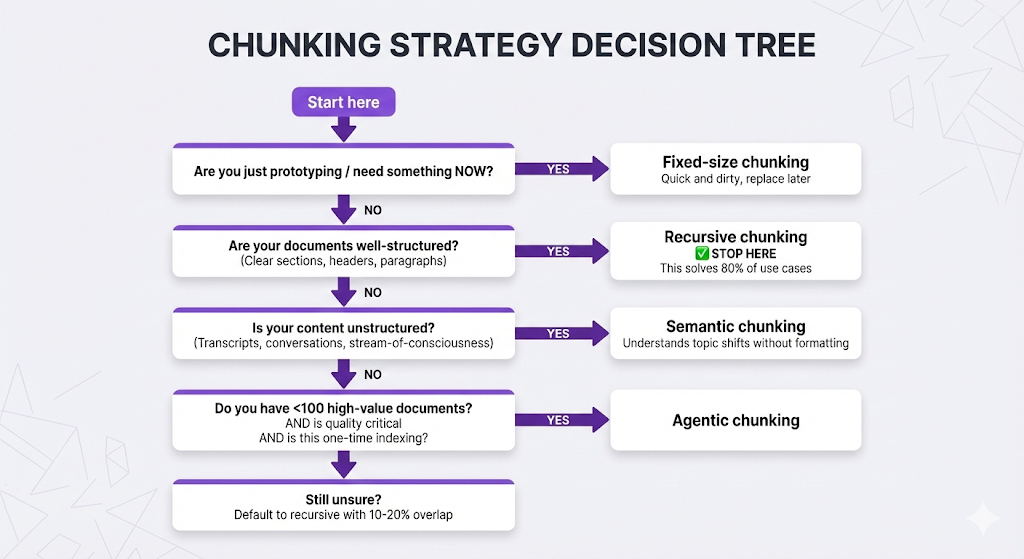
Your Chunking Checklist
Before you finalize your chunking approach:
1. Know your documents:
- What types? (Policies, FAQs, logs, research papers?)
- How structured? (Clear sections vs. freeform text?)
- How long? (Pages per document?)
- Any special content? (Tables, code, lists?)
2. Know your queries:
- How specific? ("What's the sick leave policy" vs "Tell me about leave")
- Need full context? (Multi-step processes vs. simple facts)
- Looking for exact info? (Numbers, dates) or concepts? (Philosophy, mission)
3. Set your constraints:
- Embedding model max tokens?
- Indexing speed important?
- Storage/cost limitations?
- Quality vs. speed trade-off?
4. Test and iterate:
- Start with recursive (safe default)
- Try a few chunk sizes (300, 500, 800 tokens)
- Test with real queries
- Measure retrieval quality
- Adjust based on results
Quick Reference Table
| If your content is... | Use this strategy | With this size | And this overlap |
|---|---|---|---|
| Well-structured docs | Recursive | 400-600 tokens | 10-20% |
| Unstructured text | Semantic | 300-500 tokens | 10% |
| Simple Q&A pairs | Custom (Q+A) | Variable | 0% |
| Technical docs with code | Recursive + code-aware | 500-800 tokens | 20% |
| Chat transcripts | Small fixed | 100-200 tokens | 0% |
| Legal documents | Recursive (large) | 800-1000 tokens | 20% |
| Mixed/uncertain | Recursive | 500 tokens | 15% |
Key Takeaways
Let's lock in what matters.
The Core Principles
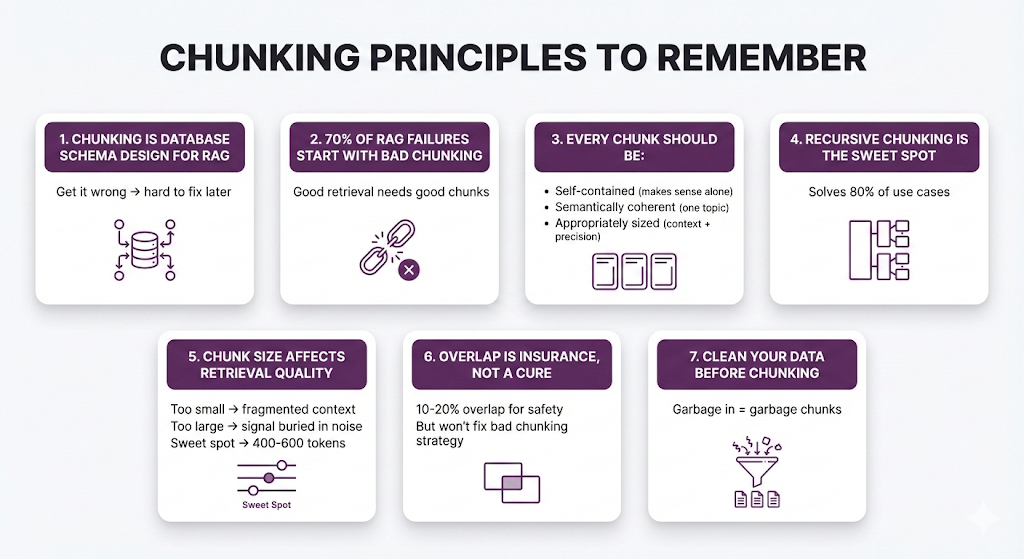
The Mental Model
Think of chunking like organizing books in a library:
- Fixed-size: Stack books on shelves until each shelf is exactly full. A 3-volume encyclopedia might end up on 3 different shelves. Fast but breaks related content.
- Recursive: Group by category (Fiction → Mystery → Detective), then split when a section gets too big. Respects natural organization but still uses size as the final constraint.
- Semantic: Read each book and group by actual themes/topics, even if they're different genres. "Books about grief" might include a memoir, a novel, and a psychology book together because they're semantically related.
- Agentic: Hire a professional librarian to organize your entire collection. They understand context, see patterns you'd miss, and make expert decisions about what belongs together.
Questions You Can Now Answer
What's the difference between chunking strategies?
- Fixed = by size, Recursive = by structure, Semantic = by meaning, Agentic = by LLM intelligence
Why does chunk size matter?
- Too small = lost context, too large = buried signal, sweet spot = balanced
When should I use overlap?
- 10-20% overlap to handle edge cases at chunk boundaries
Which strategy should I start with?
- Recursive chunking with 400-600 token chunks and 10-20% overlap
How do I know if my chunking is working?
- Test with real queries, check if retrieved chunks contain the right information
What if recursive chunking isn't working?
- First try adjusting chunk size and overlap
- If still bad, check if your docs are unstructured → try semantic
- If docs are unique/complex → consider agentic for high-value content
What You Don't Need to Worry About Yet
We intentionally left some things out:
- ❌ How to evaluate chunking quality scientifically (Post 8)
- ❌ Production optimization techniques (Post 6)
For now, you have the conceptual foundation. Everything else builds on this.
What's Next
You've mastered chunking. Your documents are split into clean, semantically coherent chunks. They're indexed in your vector database.
But here's where things get interesting.
You've prepared the knowledge. Now you need to search it effectively.
Remember from Post 2: the embedding model converts text to vectors, and the vector database searches those vectors. But we glossed over the details.
In the next post, we're diving deep into embeddings and vector databases:
Post 4 Preview: Embeddings & Vector Databases
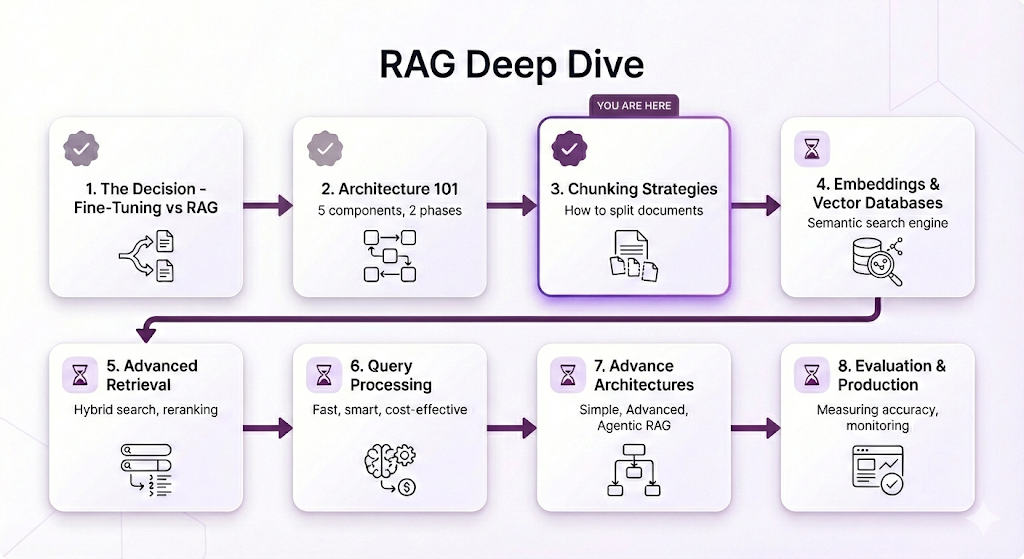
What Post 4 will cover:
Understanding Embeddings:
- How do embeddings actually capture meaning?
- Why does "dog" end up close to "puppy" in vector space?
- What are the different types of embedding models?
- How do you choose the right one for your use case?
Vector Database Deep Dive:
- How do vector databases search millions of vectors in milliseconds?
- What's the difference between HNSW, IVF, and other indexing algorithms?
- When should you use approximate vs. exact search?
- What are similarity metrics and which should you use?
The Math (Made Simple):
- Cosine similarity explained without the equations
- Why dimensionality matters
- The curse of dimensionality (and how vector DBs solve it)
Practical Decisions:
- Choosing an embedding model (OpenAI vs. Cohere vs. Google vs. open source)
- Choosing a vector database (Pinecone vs. Weaviate vs. Qdrant vs. Chroma)
- Cost considerations (API fees, storage, compute)
- When to self-host vs. use managed services
Why Embeddings Matter
You might think: "I've got good chunks now. Isn't that enough?"
Not quite.
Remember the sick leave example?
User asks: "How many sick days do I get?"

Your chunk: "Employees are entitled to 15 days of sick leave per year."
This only worked because the embedding model understood:
- "sick days" ≈ "sick leave"
- "How many" ≈ "entitled to 15"
- "I get" ≈ "employees are entitled"
Different words, same meaning. That's what embeddings enable.
But not all embedding models are created equal:
- Some are better at technical jargon
- Some excel at multilingual content
- Some are optimized for speed vs. accuracy
- Some work better with short text vs. long documents
In Post 4, you'll learn how to choose the right embedding model and vector database for your specific use case.
See You in Post 4
You've built the foundation:
- Post 1: You know WHY to use RAG
- Post 2: You know HOW RAG works
- Post 3: You know how to PREPARE your documents
Next up: Understanding the semantic search engine that makes retrieval work.
Ready to Build Your RAG System?
We help companies build production-grade RAG systems that actually deliver results. Whether you're starting from scratch or optimizing an existing implementation, we bring the expertise to get you from concept to deployment. Let's talk about your use case.


Part 3 of the RAG Deep Dive Series | Next up: Embeddings & Vector Databases