RAG Deep Dive Series: Advanced Retrieval
Part 5: Advanced Retrieval — Beyond Basic Similarity Search


In Post 4, you learned how embeddings and vector databases power semantic search. You understand how "sick days" can match "sick leave" even though the words are different.
But here's the thing: Basic semantic search gets you 70-80% accuracy. For some use cases, that's fine. But when you need 90-95% accuracy? That's when you need advanced retrieval techniques.
Remember these issues from Post 2?

These aren't bugs. They're limitations of basic similarity search.
This post shows you how to fix them.
What You'll Learn
You'll understand:
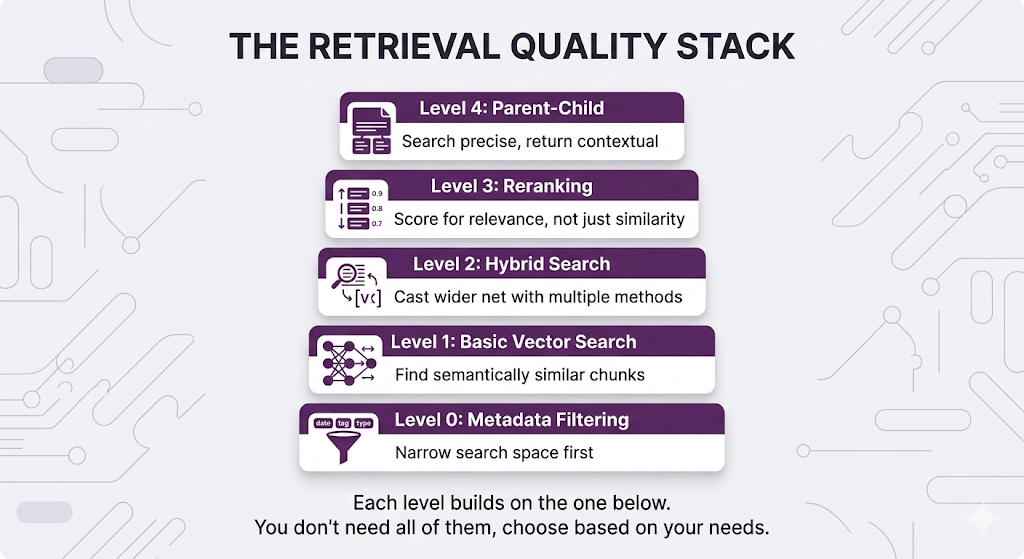
- Metadata filtering — Narrow search space before similarity search (free performance!)
- Reranking — Why similarity ≠ relevance, and how to fix it
- Hybrid search — Combine semantic + keyword search for best results
- Parent-child retrieval — Search with small chunks, return large chunks
Same promise: Concepts first, no code unless it clarifies the concept. Practical examples showing when each technique matters.
By the end, you'll know how to take your RAG system from "pretty good" to "production-grade."
Table of Contents
- The Problem: Why Basic Retrieval Isn't Enough
- Metadata Filtering: Your First Line of Defense
- Reranking: When Similarity ≠ Relevance
- Hybrid Search: Best of Both Worlds
- Parent-Child Retrieval: Small Chunks, Big Context
- Putting It All Together
- Key Takeaways
- What's Next
The Problem: Why Basic Retrieval Isn't Enough
You've built your RAG system. Chunks are embedded, vector database is running, semantic search works.
Ship it?
Not so fast.
Let's see what happens when basic retrieval meets the real world.
The "Close But No Cigar" Problem
Your HR knowledge base has these chunks:

User asks: "How many vacation days do new employees get?"
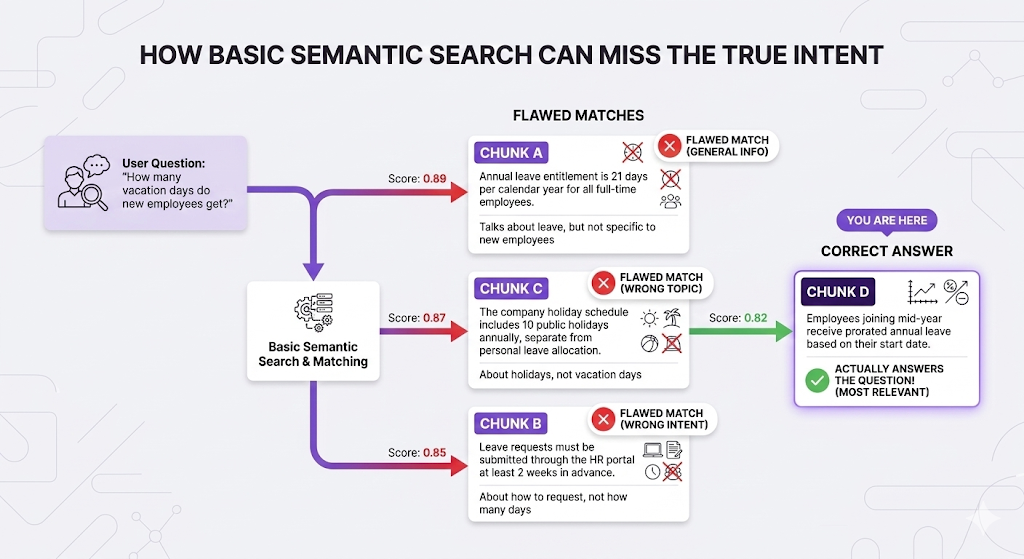
The problem: Chunk D ranks 4th, but it's the only one that actually answers "new employees."
Why this happens:
All four chunks are semantically similar to "vacation days." They're all about time off. The embedding model can't tell which one specifically answers "new employees" it just knows they're all related to leave.
Similarity ≠ Relevance.
This is the core problem advanced retrieval solves.
Metadata Filtering: Your First Line of Defense
The simplest and often most effective technique: filter before you search.
The Concept
Instead of searching your entire knowledge base, narrow the search space based on metadata.
Think of it like filtering products on Amazon:
Without filtering:
"Show me all products" → 100 million results

With filtering:
"Show me all products WHERE:
 - category = Electronics
 - price < $500
 - rating > 4 stars"
→ 5,000 results (much better!)
Same principle for RAG:
Without filtering:
Search entire knowledge base → Might retrieve irrelevant documents

With filtering:
Search WHERE:
 - category = "HR"
 - doc_type = "policy"
 - audience = "new-hires"
→ Only searches relevant documents
Real Example
The scenario:
Your company has 10,000 documents across:
- HR policies
- Engineering docs
- Sales playbooks
- Finance procedures
- Legal contracts

Common Metadata Fields
| Field | Example Values | Use Case |
|---|---|---|
| category | HR, Engineering, Sales | Scope to department |
| doc_type | policy, guide, FAQ, procedure | Filter by content type |
| audience | new-hires, managers, all-employees | Target specific roles |
| last_updated | 2024-01-15 | Exclude outdated docs |
| version | v2.0, current, deprecated | Avoid old versions |
| language | en, es, fr | Multilingual content |
| access_level | public, internal, confidential | Permissions |
The Performance Bonus
Here's the kicker: Metadata filtering is basically free.

Why it's fast:
Vector databases have efficient indexes for metadata. Filtering narrows the search space BEFORE semantic search runs.
When to Use Metadata Filtering
Always use it when:
- ✅ Multi-domain knowledge base (HR + Engineering + Sales)
- ✅ User-specific content (permissions, roles, departments)
- ✅ Time-sensitive docs (exclude outdated versions)
- ✅ Multi-tenant systems (filter by organization)
Skip it when:
- ❌ Single-topic knowledge base (everything is relevant)
- ❌ You don't have meaningful metadata
- ❌ Over-filtering might exclude relevant results
The Limitation
Important: Metadata filtering narrows WHERE you search, but doesn't improve HOW you search.

Filtering is your foundation. Now let's improve the actual matching.
Reranking: When Similarity ≠ Relevance
This is where things get interesting.
The Core Problem
Back to our example:
User: "How many vacation days do new employees get?"

Basic search ranked:
1. Chunk A: "Annual leave is 21 days..." (score: 0.89)
4. Chunk D: "Employees joining mid-year receive prorated..." (score: 0.82)
Chunk D is the answer, but it ranked 4th.
Why? Because basic similarity measures "how related is this to vacation days?" not "does this answer the specific question about NEW employees?"
Reranking solves this.
What Is Reranking?
Two-stage process:

Bi-Encoder vs Cross-Encoder
To understand reranking, you need to understand how your retriever vs reranker "think."
Bi-Encoder (Your Retriever):
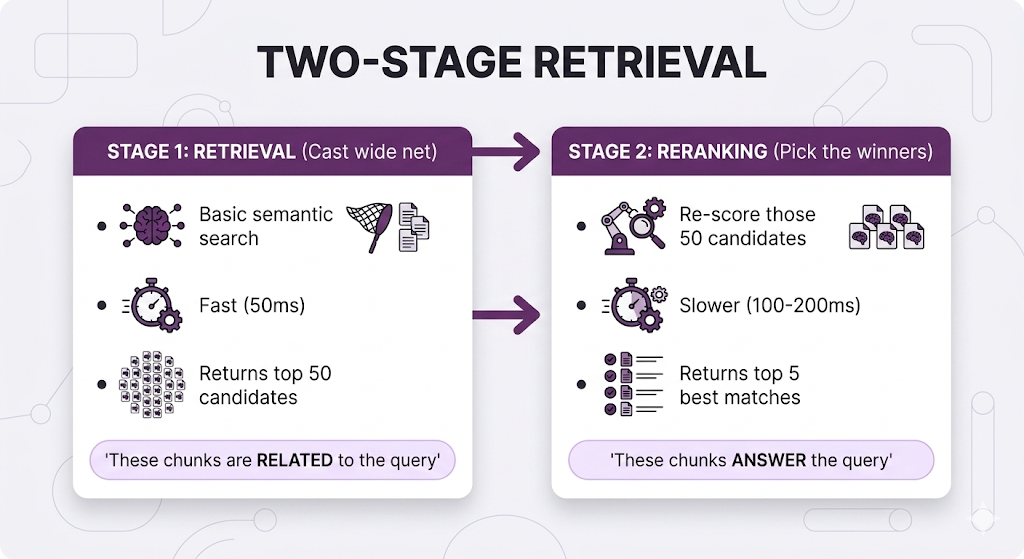
The limitation: Query and document are encoded independently. The model doesn't consider how they relate just measures vector distance.
Cross-Encoder (Your Reranker):

The key difference:
The cross-encoder sees the query and document TOGETHER. It can understand nuances like:
- "This chunk mentions vacation days, but not for NEW employees specifically"
- "This chunk answers HOW MANY days, not HOW TO REQUEST"
Reranking in Action
Back to our example:

Before reranking: Wrong chunk #1
After reranking: Right chunk #1
That's the power of reranking.
Comparison Table
| Aspect | Bi-Encoder (Retriever) | Cross-Encoder (Reranker) |
|---|---|---|
| Speed | ⚡⚡⚡ Fast (pre-computed) | 🐢 Slower (per-query processing) |
| Scalability | Millions of docs | Hundreds of docs max |
| Accuracy | Good for casting wide net | Better at finding exact answer |
| Use Case | Stage 1: Find candidates | Stage 2: Pick winners |
Popular Reranker Models
| Model | Provider | Best For |
|---|---|---|
| Cohere Rerank | Cohere | Production, easy API |
| BGE Reranker | BAAI (Open Source) | Self-hosted, customizable |
| ms-marco-MiniLM | Open Source | Lightweight, fast |
| Jina Reranker | Jina AI | Long documents (8K+ tokens) |
Using an LLM for Reranking
Here's something practical: You don't need a special reranker model to rerank. You can use a regular LLM with a simple system prompt.
The concept:
Instead of a dedicated reranker model, you ask the LLM: "Given this query and these chunks, which ones actually answer the question? Score each from 0-100."
Here's how it works:
┌─────────────────────────────────────────────────────────────────┐
│              LLM RERANKING EXAMPLE                              │
├─────────────────────────────────────────────────────────────────┤
│                                                                 │
│  User Query: "How many vacation days do new employees get?"     │
│                                                                 │
│  Retrieved Chunks (from basic search):                          │
│  1. "Annual leave is 21 days per year for all employees"        │
│  2. "Leave requests must be submitted 2 weeks in advance"       │
│  3. "Holiday schedule includes 10 public holidays"              │
│  4. "Employees joining mid-year receive prorated leave"         │
│                                                                 │
└─────────────────────────────────────────────────────────────────┘
System Prompt for LLM Reranker:
You are a relevance scoring assistant. Given a user query and a list of
document chunks, score each chunk from 0-100 based on how well it answers
the query.

Scoring criteria:
- 90-100: Directly answers the query
- 70-89: Highly relevant, provides useful context
- 50-69: Somewhat relevant, mentions related topics
- 30-49: Tangentially related
- 0-29: Not relevant

Return ONLY a JSON object with chunk IDs and scores.
LLM Input:
Query: "How many vacation days do new employees get?"

Chunks:
1. "Annual leave entitlement is 21 days per calendar year for all
    full-time employees."
2. "Leave requests must be submitted through the HR portal at least
    2 weeks in advance."
3. "The company holiday schedule includes 10 public holidays annually,
    separate from personal leave allocation."
4. "Employees joining mid-year receive prorated annual leave based on
    their start date."

Score each chunk's relevance to the query.
LLM Output:
{
  "scores": [
    {
      "chunk_id": 1,
      "score": 75,
      "reasoning": "Mentions vacation days (21 days) but doesn't
                    specifically address NEW employees"
    },
    {
      "chunk_id": 2,
      "score": 35,
      "reasoning": "About HOW to request leave, not HOW MANY days.
                    Not relevant to the question"
    },
    {
      "chunk_id": 3,
      "score": 25,
      "reasoning": "About public holidays, not vacation days.
                    Different topic entirely"
    },
    {
      "chunk_id": 4,
      "score": 95,
      "reasoning": "Directly answers the question! 'Employees joining
                    mid-year' = new employees. Explains prorated leave"
    }
  ]
}
New ranking based on LLM scores:
1. Chunk 4 (score: 95) ← Correct answer now #1!
2. Chunk 1 (score: 75)
3. Chunk 2 (score: 35)
4. Chunk 3 (score: 25)
Why this works:
The LLM can reason about the relationship between query and chunks:
- "New employees" = "joining mid-year" (semantic understanding)
- Question asks "how many" so chunks about "how to request" aren't relevant
- Can distinguish between vacation days vs public holidays
LLM vs Dedicated Reranker: Trade-offs
| Factor | LLM Reranking | Dedicated Reranker |
|---|---|---|
| Cost | $$$ (API costs add up) | $ (cheap or free if self-hosted) |
| Speed | Slow (500ms-2s) | Fast (50-100ms) |
| Flexibility | High—customize criteria in prompt | Low—generic relevance only |
| Accuracy | Very high (can reason) | High (but no reasoning) |
| Setup | Easy—just write a prompt | Need to deploy model |
| Best for | Low volume, complex ranking needs | High volume, standard relevance |
When to use LLM reranking:
Starting out — Easiest to implement, no extra infrastructure
Low query volume — Cost is manageable (<1000 queries/day)
Complex ranking logic — "Rank by relevance AND recency AND user's department"
Need explanations — LLM can explain why it ranked things certain ways
When to use dedicated reranker:
High volume production — Much cheaper at scale (>10K queries/day)
Latency critical — 10x faster than LLM
Standard relevance — Just need "does this answer the question?"
The practical advice:
- Starting out? Use LLM reranking simpler and no infrastructure needed
- Production at scale? Use dedicated reranker faster and cheaper
- Complex needs? Use both dedicated reranker first (fast), LLM for top 10 (accurate)
When to Use Reranking
Use it when:
- Complex queries with nuanced needs
- You need 90%+ accuracy
- Users ask specific questions (not just browsing)
Skip it when:
- Simple fact lookups (basic search works fine)
- Latency budget under 500ms (reranking adds ~100-200ms)
- Very small knowledge base (<100 chunks)
Hybrid Search: Best of Both Worlds
Remember Post 4 where we explained semantic vs keyword search?
Here's the reality: Neither is perfect alone.

Hybrid search = Run both, merge results.
Real-World Failure Examples
Example 1: Missing exact terms
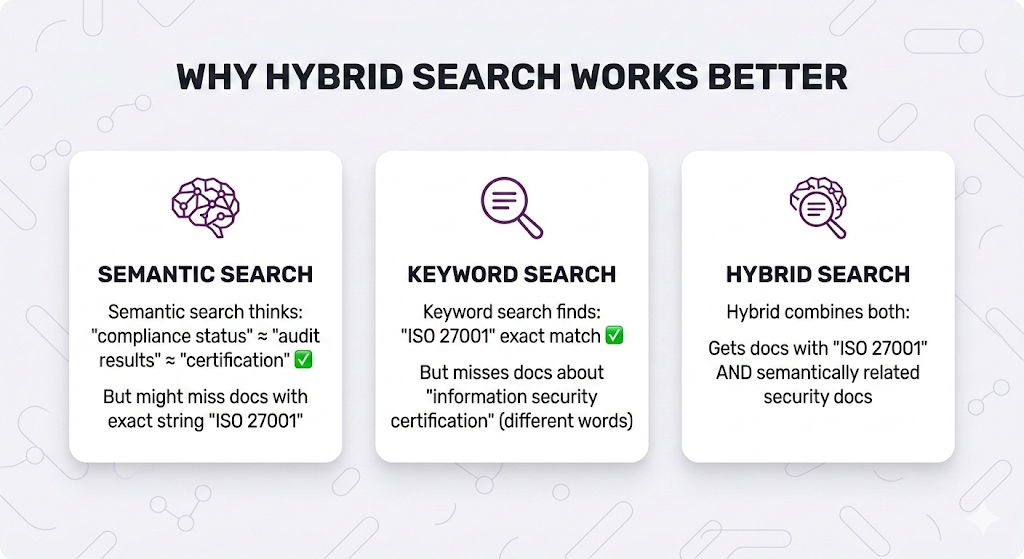
Example 2: Names and codes

How Hybrid Search Works
The process:

Score Fusion Methods
You have two result lists. How do you combine them?
Method 1: Reciprocal Rank Fusion (RRF)
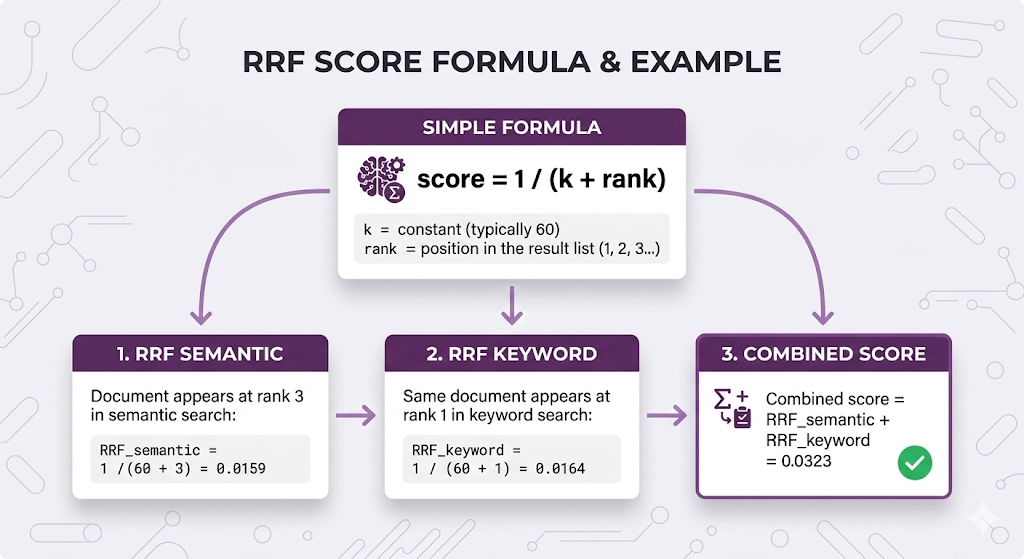
Why RRF is popular:
- ✅ Simple no tuning needed
- ✅ No score normalization required
- ✅ Works well in practice
- ✅ Default choice for most systems
Method 2: Weighted Combination
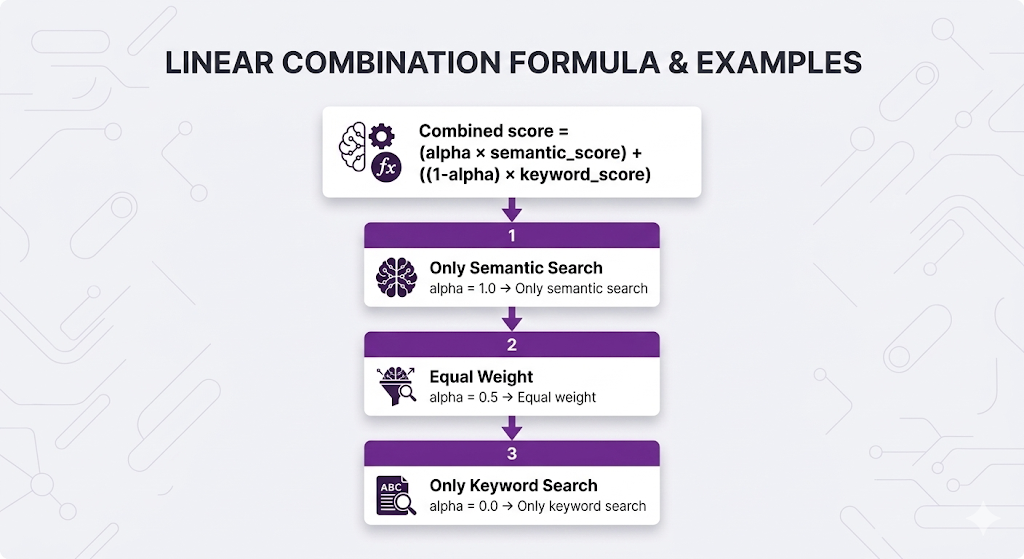
Why weighted:
- ✅ More control over which search dominates
- ✅ Can tune based on your data
- ❌ Requires score normalization
- ❌ Need to find optimal alpha
Which to use?
| Situation | Recommendation |
|---|---|
| Starting out | RRF (simpler, no tuning) |
| Need more control | Weighted (tune alpha) |
| Exact terms critical | Weighted with lower alpha (more keyword weight) |
| Conceptual queries | Weighted with higher alpha (more semantic weight) |
Implementation Patterns
Pattern 1: Separate Systems (Most flexible)
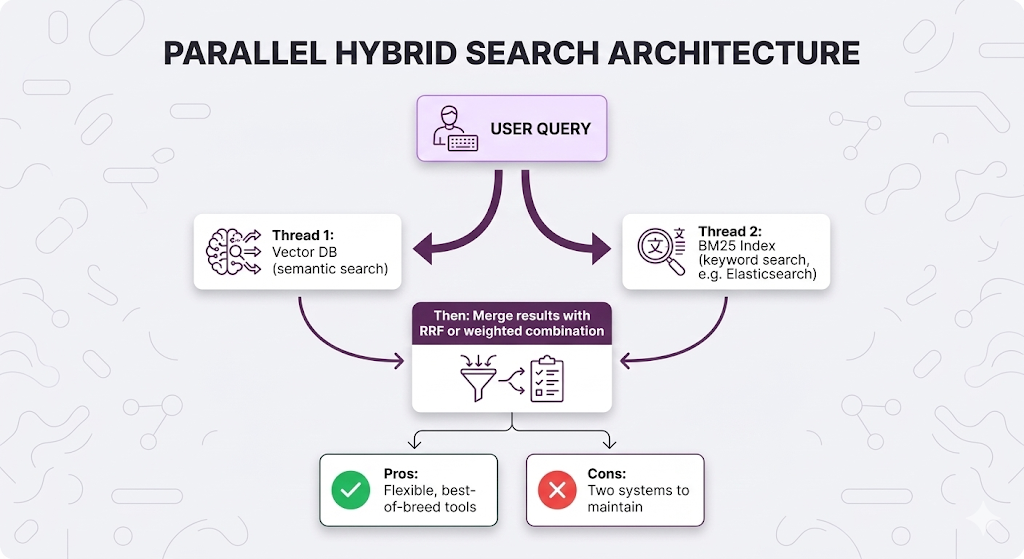
Pattern 2: Native Hybrid (Simpler)
Some vector databases support hybrid search natively:
| Database | Native Hybrid? | Method |
|---|---|---|
| Weaviate | ✅ Yes | BM25 + vector in one query |
| Qdrant | ✅ Yes | Sparse + dense vectors |
| Pinecone | ✅ Yes | Hybrid search feature |
| Milvus | ✅ Yes | Multi-vector search |
| Chroma | ❌ No | Need separate BM25 index |

When to Use Hybrid Search
Use it when:
- ✅ Exact terms matter (names, codes, certifications)
- ✅ Mixed query types (some conceptual, some specific)
- ✅ Multi-language content (keyword helps with exact matches)
Skip it when:
- ❌ Pure conceptual queries (semantic alone works)
- ❌ Very small knowledge base (overhead not worth it)
- ❌ Latency budget is tight (adds ~50ms)

Parent-Child Retrieval: Small Chunks, Big Context
Remember the chunking paradox from Post 3?
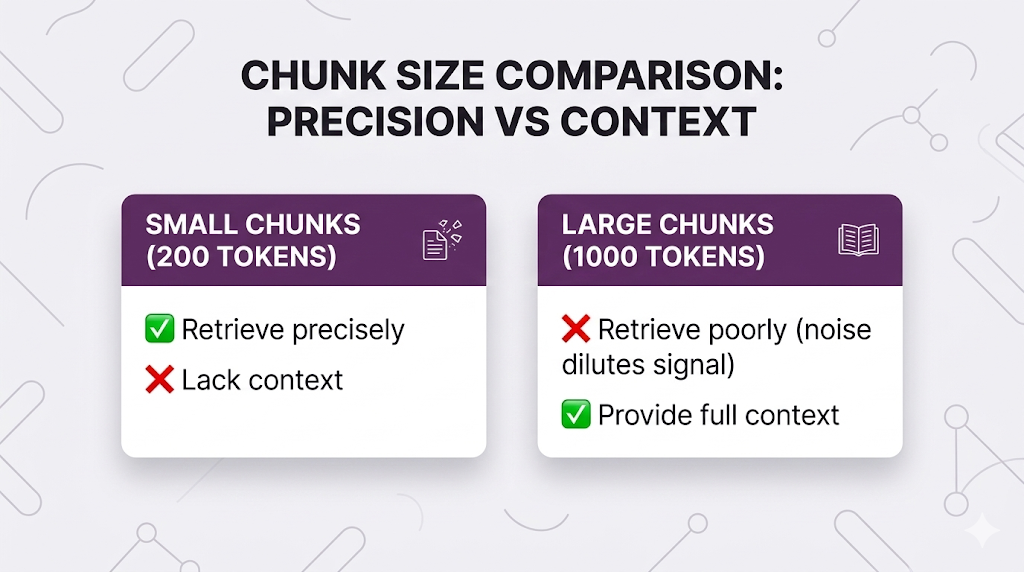
What if you could have both?
That's parent-child retrieval.
The Concept
Two levels of chunking:
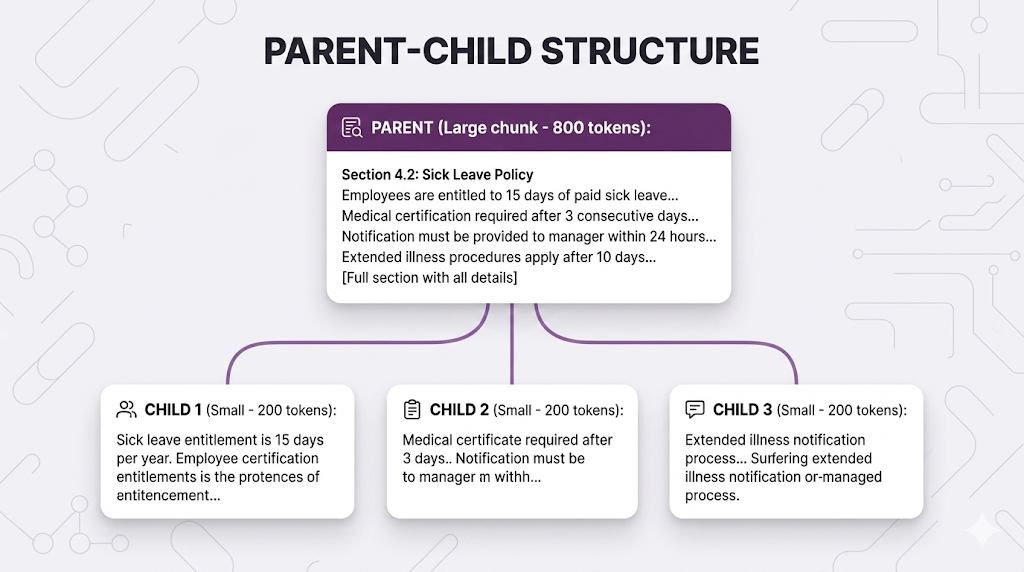
The workflow:
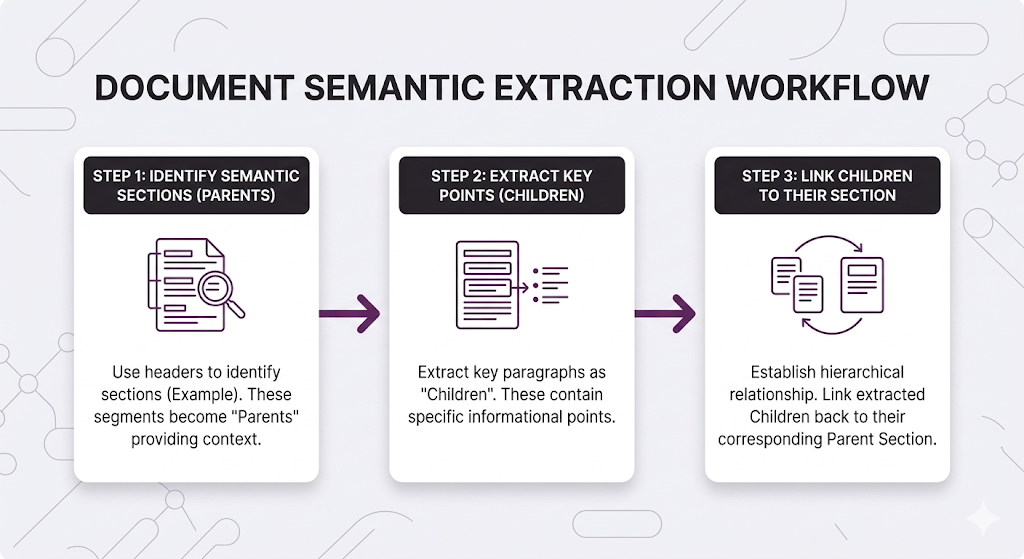
- Index: Store BOTH parent and child chunks (with links between them)
- Search: Use child chunks (small, precise)
- Retrieve: Return parent chunks (large, contextual)
How It Works

You get precise retrieval (child chunks match specific details) with full context (parent chunk has everything).
Implementation Approaches
Approach 1: Recursive Chunking

Approach 2: Semantic Boundaries
When to Use Parent-Child
Use it when:
- ✅ Procedural documentation (steps, processes)
- ✅ Complex policies (multiple related pieces)
- ✅ Long-form content where context matters
- ✅ Accuracy + completeness both critical
Skip it when:
- ❌ Self-contained FAQs (each Q&A is independent)
- ❌ Simple fact lookups (small chunks work fine)
- ❌ Need ultra-fast retrieval (adds ~20ms for parent lookup)
Putting It All Together
You've learned four techniques. How do you combine them?
The Retrieval Quality Stack
Full Pipeline Example
Let's trace through an HR query with all techniques:

Latency Budget
| Technique | Time Cost | Skip When |
|---|---|---|
| Metadata Filtering | ~5-10ms (often speeds things up!) | Never it's free perf |
| Hybrid Search | ~50-100ms | Latency budget under 500ms |
| Reranking | ~100-200ms | Simple factual queries |
| Parent Expansion | ~20ms | Self-contained content |
Total latency targets:
| Application | Target | What to Use |
|---|---|---|
| Chat assistant | < 2s | Full pipeline works |
| Real-time search | < 500ms | Skip reranking |
| Autocomplete | < 100ms | Basic search only |
When to Use What

Key Takeaways
You've leveled up from basic retrieval to production-grade search.
The Mental Model
Don't just find similar documents.
Find the documents that actually ANSWER the question.
Basic search: "What LOOKS relevant?"
Advanced search: "What IS relevant?"
The techniques in this post bridge that gap.
Core Principles
1. Similarity ≠ Relevance
- A document can be semantically similar but not actually answer the question
- Reranking fixes this by understanding query-document relationships
2. Different query types need different approaches
- Semantic search for concepts
- Keyword search for exact terms
- Hybrid gives you both
3. Small chunks retrieve precisely, large chunks provide context
- Parent-child retrieval lets you have both without compromise
4. Metadata filtering is free performance
- Always narrow your search space when you can
- Faster search + better results
5. More techniques = more latency
- Choose based on your accuracy vs speed requirements
- Not everything needs the full pipeline
Quick Reference
| Technique | Use When | Skip When |
|---|---|---|
| Metadata Filtering | Multi-domain corpus, access control | Single-topic knowledge base |
| Hybrid Search | Exact terms matter (names, codes) | Pure conceptual queries |
| Reranking | Complex queries, nuanced needs | Simple factual lookups |
| Parent-Child | Procedural docs, context matters | Self-contained FAQs |
What's Next
You've mastered retrieval. Your chunks are being found accurately and efficiently.
But there's one more piece: The query itself.
Sometimes the problem isn't how you search it's what you're searching FOR.
Post 6 Preview: Query Processing
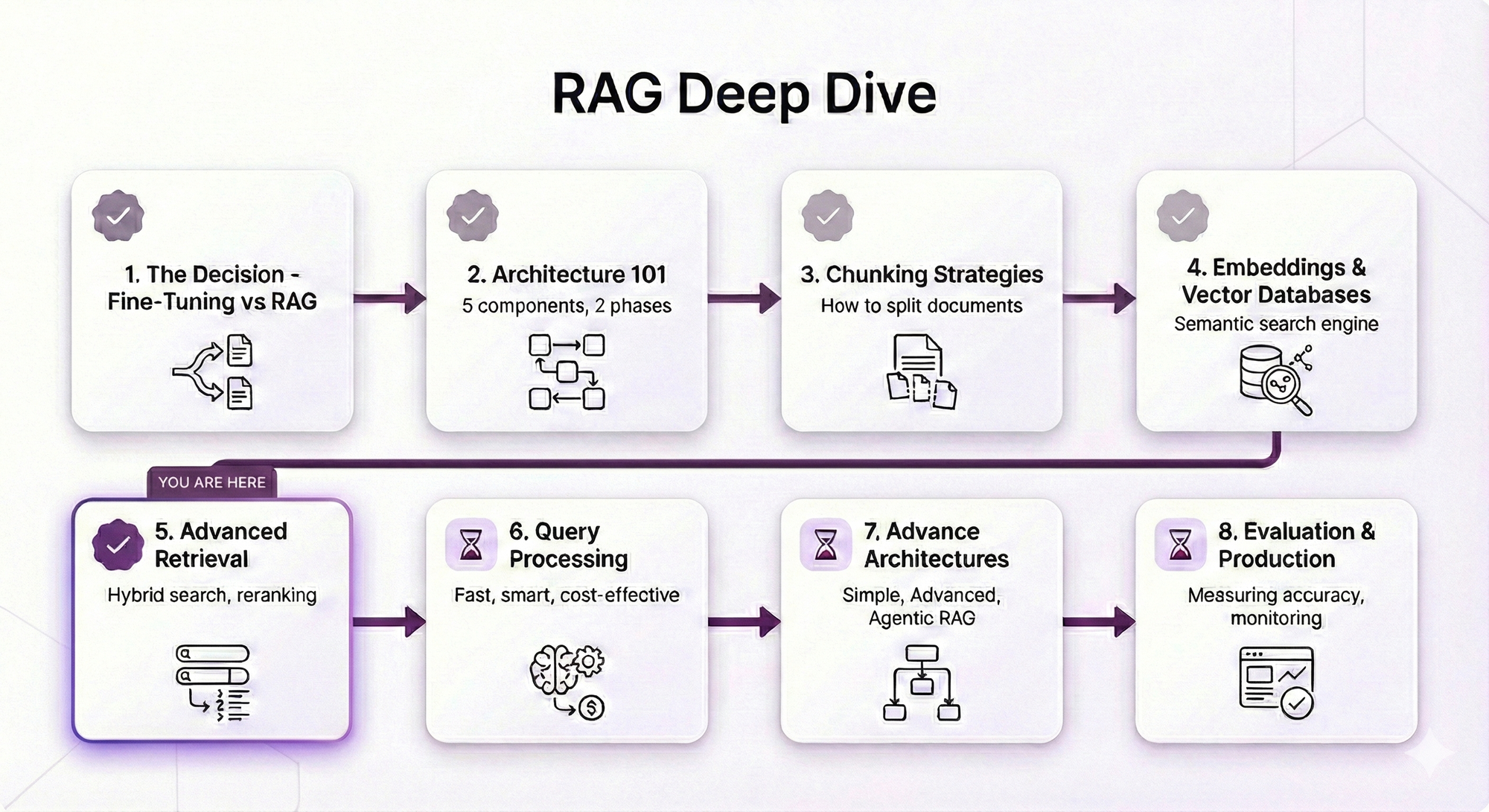
What Post 6 will cover:
Query Expansion:
- Handling vague queries ("leave policy" → "sick leave OR vacation OR parental")
- Synonym mapping and acronym handling
- When to expand vs when to clarify
HyDE (Hypothetical Document Embeddings):
- Let the LLM imagine the answer, then search for that
- Why this works better than searching the raw query
- When HyDE helps vs when it's overkill
Multi-Query Strategies:
- Breaking complex questions into simpler ones
- Parallel searches with result fusion
- Query decomposition for multi-hop reasoning
Query Routing:
- Different queries need different strategies
- How to detect query type and route appropriately
- Building a query classifier
Why Query Processing Matters
You've optimized everything AFTER the query reaches your system. But what if the query itself is the problem?
Examples:
Bad query: "leave"
Better: "sick leave policy for new employees"

Bad query: "How does our refund process work and what are the exceptions?"
Better: Split into two queries, search separately, combine results

Bad query: "PTO"
Better: Expand to "PTO OR paid time off OR vacation days"
In Post 6, you'll learn how to transform user queries into search queries that actually find what they need.
See You in Post 6
You've built the retrieval pipeline:
- Post 1: Why RAG
- Post 2: How RAG works
- Post 3: How to chunk
- Post 4: How to search semantically
- Post 5: How to search better
Next up: How to ask better questions.
Ready to Build Your RAG System?
We help companies build production-grade RAG systems that actually deliver results. Whether you're starting from scratch or optimizing an existing implementation, we bring the expertise to get you from concept to deployment. Let's talk about your use case.


Part 5 of the RAG Deep Dive Series | Next up: Query Processing